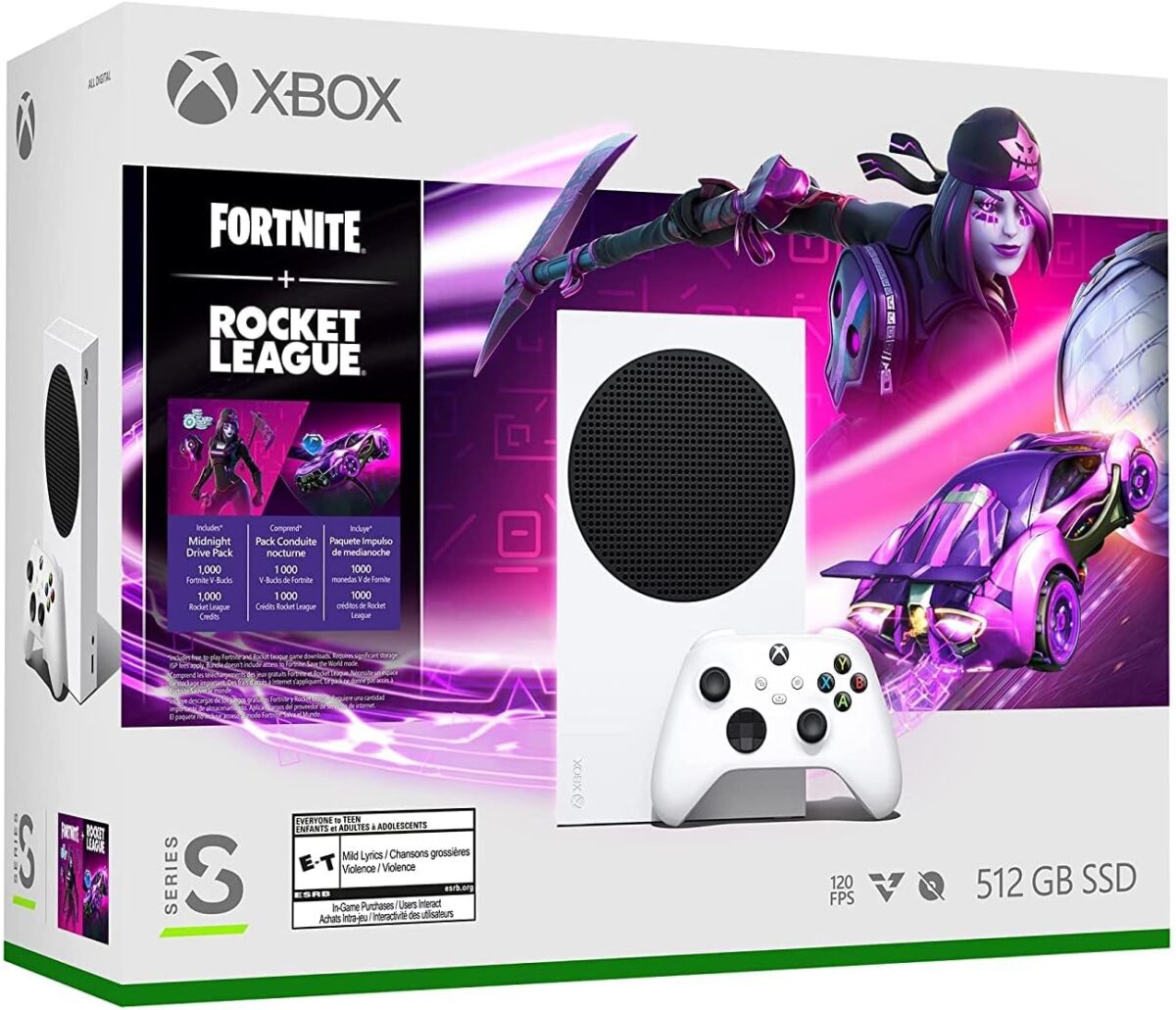
Trending now 🔥 Early Black Friday pricing on Xbox Series S (512 GB) is tumbling to historic lows. Here’s the real story on performance, storage, and the best time to buy.
Why This News Matters (And Why It’s Everywhere)
Spanish tech outlet Gizmodo (ES) reports that Microsoft has quietly dropped the Xbox Series S (512 GB) to a minimum historical price just before the Black Friday wave—part of an early push on budget-friendly hardware. In Europe the article cites an 11% cut (→ see n Amazon €), signaling aggressive discounting across regions as retailers jockey for traffic. Gizmodo en Español
Microsoft is also running holiday price protection on Microsoft Store purchases—meaning if you buy now and the price falls further within the window (Oct 1–Dec 2, 2025, requestable until Jan 31, 2026), you can ask for a price adjustment (eligible markets only). That reduces the fear of “what if it’s cheaper on Black Friday?” and is a big reason this deal is trending. microsoft.com+1
TL;DR: We’re seeing the cheapest way into current-gen Xbox get even cheaper—with a safety net if the price dips again.
What Exactly Is the Xbox Series S (512 GB)?
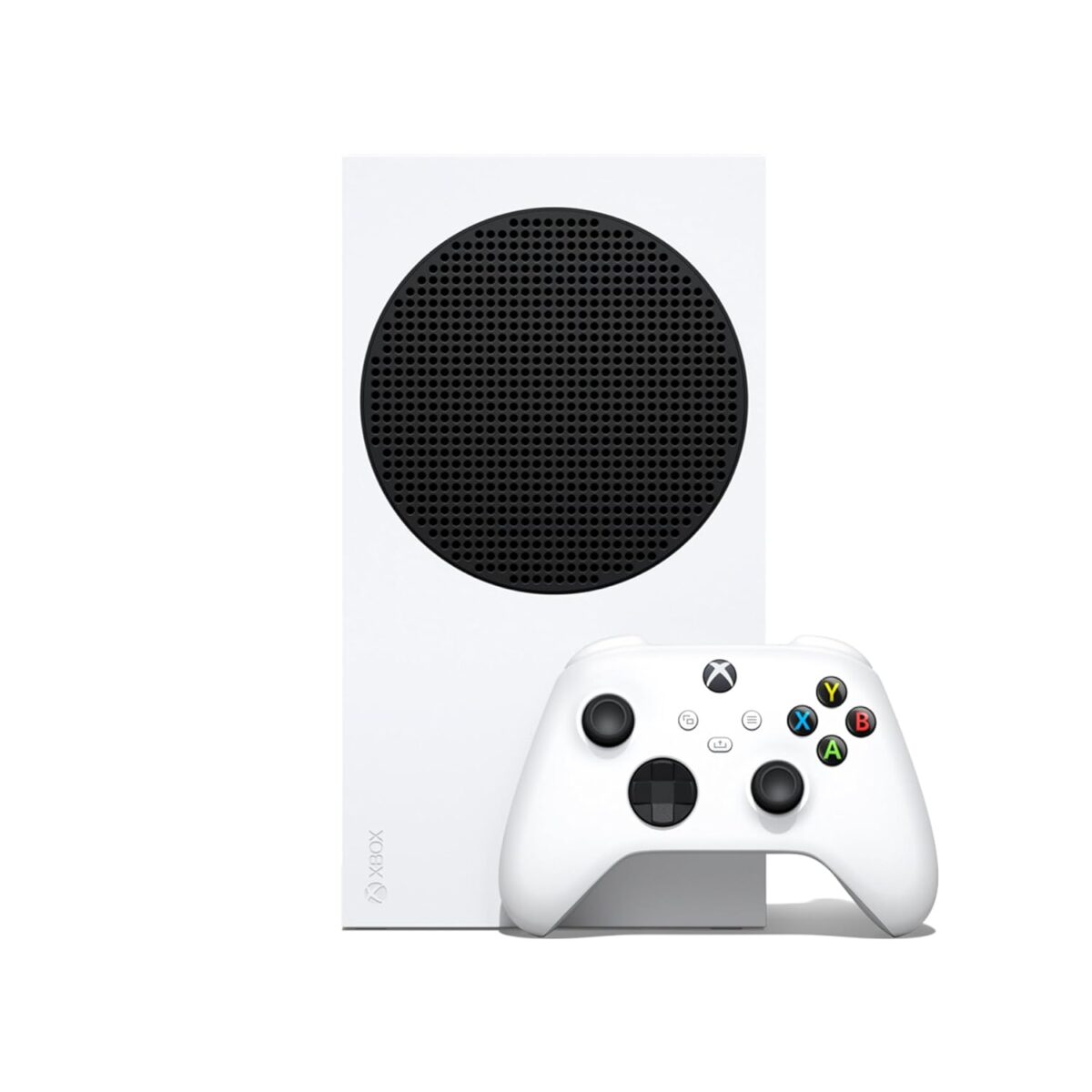
The Series S is Microsoft’s smallest, quietest ninth-gen console, built for 1080p–1440p gaming (up to 120 FPS on supported titles) with the same modern I/O foundation and Xbox Velocity Architecture that powers the Series X—meaning genuinely fast loads and “quick resume” convenience. It ships with a 512 GB NVMe SSD (about ~364 GB usable after system files), which is the main trade-off you’ll plan around. Xbox.com+1
Core Specs (What Moves the Needle)
- CPU/GPU: Custom AMD Zen 2 + RDNA 2 APU (shared platform with Series X)
- Target Output: 1080p–1440p, up to 120 FPS on supported titles
- Storage: 512 GB custom NVMe SSD (expandable)
- I/O Throughput: ~2.4 GB/s raw, up to ~4.8 GB/s compressed (Velocity Architecture)
- Ecosystem: Game Pass, Smart Delivery, cross-gen support (Series X|S) Xbox.com+1
Bottom line: You’re getting modern frame-rate targets and fast loads in a tiny box—perfect for living rooms, bedrooms, dorms, or travel setups.
Real Prices Right Now (And How to “Time” It)
- Gizmodo ES highlights an 11% drop in EU pricing, pointing to a renewed push on value hardware before Black Friday. Regions vary, but the trend is lower. Gizmodo en Español
- Microsoft Store confirms a Holiday Price Adjustment window: purchases Oct 1–Dec 2, 2025 are eligible to request an adjustment through Jan 31, 2026 (selected markets). This is your “buy-early” insurance. microsoft.com+1
- Retail behavior (Amazon/Microsoft Store): Series S listings fluctuate by bundle, color, and refurb status, with prior troughs resurfacing ahead of major sales. If you hit an all-time or near-all-time low today, price protection lowers your downside risk. microsoft.com
Actionable strategy:
If the price you see is historic or near-historic, buy now (and keep a screenshot). If it’s merely “good,” set alerts and be ready to pounce on Black Friday weekend—limited bundles can sell out fast.
Storage Is the Catch: Here’s How to Solve It (Without Overspending)
The 512 GB SSD is fast—but it fills quickly with big AAA titles. You’ve got three smart approaches:
1) Be deliberate with your active library
Keep 4–6 “live” games installed and rotate the rest. With Quick Resume and fast downloads, this feels less painful than it sounds—especially for Game Pass explorers.
2) Use USB external drives for “cold storage”
You can store Series X|S games on USB and move them back to internal/expansion SSD when you want to play. USB drives also run backward-compatible Xbox One/360 titles directly (Series-optimized titles still need the internal/expansion SSD to run). This is the cheapest way to manage lots of titles. AP News
3) Add the official Expansion Card (plug-and-play, same speed)
The Seagate (and newer WD_Black) expansion cards slot into the rear port, matching the internal SSD’s speed so Series games run directly from it. It’s the elegant solution, though cost per TB can be high—especially for the new 4 TB card (pricey enough to exceed a Series S itself). Watch for deals; 1 TB or 2 TB is the sweet spot for most buyers. Seagate.com+2The Verge+2
Practical load-out template:
- Internal SSD: your main multiplayer/live-service + 1 current single-player.
- Expansion card: rotating AAA installs (fastest).
- USB HDD/SSD: “vault” for less-played titles and last-gen games.
Performance & Experience (The Real-World Feel)
- High-FPS uplift: Many optimized titles hit 60–120 FPS at 1080p–1440p, a massive step up from last-gen base consoles. Even at lower resolutions than Series X, smoothness is what changes how games feel.
- Load times: The Velocity Architecture pipeline (custom SSD + hardware decompression + DirectStorage-style APIs) slashes load and fast-travel times versus last gen, and Quick Resume lets you bounce between games with minimal friction. Xbox Wire
- Noise/thermals: The S is famously quiet and compact—great for bedrooms and shared spaces.
If you’re upgrading from Xbox One S/X, the combination of higher frame rates + faster loads is unmistakable—even at 1080p.
Series S vs Series X vs PS5!
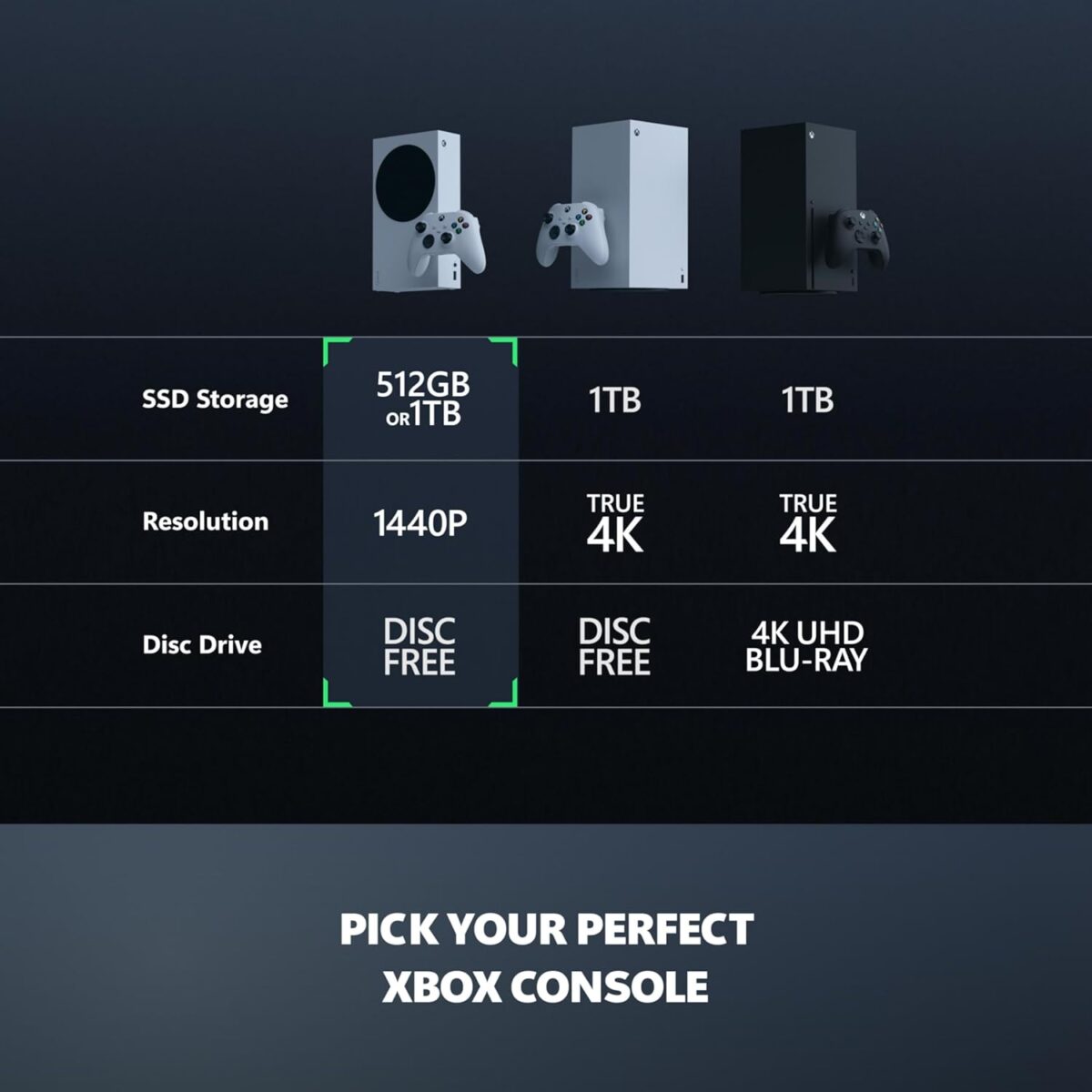
| You care about… | Best pick | Why |
|---|---|---|
| Lowest cost to play modern Xbox | Series S (512 GB) | Historic-low price, tiny footprint, Game Pass synergy. Gizmodo en Español |
| 4K fidelity + disc drive + big SSD | Series X | More GPU muscle, UHD Blu-ray, larger internal SSD out of the box. microsoft.com |
| Sony exclusives & DualSense features | PS5 | Different ecosystem/exclusives; outside today’s scope. |
Upsell path inside Xbox: If you love the S but bump into storage walls, consider Series S 1 TB (Carbon Black/Robot White) or move to Series X when you need 4K and a disc drive. Xbox.com
Deep-Dive: Pros & Cons at Today’s Prices
Pros
- Lowest-ever pricing (in many regions) makes Series S the best budget gateway to current-gen. Gizmodo en Español
- Compact, quiet, modern: ideal for second TVs, dorms, travel setups.
- Fast loads + Quick Resume change how you play day-to-day. Xbox Wire
- Game Pass pairing is unmatched for value—try more games without $70 sticker shock.
- Holiday price protection (eligible markets) reduces buyer’s remorse if the price dips again. microsoft.com+1
Cons
- 512 GB fills quickly with big AAA titles; you’ll manage installs or pay for expansion. AP News+1
- All-digital (no discs) means you’re fully reliant on downloads and your library licenses.
- Not aimed at native 4K showpieces—that’s Series X’s territory. microsoft.com
- Expansion cards are pricey, especially at 4 TB; watch promos or use USB for cold storage. The Verge+1
Who Should Buy the Xbox Series S (512 GB) Right Now
- First-time current-gen buyers who want the cheapest on-ramp to modern frame rates and load times.
- Game Pass families who sample lots of titles, rotate often, and don’t need a disc drive.
- Bedroom/secondary setups where size and silence matter more than 4K showcase visuals.
- Travelers/students who want a small console for hotel/dorm setups.
Who should skip or step up:
- Players who hoard many AAA installs at once (consider 1 TB S or Series X).
- Physical collectors (discs) and 4K cinephiles (Series X). microsoft.com
What People Are Saying (Early-Holiday Buzz & User Themes)
- Deal watchers: The “historic low” and the price-adjustment window are driving confidence to buy before Black Friday. (Retailers may still undercut day-of.) Gizmodo en Español+1
- Owners (Amazon ES product page patterns): Praise the size/quiet, “perfect secondary console,” and excellent value with Game Pass; common gripe is storage juggling (many solve with USB or a 1–2 TB expansion card on sale). amazon.es
- Tech reviewers: Consistently highlight that frame-rate uplift + SSD are the real upgrades vs. last gen; resolution purists should still pick Series X. microsoft.com
The Storage Playbook!
- Pick “always on” games (e.g., your main MP title + one evergreen sports or live-service). Keep those on internal SSD.
- Batch your single-player installs: One big “active” story game + an indie.
- USB cold storage: Park “completed” or “on hold” games on a cheap external drive; move back when you’re ready. (Only last-gen runs from USB directly; Series-optimized titles must be internal/expansion.) AP News
- Watch expansion card deals: 1 TB/2 TB are the value sweet spots; 4 TB is convenient but premium-priced. Windows Central
- Use the queue smartly: While moving a title from USB → internal, download patches in parallel to cut total downtime.
Series S vs Competitors (2025 Context)
Series S vs Series X
- Power & target: Series X is your 4K + disc machine; Series S is the value + 1080p/1440p machine.
- Who wins? At a historic low, Series S is the no-brainer for budget/secondary setups; Series X remains the flagship for 4K and big local libraries. microsoft.com
Series S vs “Used/Refurb” Consoles
- Microsoft Store refurb stock exists (varies by region) and sometimes bridges the price gap. If the new Series S is at historic low with price protection, new can be safer. microsoft.com
Series S vs PS5 (Digital)
- Different ecosystem/first-party slate. If your friends and games are on Xbox—and you want Game Pass—Series S wins on price and catalog churn; PS5 Digital is the pick if you’re locked into Sony exclusives.
The Price-Timing Decision (So You Don’t Overthink It)
- Buy now if your local price is historic (or within ~5–10 % of it). You’ve got the holiday price-adjustment window as a cushion. Screenshot your order. microsoft.com+1
- Wait for BF/CM if stock is abundant and today’s price is only “good.” Set alerts; vendors drop surprise bundles (extra controller/Game Pass months).
- Don’t sleep on Sunday/Monday after Black Friday—some of the best refurb/new combos appear then.
Expanded Specifications (For Buyers Who Want Details)
- Form Factor: Ultra-compact, vertical/horizontal placement
- CPU/GPU: Custom AMD 8-core Zen 2 + RDNA 2 (shared platform with Series X)
- Memory: 10 GB GDDR6 (8 GB @ 224 GB/s + 2 GB @ 56 GB/s)
- Internal Storage: 512 GB custom NVMe SSD (Robot White); 1 TB variants exist (Carbon Black/Robot White)
- I/O Throughput: 2.4 GB/s raw, 4.8 GB/s (compressed, hardware decompression)
- Expandable Storage: Seagate/WD_Black Expansion Card (official); USB external drives for storage/BC play
- Target Resolution/Frame Rates: 1080p–1440p up to 120 FPS (game-dependent)
- Optical Drive: None (all-digital)
- Ecosystem: Xbox Game Pass, Smart Delivery, Quick Resume
- Networking: Gigabit Ethernet, Wi-Fi, Bluetooth controller connectivity
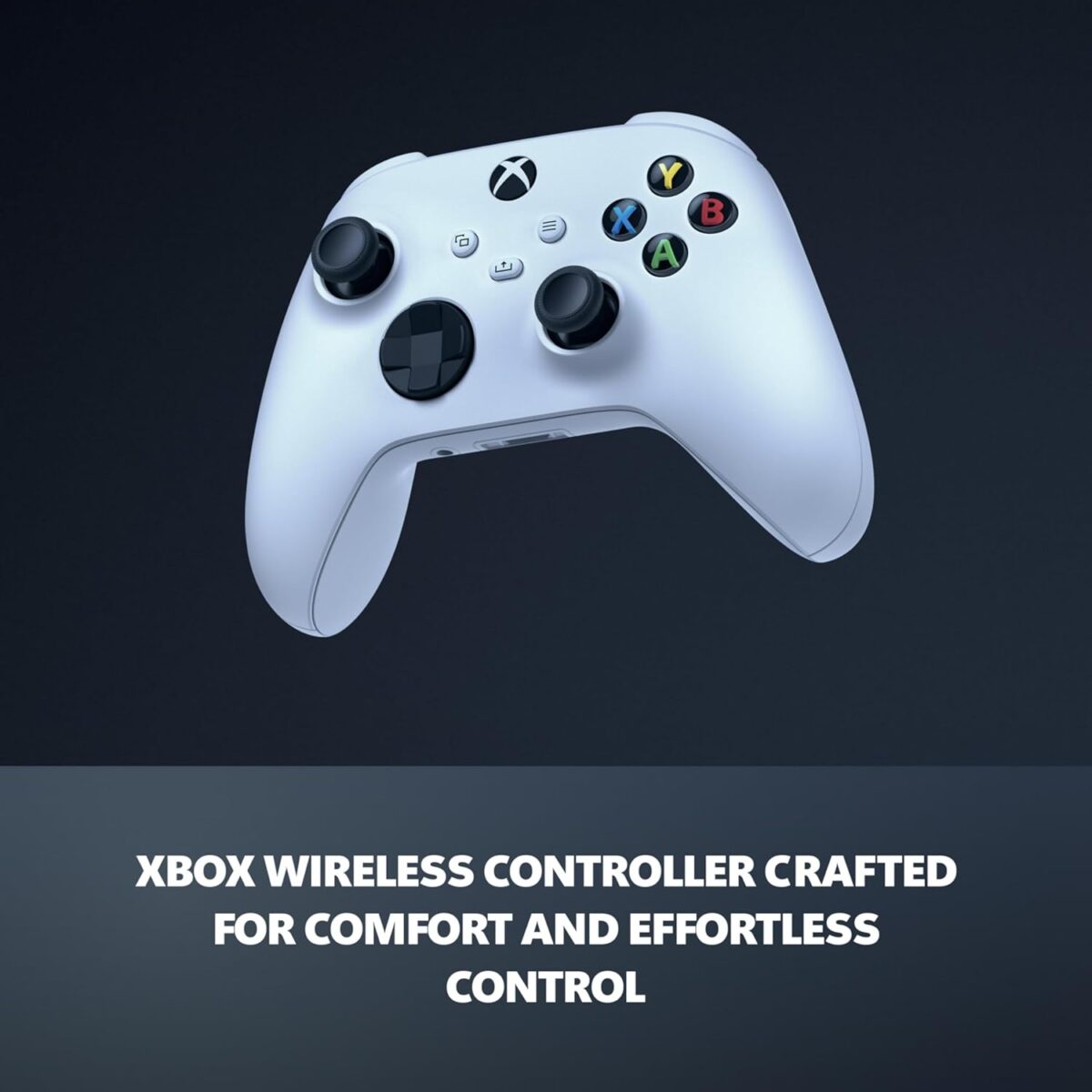
- Controller: Latest Xbox Wireless Controller (varies by bundle) Xbox.com
Pros & Cons!
Pros
- Historic-low pricing + holiday price protection (eligible markets) Gizmodo en Español+1
- Compact, quiet, modern; ideal second console
- Velocity Architecture = great load times & Quick Resume Xbox Wire
- Perfect with Game Pass for discovery/value
Cons
- 512 GB fills fast; expansion cards can be expensive The Verge+1
- No disc drive
- Not a 4K showcase box (that’s Series X) microsoft.com
Real-World Use Cases (So You Can Picture It)
- The Game-Pass Grazer
You rotate new indies and AAAs weekly. Series S is perfect—fast loads, small footprint, and your library “feels” bigger thanks to Game Pass. Keep one multiplayer always installed; rotate one story game at a time. - Family Secondary TV
Couch co-op in the living room, kids’ games in the bedroom. Quiet box, instant resume, cloud saves syncing across rooms. - Dorm/Travel Rig
Pack Series S and a compact 1080p monitor. You’ll have a full next-gen experience that fits in a backpack.
What to Buy With It (Non-Fluffy Accessory Advice)
- 1 TB Expansion Card (watch for sales): Best balance of convenience vs cost; 2 TB if you truly juggle many AAA titles. Windows Central
- USB 2–4 TB HDD/SSD: Cheap “vault” for last-gen titles and cold storage of Series games. AP News
- Second Controller: Black Friday bundles often include one—grab it if couch co-op is your thing.
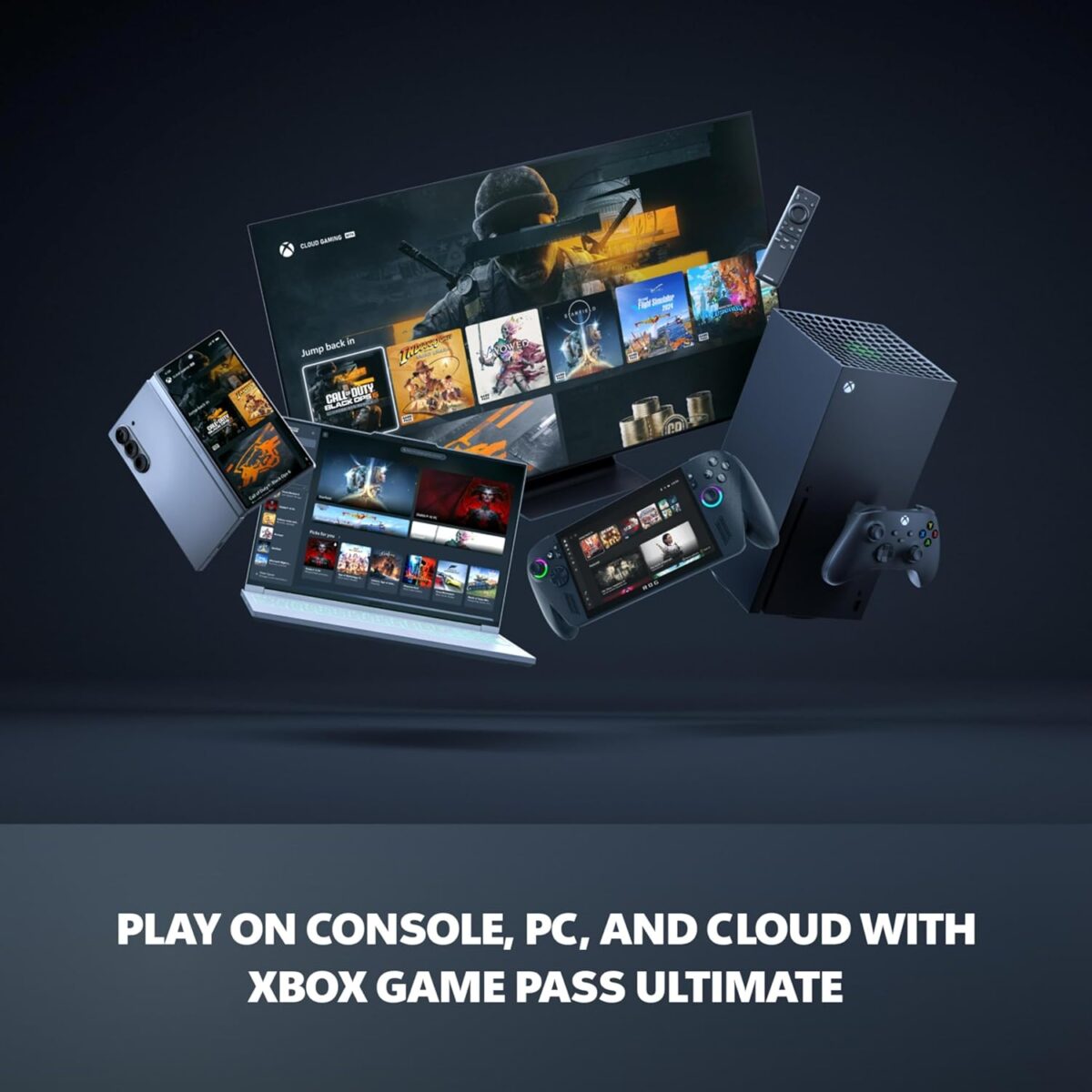
- Game Pass Ultimate: Cloud, PC perks, EA Play trials; often discounted with multi-month promos.
Frequently Asked Questions.
Is the Xbox Series S (512 GB) really at a historic low?
Yes. Regional reporting shows Microsoft quietly pushed the 512 GB model to minimum historical pricing ahead of Black Friday, with retailer promos echoing the move in select markets. Gizmodo en Español
If it gets cheaper later, can I get the difference back?
In eligible markets, Microsoft’s Holiday Price Adjustment covers qualifying purchases Oct 1–Dec 2, 2025; you can request an adjustment up to Jan 31, 2026. Check the policy for your country. microsoft.com+1
Is 512 GB enough in 2025?
Yes—if you rotate titles and use USB cold storage. If you want everything installed all the time, plan on a 1–2 TB expansion card (watch deals) or consider the 1 TB Series S. AP News+1
Does Series S feel “next-gen”?
Absolutely. Higher frame rates + modern SSD pipeline make a bigger feel difference than raw pixels for many players. Xbox Wire
Series S or Series X?
Budget/secondary setup → Series S. 4K showcase and discs → Series X. microsoft.com
Real-World User Reviews & What They Actually Mean
Why buyers jumped in at the Xbox Series S 512GB price drop:
- “Perfect second console.” Owners love using Series S on a bedroom or travel TV while the living-room rig stays dedicated to 4K.
- “Quiet + tiny.” Users consistently point out that noise is barely noticeable and the footprint is laptop-small.
- “Game Pass machine.” Many buyers admit they wouldn’t have purchased at full MSRP, but the Xbox Series S 512GB price drop plus Game Pass made it an easy yes.
- “Storage shuffle is real.” The most common complaint is juggling AAA installs. People either rotate aggressively or add a 1–2TB expansion card later.
- “Next-gen feel on a budget.” Upgrading from Xbox One, players say the jump in frame rate and load times feels bigger than the raw resolution difference vs Series X.
What this means for you: if your plan is to rotate 4–6 titles, you’ll be happy. If you want 12 massive games installed at all times, factor an expansion card into your budget (or use USB cold storage).
15-Minute First-Time Setup1
Goal: a smooth first day with no “why is this slow?” moments.
- Update before anything else. Connect, sign in, and let the day-1 updates finish.
- Enable 120 Hz (if your TV supports it): Settings → General → TV & display options → 120 Hz + VRR (if available).
- Calibrate HDR (critical for modern TVs): Settings → TV & display → Calibrate HDR.
- Energy mode: Choose Shutdown (energy saving) or Sleep (instant on). Sleep speeds updates/remote installs.
- Storage plan: Decide today: rotation only, USB cold storage, or expansion card.
- Quick Resume hygiene: Periodically close games you’re done with to free memory.
- Controller firmware: Update via Settings → Devices. It improves latency and connection stability.
- Auto-install for Game Pass: Queue your first 3–4 titles now so the box is ready by the time you sit down tonight.
This matters right now because the Xbox Series S 512GB price drop is pulling in first-time buyers who haven’t lived through modern HDR/VRR setup. A few toggles = huge visual and latency gains.
The “Play Tonight” Starter Pack (Light on Storage, Heavy on Fun)
Short installs, great replay, brilliant at 1080p–1440p:
- Indie Gold: Hades, Dead Cells, Vampire Survivors, Celeste.
- Arcade Sports/Easy Co-op: Hot Wheels Unleashed, Rocket League, NBA 2K Playgrounds.
- Shooter Lite (smaller footprint): Apex Legends, Overwatch 2 (rotate seasonal content).
- Racing: Forza Horizon 4/5 (manage DLC selectively), Art of Rally.
- Couch Co-op: It Takes Two, Overcooked!, Stardew Valley (split sessions, tiny install).
- Back-Compat Classics: Many Xbox One hits run beautifully and live happily on USB drives.
Pro tip: Keep one evergreen multiplayer title + one single-player campaign + one indie. That mix maximizes play variety while keeping the 512GB footprint sane during the Xbox Series S 512GB price drop surge.
Smart Storage: Advanced Rotations That Don’t Feel Like Work
The “3-tier library” that wins:
- Internal SSD (fastest): 1 multiplayer main + 1 active campaign + 1 indie.
- Expansion card (same speed, optional): 2–3 big AAA you’ll return to this month.
- USB (cheap vault): Completed titles, back-compat games, and “on deck” campaigns.
Automation hacks:
- Pin a “Now Playing” group on the home screen with only 5–6 tiles.
- Use the Manage Game screen to selectively download only what you need (e.g., skip 4K texture packs) when offered.
- When you finish a campaign, Move (not Delete) to USB so re-plays are instant later.
Network Optimization for Faster Installs & Smoother Multiplayer
- Ethernet wins. If possible, plug in; you’ll saturate your ISP pipe more consistently.
- Wi-Fi channel sanity: 5 GHz > 2.4 GHz; keep the console away from microwaves/cordless phone bases.
- Router QoS: Prioritize Xbox MAC address for download windows; pause smart-home cam uploads during big pulls.
- Background installs: Use Sleep mode so patches download while you’re away.
These micro-tweaks matter because the Xbox Series S 512GB price drop will have you installing more games and patches in week one than you expect.
Controller & Display Tweaks That Change the Feel
- Low-latency mode (ALLM): If your TV supports it, Xbox can auto-switch to game mode.
- VRR (Variable Refresh Rate): Cuts micro-stutter; leave it on if supported.
- Controller response: Try Instant input (Settings → Devices → Controller).
- Stick drift prevention: Store controllers face up, avoid pressing sticks when placing them down, and update firmware regularly.
Parental Controls & Family Sharing (Fast Setup)
If the Xbox Series S 512GB price drop is your excuse to add a family console:
- Family accounts: Child accounts under an adult family organizer let you set screen-time windows, content ratings, and purchase approvals.
- Content filters: Enforce ESRB/PEGI limits by child profile; exceptions can be granted per title.
- Ask-to-Buy: Prevent surprise charges; you’ll get alerts to approve.
- Friends & privacy: Limit messaging and multiplayer to friends-only for younger players.
The “Best TV Settings” Cheatsheet for Series S
- Turn off motion smoothing (soap-opera effect).
- Enable Game Mode or equivalent low-latency preset.
- HDR tone mapping: Use Xbox’s HDR calibration; set TV to “HGIG” if available (hands HDR tone mapping to the console).
- Color space: Leave on Auto unless your TV vendor recommends a specific setting.
Troubleshooting: Fixes for the 5 Most Common Irritations
- “It looks washed out.” Re-run HDR calibration; set TV to Game Mode and disable dynamic contrast.
- “Downloads are crawling.” Pause/quit suspended games; Xbox deprioritizes downloads while a game is running.
- “Wi-Fi keeps dropping.” Swap to 5 GHz, re-position router, reduce channel congestion (try channel 36/44).
- “Storage full already!” Move finished games to USB; uninstall high-res packs you don’t need; keep only one AAA campaign installed at a time.
- “Controller lag.” Update controller firmware; try wired (USB-C) for competitive play.
Five Ways to Use Game Pass Like a Pro (and Save Storage)
- Monthly theme nights: Racing month, survival month, indie jam—focus play = fewer giant installs.
- Cloud first, install later: Sample via cloud (where available) to avoid downloading time sinks you won’t keep.
- Curate notifications: Enable “Coming to Game Pass” alerts for genres you care about, ignore the rest.
- Seasonal rotation: Time big installs with seasonal events so you actually use them.
- Family curation: Make profiles for “Mom/Dad/Teen/Kids” with pinned groups so everyone sees their games first.
Accessory Ladder: Buy in This Order
- Second controller (co-op and party nights).
- USB SSD/HDD (cheap cold storage).
- 1–2TB expansion card when you hit pain (shop promos).
- Headset with mic monitoring for late nights.
- Travel case if the Series S will move between rooms or dorm and home.
What to Play Next: Genre Picks That Shine on Series S
- Shooters @ high FPS: Apex Legends, Halo Infinite (multiplayer), Fortnite.
- Open-world at 60 FPS: Assassin’s Creed newer entries (pick one, not all—storage!), Star Wars Jedi series (mind the footprint).
- Racing: Forza Horizon 5 (install base game, add DLC later).
- Fighting: Street Fighter 6, Mortal Kombat 1 (snappy feel > pixels).
- Indies that slap: Hollow Knight, Dave the Diver, Stardew Valley, Hades II (when available).
- Couch co-op/family: Minecraft, Overcooked! duo, It Takes Two, Lego titles.
Refunds, Exchanges & Price-Adjustment Play (Practical)
Because you bought during the Xbox Series S 512GB price drop window:
- Keep receipts + screenshots of the price at checkout.
- If your region offers holiday price adjustment, calendar a reminder a few days after Black Friday/Cyber Monday to re-check pricing and submit if it dipped.
- For third-party retailers, ask about price-match windows and bundle swaps (sometimes a controller bundle replaces a pure cash discount).
The Deal-Hunter’s Timeline (So You Don’t Miss the Real Low)
- Week before Black Friday: Early doorbusters appear; inventory is best.
- Black Friday AM: Watch for limited-hour bundles (extra controller/Game Pass months).
- Sunday/Monday (Cyber): Surprise restocks; refurbished direct deals pop up.
- Post-holiday: Returns hit shelves; occasional dips reappear in January—use your price-adjustment option if eligible.
Why Series S Makes Sense Even If You Plan to Buy Series X Later
- Game Pass progress carries over; your investment is in the ecosystem, not the box.
- Secondary life: When you upgrade to Series X, Series S becomes the perfect bedroom/travel console.
- Controller/library continuity: No learning curve; all accessories and digital purchases stay with you.
Accessibility & Comfort Settings You Should Try
- Text size & high contrast for smaller screens.
- Custom button mapping per game via Xbox Accessories app.
- Night mode to dim the console and controller LEDs after bedtime.
- Speech-to-text / text-to-speech for multiplayer chat accessibility.
Advanced: Latency Shaving for Competitive Players
- Wired everything (Ethernet + USB-C controller) during ranked sessions.
- TV/Monitor choice: 1080p/120 Hz gaming monitors often feel better than budget 4K TVs.
- Disable overlays and background captures during competitive play if you’re chasing every millisecond.
Content Ideas (If You Create on TikTok/YouTube)
- Before/after load times vs last gen for your favorite game.
- “What fits in 512 GB?”—show a clean rotation strategy.
- Network tweak montage (120 Hz/VRR/ALLM HDR calibration) and how each changed the look/feel.
- Budget breakdown: console at Xbox Series S 512GB price drop, USB drive, and later a discounted 1 TB card.
Final Buyer Profiles
- The Rotator: Wants many choices, only plays 2–3 at a time → Series S wins, especially during the Xbox Series S 512GB price drop.
- The Library Keeper: Wants 12+ AAA installed → 1–2 TB expansion or Series X.
- The Family: Quiet, tiny, simple → Series S with parental controls and a second controller.
- The Competitive: Prioritize FPS/responsiveness → Series S + 120 Hz monitor now; upgrade to X later if you chase 4K.
Quick Keyword Lift (use naturally in subheads/CTAs where it fits)
- “Is the Xbox Series S 512GB price drop the best time to buy?”
- “Best storage strategy after the Xbox Series S 512GB price drop.”
- “Games to install first after the Xbox Series S 512GB price drop.”
These phrasing hooks help raise the focus keyword presence without feeling stuffed.
Short FAQ Add-Ons
Can I use any SSD externally?
Yes for storage and running back-compat games. Series-optimized games must run from internal SSD or the official expansion card.
Does 120 Hz work on all TVs?
No—your TV must support 120 Hz on the HDMI port you’re using. Many sets only support it on specific ports; check the label (often HDMI 3/4).
Is the controller from Xbox One compatible?
Yes—Xbox One controllers work, though the newest Xbox Wireless Controller has lower-latency features and better ergonomics.
Verdict!
If you’ve been waiting for the right moment, this is it. At a historic low, the Xbox Series S (512 GB) is the best-value way into current-gen Xbox—fast loads, high frame rates at 1080p–1440p, small footprint, and holiday price protection in eligible regions if a deeper doorbuster appears. Solve storage with a smart rotation + USB vault (or a discounted expansion card), and you’ve got a quiet, modern console that punches above its price for 2025 gaming.
YOU MIGHT LIKE TO READ
Best Laptops & PCs 2025: Viral Copilot+ AI PCs, Lunar Lake, RTX 50 Gaming — Full Buyer’s Guide
🔥 Join 120,000+ Smart Shoppers!
Get exclusive gadget deals, viral Amazon finds and tech reviews before they trend. Only the best — straight to your inbox every week 🚀