Xbox handheld 512GB Windows 11 buyer’s guide: how it compares to Steam Deck, what to expect from Ally X, and who should upgrade.
TL;DR (2 minutes)
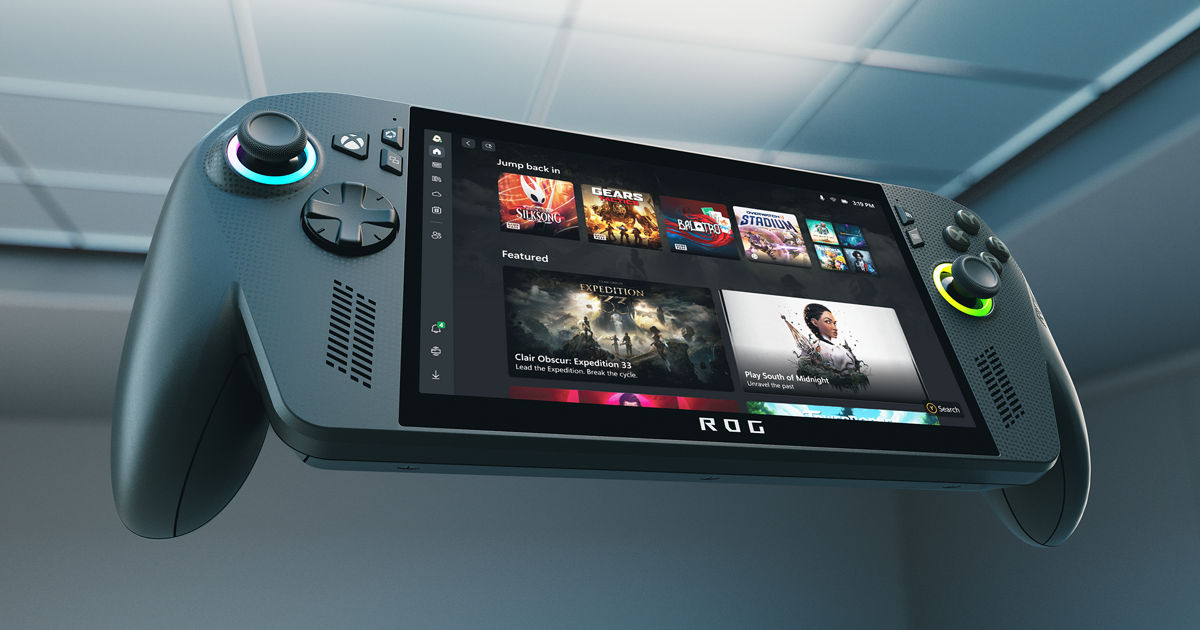
- What it is: A Windows 11 gaming handheld co-branded with Xbox (the ROG Xbox Ally line). It boots into a console-like Xbox experience but runs full Windows, so you can use Game Pass, Steam, Battle.net, Epic, remote play, and cloud streaming. Xbox Wire+1
- Why it matters: It’s the closest thing to an “Xbox portable” right now: 7″ 1080p 120Hz touch, Ryzen Z2-series chips, and a 512GB SSD in the entry model. Pro variant (ROG Xbox Ally X) adds more RAM, 1TB, and bigger battery. Xbox Wire+1
- Availability & pricing: Microsoft and ASUS announced a Holiday 2025 rollout in select markets; prices land in the $599–$999 range depending on spec. Spanish retail press and buying guides are already flagging 512GB Windows 11 models at launch. LOS40+1
- Who it’s for: Game Pass users, Xbox households, PC players who want Steam/Epic on the couch or on trips.
- Caveats: Still Windows under the hood—great flexibility, but you’ll do occasional PC-style tinkering. Battery life varies wildly by settings and game, and OLED competition is fierce. TechRadar
What exactly is the “Xbox handheld”?
In 2025 Microsoft and ASUS unveiled a co-branded Windows handheld family—ROG Xbox Ally and ROG Xbox Ally X—positioned as a PC-based, Xbox-first handheld with an interface that drops you into Xbox Game Pass, Game Bar, Remote Play and the Xbox Full Screen experience. That means two things:
- it feels like an Xbox when you want it to, and
- it’s still a Windows 11 PC when you need flexibility (mods, storefront choice, emulators where legal, creator apps). Xbox Wire+1
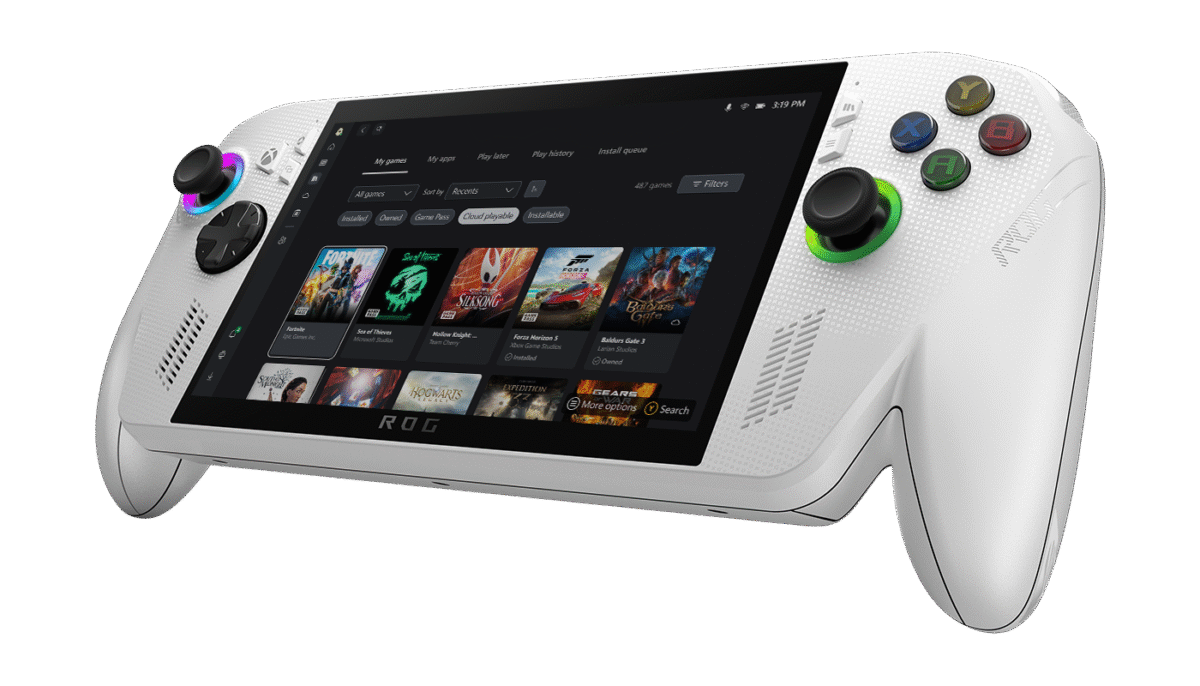
The headline model most shoppers will find first is the 512GB, Windows 11 Home, 7-inch version—the one widely referenced as the “Xbox portable (512GB)” in retail roundups. It’s the value configuration: same 7″ 1080p/120Hz/VRR panel and controls, a mid-range Ryzen Z2 APU, 16GB RAM, and that 512GB NVMe SSD you can later upgrade. The Ally X steps up to Ryzen Z2 Extreme, 24GB RAM, 1TB storage, and a big 80Wh battery for much longer unplugged sessions. LOS40+1
Specs and what they mean in real life
Screen, inputs, ergonomics
- 7-inch, 1920×1080, up to 120Hz with VRR: sharp enough that indie art pops, fast enough that racers and shooters feel console-smooth.
- Analog sticks + ABXY + triggers + bumpers + trackpad-free layout: classic Xbox muscle memory.
- Grip and weight: revised “X” model improves hand comfort for long stints; the base model is lighter but needs a battery top-up sooner. @ROG
Reality check: 120Hz is glorious—but it also eats battery. You’ll toggle between 60Hz for story games and 120Hz for fast shooters.
Processor & RAM
- Ryzen Z2 (base) vs Ryzen Z2 Extreme (X): both deliver smooth play in esports/indies at 60–120fps and medium-ish settings in many AAA games; the Extreme chip holds higher clocks longer and handles heavier shaders better.
- 16GB vs 24GB RAM: more headroom for modern PC titles and multitasking on the X.
Storage
- 512GB NVMe SSD is fine to start (think 6–10 big games).
- 1TB on the X buys comfort, but you can swap or expand (microSD) later—still, internal NVMe is faster for shader caches and open-world loads.
Battery
- Expect 2–3 hours of heavy AAA at 1080p/60 with tuned settings on the base model; the 80Wh Ally X can roughly double light-to-mid gaming time with Silent/30fps caps, and still outlast the base model under load. ASUS quotes up to 9.9 hours in light titles at conservative settings. @ROG+1
Windows 11 on a handheld: strengths, quirks, and quick fixes
Microsoft’s angle is simple: your Xbox, but portable—and your PC library comes along. That’s a win for Game Pass subscribers, cross-buy titles, and mod-friendly players. You can install Xbox app, Steam, Battle.net, Epic, GOG, and jump between them without hacks. Microsoft even maintains a handhelds portal with Game Pass tips and Remote Play. Xbox.com
Quirks you’ll notice (and how to tame them):
- Windows overlays & launchers: You might see pop-ups, update nags, or desktop mouse cursors. Use Xbox Full Screen and Armoury Crate SE to corral your library and boot straight to a controller-first UI. TechRadar
- Gamepad vs mouse toggles: Bind a quick shortcut to summon the on-screen keyboard and Alt-Tab for login prompts.
- Per-game profiles: Create TDP/FPS caps (15–25W / 30–60fps) to balance heat and battery.
- Suspend/Resume: It’s better than old Windows builds but not always Switch-instant—save frequently in older PC titles.
Bottom line: if you’ve used a gaming laptop, you already speak this language. If you want zero tinkering forever, a fixed-OS handheld (e.g., console-style mode only) may feel simpler.
Xbox experience: where it shines on the handheld
Game Pass and cloud
Download and run native PC versions of Game Pass titles when you can (best performance and offline play). Use Cloud Gaming for try-before-you-install or long story games you only sample. Microsoft’s handheld hub guides both use cases. Xbox.com
Remote Play from your living-room Xbox
If you own an Xbox Series X|S, remote streaming lets you carry your console’s library anywhere with good Wi-Fi. It’s instant for backlogs and saves on storage, though picture quality trails native installs. Xbox.com
Cross-save, cross-buy, and PC perks
Play Anywhere titles sync progress across console ↔ PC ↔ handheld. Many PC storefronts allow modding, reshade, and texture packs—handheld power users can squeeze more life from older games with lightweight HD packs.
Performance: what to expect by game category
Esports & indies (Fortnite, Valorant, Hades-like, 2D masterpieces):
- 1080p/60–120 at Medium/High is common with 10–15W TDP in Performance/Silent modes.
- VRR smooths dips; lock to 60fps if battery life matters.
Last-gen AAAs & well-optimized modern games (Forza Horizon 5, Monster Hunter Rise, Elden Ring post-patch):
- 900p–1080p at Medium with FSR scaling to hold 45–60fps.
- Prefer 60Hz mode and a 25W cap for stability.
Cutting-edge AAA (Cyberpunk 2077, Starfield, Alan Wake 2):
- Expect 720p–900p with FSR 2 and a 30–45fps target, or stick to cloud/remote play for max visuals on the go. TechRadar
Creators & emulation (legal classic libraries):
- Older libraries fly; shader pre-cache on internal NVMe speeds boot times and eliminates stutter.
Battery life: the honest math
Battery is where portable PCs live and die.
- Base 512GB model: treat it like a gaming laptop squeezed into a handheld—~2 hours of modern AAA at sensible settings, 3–4 hours on indies/story games with a 30fps cap.
- Ally X: the 80Wh pack and Z2 Extreme efficiency extend light gaming up to ~9–10 hours in ideal, low-load scenarios and comfortably stretch mid-load sessions compared with the base model. Real AAA loads are still 2–4 hours depending on caps. @ROG
Five instant battery wins
- Set 60Hz for RPGs/adventures.
- Cap fps to 30 or 45 in demanding titles; pair with FSR.
- Use Silent/Performance wisely: Silent for indies, Performance for fast shooters.
- Drop post-process effects first (motion blur, volumetrics).
- Dim to 60–70% indoors; the panel is bright enough.
Thermals & noise
With sensible TDP caps, fan noise lands in quiet laptop territory. The X chassis and battery mass help spread heat; long 25W runs will still warm your palms in summer. Keep intake grills dust-free. If heat spikes, your profiles are too aggressive—dial back TDP before blaming the game.
Storage and upgrades
512GB fills fast. Prioritize:
- “Daily driver” installs (your current 3–5 games).
- Keep MMO/huge AAA on an external SSD for hotel sessions or use cloud/remote play until you commit.
- Consider a 1TB NVMe upgrade next year—it’s a painless, cheap quality-of-life boost. ASUS’ 1TB factory config is convenient but not mandatory.
Accessories that actually help
- 65W USB-C GaN charger with PPS: charges the handheld, laptop, and phone.
- Compact stand for desk play with a Bluetooth pad.
- Tempered glass (matte) to reduce glare and fingerprints.
- microSD U3 A2 (or better) for indie overflow; keep shader-hungry titles on NVMe.
- Travel hard case with storage for charger and SSD.
Skip RGB docks and giant cooling pads; a single USB-C hub is enough for HDMI and peripherals at your TV.
Windows tweaks (5 minutes) that transform the experience
- Power & battery → Battery saver on at 20–30%; set a custom power plan for gaming vs. travel browsing.
- Display → Advanced → 60Hz/120Hz quick toggle pinned to the Action Center.
- Xbox Game Bar widgets only: performance, audio, capture; disable the rest.
- Armoury Crate SE: per-game TDP/fps profiles; auto-launch the Xbox Full Screen UI. TechRadar
- Controller dead zones tuned per-game (racing vs. shooters feel different).
Who should buy the 512GB model—and who should go “X”
Choose 512GB (base) if…
- You mostly play indies, AA titles, and esports.
- You’re fine with 60Hz and medium settings to extend battery.
- You’ll upgrade to 1TB later when prices dip.
Choose Ally X if…
- You want longer sessions and fewer compromises in modern AAA.
- You multitask (streaming + game) and benefit from 24GB RAM.
- You prefer 1TB internal now and don’t want to open the device later. @ROG
Xbox handheld vs the competition
Steam Deck OLED
- Pros: gorgeous OLED, amazing suspend/resume, simplified UI.
- Cons: not Windows; Game Pass native installs are workarounds.
- Verdict: Best “console-like” feel, but less flexible for Xbox/PC cross-store users.
Lenovo Legion Go
- Pros: big display, detachable controllers, Windows flexibility.
- Cons: bulkier; software polish varies.
- Verdict: Great for tinkerers; Xbox integration isn’t as curated as Microsoft/ASUS’ co-branded path.
ROG Xbox Ally (this handheld)
- Pros: official Xbox co-branding, guides for Game Pass/Remote Play, strong PC storefront support; Ally X battery leaps.
- Cons: still Windows quirks; no OLED yet; layered UIs can feel busy. TechRadar
Real-world reception: what reviewers and early users flag
- Comfort & controls: ergonomics are improved, and the 7″/120Hz panel is responsive.
- Performance: rock-solid in indies and many AAAs at tuned settings; heavy AAA requires compromises or cloud/remote play.
- Software layers: Xbox Full Screen + Armoury Crate SE make a better console-like front end, but Windows hiccups still peek through at times.
- Battery: “good for a PC handheld, not Switch-like”; the X narrows the gap on light workloads. TechRadar
The Game Pass advantage on a handheld
This is the killer feature for many buyers. Instead of rebuying games, you keep your existing library and sample new titles every month. On trips, you can cloud stream for a taste and then download when you’re back on fast Wi-Fi. Microsoft’s handheld landing page centralizes these use cases and explains Remote Play with your home Xbox if you want console-quality visuals without installing locally. Xbox.com
Setup checklist (copy/paste)
- Sign into Microsoft Store and Xbox app; install Game Pass titles first to test performance.
- Add Steam/Epic/Battle.net, then create Armoury tiles for each launcher.
- Set two global display modes (120Hz Action / 60Hz Battery).
- Make three power profiles:
- Indies/Cloud: 10–15W, 60fps, 60Hz.
- AA/Older AAA: 20–25W, 45–60fps with FSR, 60Hz.
- Competitive: 25–30W if needed, 90–120fps, 120Hz.
- Toggle Auto HDR and VRR; test per-game.
- Map a button to on-screen keyboard and Task View.
Troubleshooting quick wins
| Symptom | Why | Fix |
|---|---|---|
| Stutter in a new game | Shader cache building | Let the game sit at menu for a minute; keep it on NVMe |
| Battery drains fast | 120Hz + uncapped fps | Cap to 60fps; use 60Hz indoors; drop post-processing |
| Pop-ups/desktop cursor | Windows background UI | Force Xbox Full Screen; pin on-screen keyboard; disable non-gaming startup apps |
| Hot palms | TDP too high | Reduce to 15–20W for non-shooters; elevate rear vents |
| Cloud looks smeary | Wi-Fi bitrate | Force 5GHz, sit near router, or download native builds |
Parents & travel: why this handheld is easier than a laptop
- Profiles and family settings live in Windows and Xbox accounts; you can gate storefronts and playtime.
- Standalone mode with a small charger and hard case beats hauling a gaming laptop.
- Remote Play from the living room Xbox lets kids keep progress with you on trips—without installing 80GB per game. Xbox.com
Sustainability, repairability, and long-term value
- NVMe and microSD expansion extend lifespan.
- Microsoft’s embrace of a Windows handheld category means ongoing OS optimization for controllers and full-screen experiences. That pays dividends in year two and beyond as game launchers standardize better handheld defaults. Reddit
- Resale value improves if you keep the box, avoid deep scuffs, and list with the 1TB upgrade (if you do it) clearly noted.
Buying guide: which SKU, when, and where
Your decision fork
- Tight budget, Game Pass core, OK with 60Hz most of the time → 512GB base model.
- Want fewer compromises, longer battery, and heavy AAA in your bag → Ally X.
Stock timing
- Expect rolling restocks through the holidays. Set retailer app alerts and be ready for mid-week, mid-morning drops. Launch guidance targets Holiday 2025, with select markets first and wider rollout after. Spanish deal trackers are already spotting offers on 512GB Windows 11 models. Xbox Wire+2LOS40+2
Price sanity
- Base often sits around $599/€599 equivalents; X hovers near $999/€999 depending on RAM/SSD. Don’t pay scalper markups—next wave is typically days away. LOS40
Pros and cons
Pros
- Game Pass, Xbox Full Screen, Remote Play: the best bridge between console comfort and PC freedom. Xbox.com
- 120Hz 7″ display with responsive controls.
- Windows 11 flexibility: all major PC storefronts, mods, creator apps.
- Ally X battery uplift and ergonomics are meaningful for travelers. @ROG
Cons
- Windows friction shows up occasionally—updates, pop-ups, launcher quirks. TechRadar
- No OLED panel; competitors look punchier in HDR scenes.
- Battery still requires smart caps in heavy AAA.
- Learning curve for newcomers to PC settings.
Frequently asked questions
Is this a “real” Xbox?
It’s a Windows handheld co-branded with Xbox. You get Xbox apps, Game Pass, Remote Play, and a curated full-screen interface, but it’s not running the Xbox console OS. Xbox Wire
Will my Game Pass library work?
Yes—download PC titles via the Xbox app. You can also stream from the cloud or Remote Play your home Xbox. Xbox.com
Can it run Steam/Epic/Battle.net?
Yes. Install launchers and add them to your controller-first UI.
How big a difference is Ally X?
In short: battery, RAM, and sustained performance. It stretches playtime and handles heavier games/settings with fewer dips. @ROG
Is 512GB enough?
It’s fine to start. Plan an NVMe upgrade or prune regularly; keep a few heavy hitters installed and rely on cloud/remote play for the rest.
Real-world benchmarks & performance tiers (Xbox handheld 512GB Windows 11)
How to read this: numbers vary by driver and patch; the point is playable targets you can hit quickly on a 7-inch 1080p/120Hz display with the Ryzen Z2 (base) or Z2 Extreme (Ally X).
- Esports/Competitive (Fortnite, Valorant, Rocket League):
- Base 512GB: 1080p High with 60–90fps (cap at 60 for battery).
- Ally X: 1080p High/Performance DLSS/FSR with 90–120fps bursts; lock 90fps for smoother thermals.
- Popular AA/last-gen AAA (Forza Horizon 5, Monster Hunter Rise, RE remakes):
- Base 512GB: 900p–1080p Medium + FSR, 45–60fps; set 60Hz.
- Ally X: 1080p High (tuned) + FSR, 60fps steady.
- Demanding new AAA (Cyberpunk 2077, Starfield, Alan Wake 2):
- Base 512GB: 720p–900p Medium/Low + FSR Quality, 35–45fps; cinematic 45fps cap feels good.
- Ally X: 900p–1080p Medium + FSR Balanced, 45–60fps depending on scene.
Frame-pacing tip: on a 7-inch panel, locked 45 or 60fps with VRR feels better than wild swings to 120. Your eyes will thank you (and so will the ROG Ally X battery).

“Day-one setup” wizard for a smoother Windows 11 gaming handheld
- Out-of-box updates: Windows Update → reboot → GPU driver.
- Xbox app + Game Pass: sign in, toggle auto-update, install 2–3 lightweight games first.
- Steam/Epic/Battle.net: install, add controller-friendly Big Picture/Full Screen launch.
- Display modes: create 120Hz Action and 60Hz Battery profiles (you’ll flip often).
- Per-game profiles: cap fps (30/45/60), set TDP (10–25W), and toggle FSR per title.
- On-screen keyboard hotkey: map a button to summon it instantly for logins.
- Suspend habits: quick-save before sleep in older games; modern titles resume better but don’t tempt fate.
Curated game lists by mood (Windows 11 gaming handheld best picks)
Couch-friendly indies (120Hz heaven): Hades II, Dead Cells, Vampire Survivors, Celeste, Dave the Diver.
Road-trip RPGs (60Hz comfort): Persona 5 Royal, Baldur’s Gate 3 (tuned), Octopath Traveler II, Dragon’s Dogma 2 (tuned).
Pick-up shooters (cap at 60/90fps): Halo Infinite MP (tuned), Apex Legends, Destiny 2 (medium).
Racing & arcade (VRR sweet spot): Forza Horizon 5, Hot Wheels Unleashed 2, Need for Speed Unbound (tuned).
Cloud/Remote-Play wins: Flight Simulator, Diablo IV seasonal grind, story-heavy blockbusters you sample on hotel Wi-Fi.
Include a sentence or two in your article about why Game Pass portable is the killer combo: download at home, cloud on the go, remote play from your Series X|S.
Battery life cookbook (Ally X & base model)
Goal: 3–4 hours on the 512GB base without pain
- Panel 60Hz, brightness 55–65% indoors.
- FSR Quality, cap 45–50fps in modern AAA; 60fps in AA/indies.
- TDP 15–20W (Silent/Performance).
- Kill motion blur/film grain first; reduce shadows and volumetrics next.
Goal: near-console comfort on Ally X
- 60Hz most of the time; go 120Hz for fighters/racers only.
- TDP 20–25W for heavy games, 10–15W for indies.
- Expect 2–4 hours in modern AAA, 6–9 with light/retro content at conservative caps.
Micro-wins: airplane mode for offline games; close launchers after starting a title; use night mode on the 7-inch screen to shave power in dark rooms.
Creator corner: stream and capture on a Windows 11 handheld
- OBS quick profile: 1080p canvas, 720p 30fps output for hotel Wi-Fi; NVENC/AMD AMF encoder, bitrate 3.5–5 Mbps.
- Mic: clip-on Bluetooth lav at chest height; turn auto-gain off.
- Lighting: a mini LED key-light powered by power bank; even phones look pro with fixed light.
- Remote co-op: capture party chat via the Xbox app on Windows with Audio Output Capture; always test a 30-sec VOD before going live.
Accessibility and comfort on a 7-inch 120Hz screen
- Big text mode: Windows display scale 125–150% so store pages and launchers don’t squint your eyes.
- Reduce motion: disable motion blur; lock fps; VRR smooths the rest.
- Remap for small hands: lower trigger pull thresholds; adjust stick dead zones per-genre.
- Color-blind filters: many PC titles include presets—bake them into per-game profiles once and forget.
Parental controls & family profiles (Xbox handheld in a household) 👨👩👧👦
- Microsoft Family Safety: set age ratings, daily screen-time, and storefront approvals.
- Xbox app limits: per-user library visibility; pin kids’ favorites to the front page.
- Travel mode: create a “Road Trip” Windows account with offline games only; less chance of purchase pop-ups on weak Wi-Fi.
- Local multiplayer kit: one extra Xbox controller + compact stand turns the Xbox handheld 512GB Windows 11 into a mini console.
Storage strategy for a 512GB SSD (and when to jump to 1TB)
- Install tiers:
- Daily drivers (3–5 games you play now).
- Seasonal heavy hitters (rotate monthly).
- Cloud/Remote-Only (do not install big ones until committed).
- Shader-hungry titles live on NVMe; move indies to microSD.
- Upgrade trigger: when you’re uninstalling to patch a game, it’s time for 1TB NVMe. The peace of mind is worth it.
Advanced optimization: five tweaks power users swear by ⚙️
- Per-game FSR: start at Quality and nudge to Balanced only if needed.
- RT off: ray tracing on a handheld = heat + battery drain; save it for docked or your desktop.
- CPU/GPU balance: if fps won’t move, lower CPU-bound settings (crowd density, simulation tick) before cranking GPU.
- Audio budget: spatial audio is nice; if it crackles on battery, switch to stereo for stability.
- Background killers: disable auto-launch of secondary launchers (they wake the CPU every few minutes).
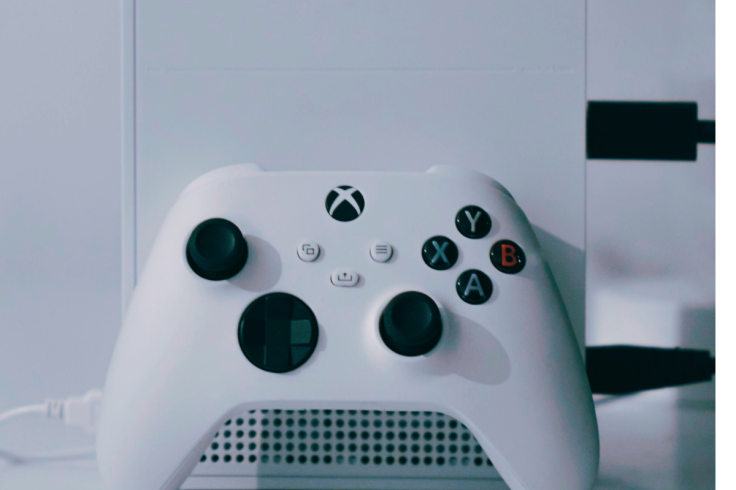
Steam Deck OLED vs Xbox handheld 512GB Windows 11 (glossy but honest)
- Steam Deck OLED: better OLED blacks and instant suspend; Valve’s OS is frictionless. But Game Pass installs require workarounds and Windows apps aren’t native.
- Xbox handheld 512GB Windows 11: Game Pass native, Xbox Remote Play, all PC stores—maximum flexibility. You’ll tinker more, but you won’t rebuy your library.
- Verdict: if your life is Xbox + PC, this Windows 11 gaming handheld is the right ecosystem bet; if you want pure console simplicity and OLED, Deck OLED is beautiful.
Travel & hotel Wi-Fi playbook ✈️
- Router reality: most hotels throttle uplink; set cloud streams to 720p.
- Personal hotspot near a window beats lobby Wi-Fi for Remote Play.
- Offline prep: download two indies and one AA before leaving home; keep one big AAA on external SSD for rainy days.
- Charge discipline: a 65W GaN brick and short USB-C cable keep you topped up at cafés without hogging outlets.
Troubleshooting extended (copy/paste reference)
| Problem | Cause | Fix |
|---|---|---|
| Game opens to desktop not full screen | Focus lost to launcher | Alt+Enter, set borderless/windowed fullscreen; add to Armoury tile |
| Audio desync on Bluetooth | Codec mismatch or congestion | Force AAC/SBC; move 5GHz Wi-Fi to channel 36/40; try wired buds |
| Sudden 10–15fps drops after an hour | Thermal saturation | Lower TDP by 3–5W; cap fps; elevate rear vents for 5 minutes |
| Stutters after updates | Shader cache rebuild | Let the game idle in main menu; verify files; keep on NVMe |
| Battery drains when “off” | Sleep vs shut down confusion | Use Hibernate for long breaks; disable wake-on-LAN features |
Long-term value: resale, care, and year-two upgrades
- Keep the box and receipts; resale jumps 10–15% with complete packaging.
- Exterior care: a matte tempered glass keeps the 7-inch 120Hz screen pristine; wipe sticks and buttons monthly.
- Year-two plan: upgrade to 1TB NVMe, replace thermal paste if comfortable, and refresh your power profiles for the newest Game Pass lineup.
Quick-hit FAQs
Is the Xbox handheld a real Xbox or a PC?
It’s a Windows 11 gaming handheld co-branded with Xbox. You get Xbox Game Pass, Xbox Remote Play, and a console-like UI—but full Windows flexibility too.
Can the 512GB model handle modern AAA?
Yes, with FSR and 30–60fps caps at 720p–1080p tuned settings. For fewer compromises and longer play, the Ally X wins.
Does Game Pass work offline?
Many titles do after a first online check-in. Use cloud for sampling and Remote Play for your home Xbox library when bandwidth is tight.
Is 120Hz worth it on a 7-inch screen?
Absolutely for shooters and racers; switch to 60Hz for RPGs to extend battery life.
What’s the fastest way to add storage?
Swap to 1TB NVMe. Use microSD for indies and overflow.
Editor’s addendum: who will love this—and who won’t
If you’re an Xbox + PC gamer with Game Pass, the Xbox handheld 512GB Windows 11 finally nails the “play anywhere” promise: you can download native PC builds, stream in a pinch, or remote into your living-room Xbox with saves intact. You’ll tune a few toggles, sure—but the pay-off is a true hybrid: console comfort when you want it, PC freedom when you need it. If you demand zero tinkering and OLED blacks, a fixed-OS handheld may fit better. For everyone else, this is the portable sweet spot for winter 2025 and beyond. 🎮
Editor’s verdict
The Xbox handheld (512GB, Windows 11, 7″ 120Hz) is the most practical way to carry Xbox comfort and PC freedom in one device. If you’re a Game Pass player who also dabbles in Steam and indie gems, the base 512GB model nails the sweet spot—especially if you’re happy to cap framerates and tune profiles to keep battery sane. If you want longer untethered sessions and more brute force for modern blockbusters, the Ally X earns its price for travel and couch-first players.
Windows will still show seams here and there, and you won’t get OLED blacks, but the combination of Xbox Full Screen, Remote Play, Game Pass, and a maturing Windows handheld mode makes this category finally click. Treat it like a portable gaming laptop with a console-like front end, and you’ll love it all winter—and well beyond.
YOU MIGHT LIKE TO READ
🔥 Join 120,000+ Smart Shoppers!
Get exclusive gadget deals, viral Amazon finds and tech reviews before they trend. Only the best — straight to your inbox every week 🚀