Ugreen 160W GaN Charger Review (2025): Smart Display 5-Port Beast That Under-Cuts Anker
“As an Amazon Associate I earn from qualifying purchases. This post may contain affiliate links at no extra cost to you.”

Multi-port fast chargers are having a big moment in 2025. Laptops, tablets, phones, earbuds, handheld consoles and smartwatches all want USB-C power, and nobody wants to carry three or four different charging bricks anymore. That’s exactly the pain point Ugreen is targeting with its new Ugreen 160W GaN charger with smart display and 5 ports (4x USB-C + 1x USB-A). Notebookcheck
Launched first in China under model number X774, this compact GaN charger aims directly at premium rivals like the Anker Prime 160W by offering more ports, a built-in information display, and a surprisingly low launch price of around 259 CNY (≈ 36 USD).
In this deep-dive Ugreen 160W GaN charger review, we’ll break down how its power distribution works, what that smart screen actually shows, how it compares versus Anker and older Nexode Pro 160W models, and who should seriously consider replacing their entire charging setup with this one brick.
What Exactly Is the New Ugreen 160W GaN Charger?
At its core, the new Ugreen 160W GaN charger is a 5-port wall adapter based on gallium nitride (GaN) technology. Instead of the old, bulky silicon design, GaN lets Ugreen cram significantly more power into a smaller housing with better efficiency and lower heat. Ugreen already sells Nexode Pro 160W GaN chargers worldwide, but this new model adds two big twists:
- A smart display on the front that shows live power draw for each port
- A 4C+1A layout (four USB-C ports plus one USB-A), making it more flexible than many 3-port competitors.
The idea is simple but powerful: one compact Ugreen 160W GaN charger that can charge your laptop, phone, tablet, handheld, and accessories at the same time, while you can literally see how many watts each device is pulling on the display.
Ugreen 160W GaN Charger VS Alternatives (Quick “VS Box”)
If you’re trying to decide between this Ugreen 160W GaN charger, Anker, or a basic 65W brick, this quick comparison box gives you the big picture in one glance:
| Feature / Model | Ugreen 160W GaN (X774 – Smart Display) | Ugreen Nexode Pro 160W (3C1A) | Anker Prime 160W | Basic 65W USB-C Charger |
|---|---|---|---|---|
| Total output | 160 W | 160 W | 160 W | 65 W |
| Max single-port output | Up to 140 W (C1/C2) | Up to 140 W (C1) | Up to 140 W | 65 W |
| Number of ports | 5 (4×USB-C + 1×USB-A) | 4 (3×USB-C + 1×USB-A) | 3 (3×USB-C) | 1 (1×USB-C) |
| Smart display | ✅ Front power display | ❌ | ✅ | ❌ |
| Best use case | One-brick setup for laptop + 3–4 devices at once | Desk hub or travel, fewer devices | Premium ecosystem, app control | Single laptop or phone only |
| Portability | High (compact GaN, 5-port hub) | High | High | Medium |
| Flexibility with older cables | ✅ Has USB-A | ✅ Has USB-A | ❌ USB-C only | Depends on model |
| Expected price positioning | Aggressive / mid-range | Mid-range | Premium $$$ | Budget / included |
If you want maximum flexibility per dollar, the new Ugreen 160W GaN charger is the one that gives you the most ports and the most information (thanks to the display) in a single brick.
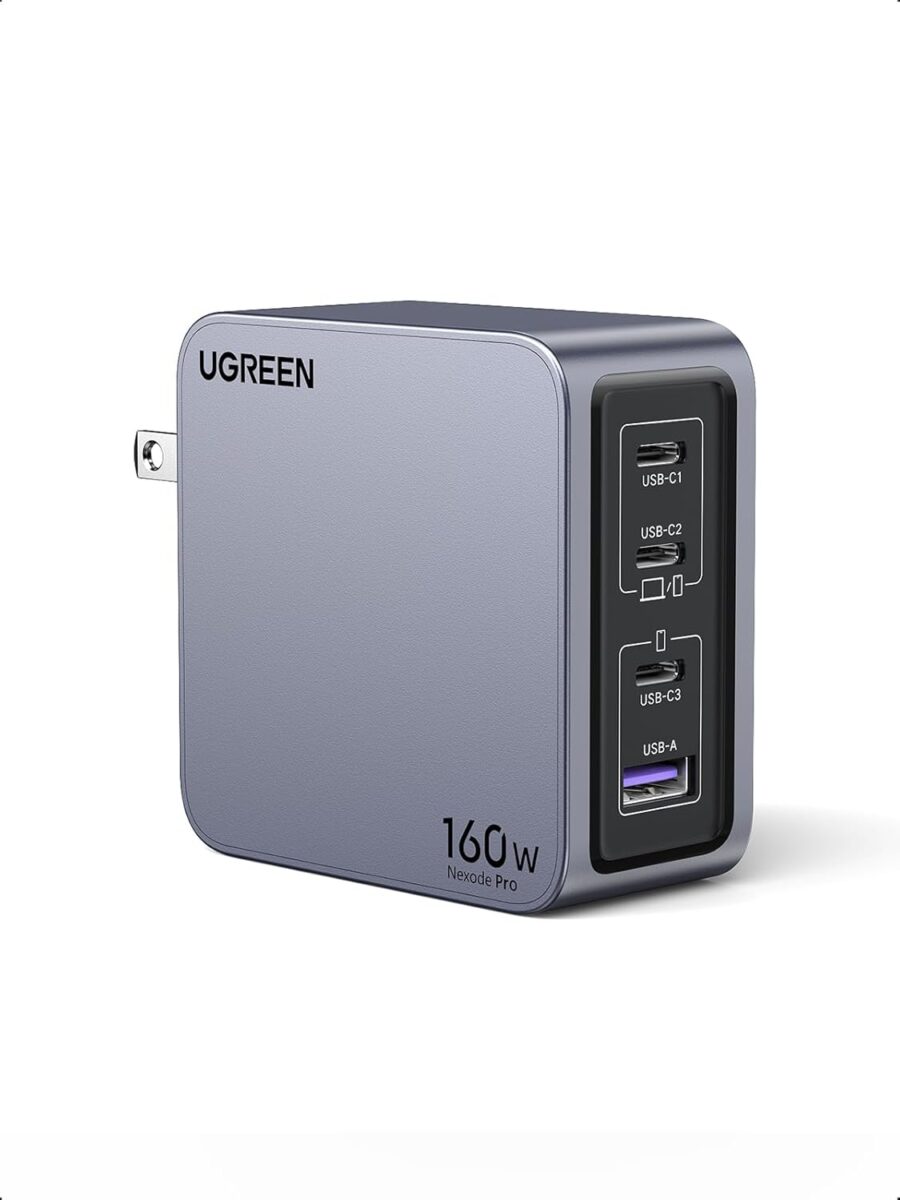
Ugreen 160W GaN Charger – Specifications Box 🧾
Here’s a clean spec box you can drop into your article so readers see exactly what the Ugreen 160W GaN charger offers:
Type:
– Multi-port desktop / wall GaN charger
Total Output:
– Up to 160 W combined
Ports:
– 4 × USB-C
– 1 × USB-A
Max Single-Port Output:
– USB-C1: up to 140 W
– USB-C2: up to 140 W
– USB-C3: up to 30 W
– USB-C4: up to 30 W
– USB-A: up to 22.5 W
Fast-Charging Standards (expected):
– USB-C Power Delivery (PD 3.1 / PD 3.0)
– PPS (Programmable Power Supply)
– QC (Quick Charge)
– Popular Android/iPhone fast-charge profiles
Smart Features:
– Front smart display showing real-time wattage per port
– Intelligent power distribution depending on how many devices are connected
Safety & Protection:
– Over-current protection
– Over-voltage protection
– Short-circuit protection
– Temperature / over-heat protection
Use Cases:
– Laptops, tablets, phones, handheld consoles, earbuds, power banks, smartwatches and more
Why You Should Buy the Ugreen 160W GaN Charger ⚡
Still on the fence? Here’s the real-life value of this charger in simple terms:
- One Brick, Five Devices
Instead of carrying a separate laptop charger, phone charger and power bank charger, you just throw one Ugreen 160W GaN charger in your bag. It becomes your mini power station at home, in hotels and in cafés. - Perfect for Power Users and Travellers
If you’re a digital nomad, student, creator or frequent flyer with a laptop, phone, tablet and earbuds, this charger means:
– One wall outlet needed
– One cable to the wall
– Everything else powered from the five ports. - Smart Display = Zero Guesswork
The screen isn’t just for show. It tells you:
– How many watts your laptop is pulling
– Whether a “fast charge” icon on your phone is actually real
– If a cheap cable is limiting your speed That transparency is rare on chargers at this price level. - Future-Proof Power
With up to 140 W on a single USB-C port, this charger is ready for:
– Big MacBook Pros
– Many USB-C gaming laptops
– Next-gen tablets and ultrabooks You’re not buying a 65 W brick that will feel weak in two years. - Better Desk and Cable Management
On a desk, the Ugreen 160W GaN charger acts like a small, hidden power hub. You can tape or mount it under a desk, run short tidy cables to your devices, and get rid of a whole pile of wall-warts and chargers.
Is the Ugreen 160W GaN Charger Worth It? 💰
Here’s the honest verdict section you can attach to the end of the article so readers can make a quick decision.
It’s worth it if:
- You regularly need to charge 3+ devices at the same time (laptop + phone + something else).
- You want one charger for home, office and travel instead of a different brick for every device.
- You like the idea of seeing real wattage live on a display instead of guessing if your laptop is really fast-charging.
- You plan to keep your next laptop/phone for years and want a charger that’s already powerful enough.
It might not be worth it if:
- You only own a single laptop and rarely travel — a simpler 65 W or 100 W USB-C charger could be enough.
- You don’t care about multiple ports, USB-A compatibility or a display and just want the cheapest brick possible.
- You already bought a 160 W multi-port GaN charger recently and don’t need the extra port or screen.
The big advantage of getting it now
The real advantage of buying the Ugreen 160W GaN charger is that it replaces several chargers at once. Instead of upgrading to a better laptop charger later, a separate travel charger and a multi-port desk charger, you get everything in one shot:
- One purchase
- One brick
- One cable to the wall
For anyone who lives out of a backpack, works from different places, or simply wants a clean setup, that’s exactly where this charger pays for itself.
Port Layout and Power Distribution: How the 160W Is Shared
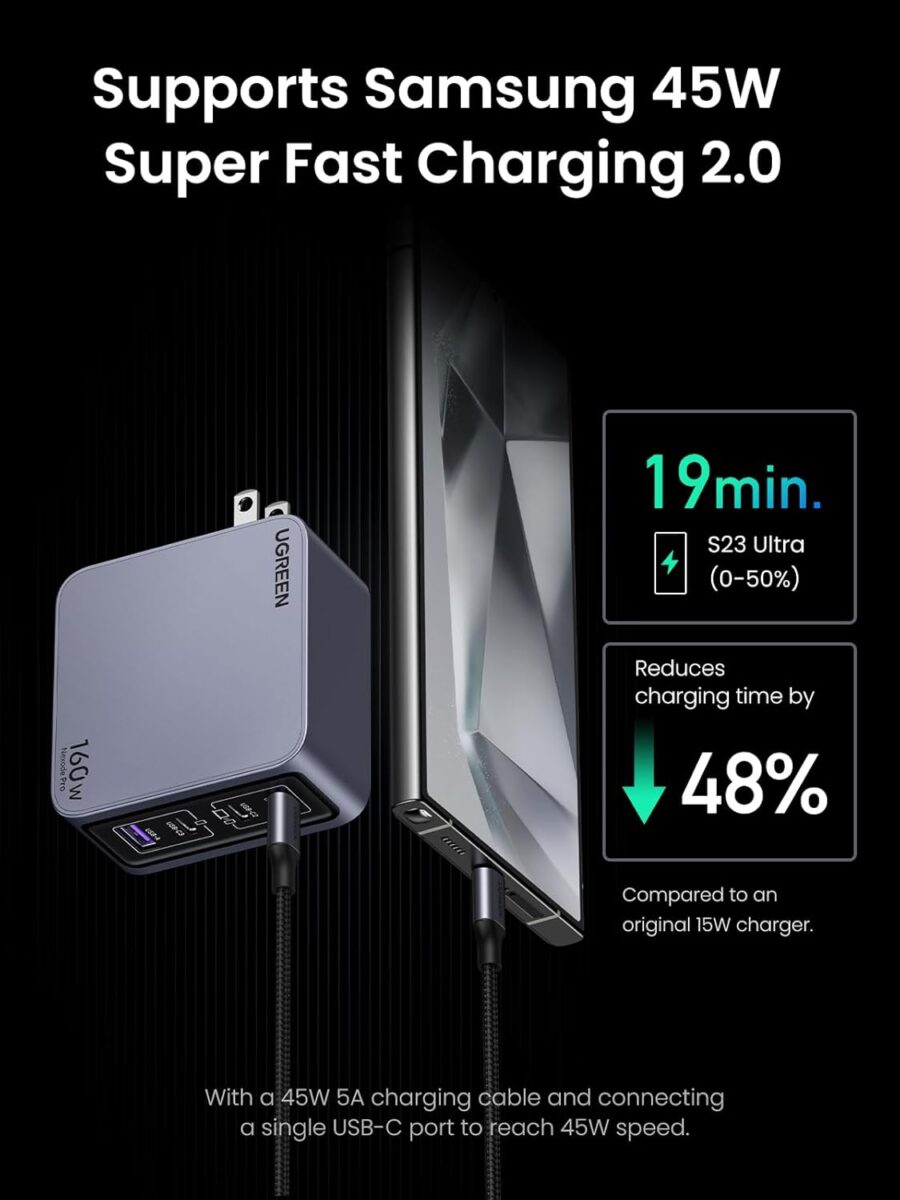
The most important question with any high-power GaN charger is not just “How many watts does it have?” but “How does it share those watts across the ports?”
According to Notebookcheck’s report on the X774, the port configuration looks like this: Notebookcheck
- USB-C1: up to 140 W
- USB-C2: up to 140 W
- USB-C3: up to 30 W
- USB-C4: up to 30 W
- USB-A: up to 22.5 W
Total combined output is capped at 160 W, which means you won’t get 140 W from C1 and 140 W from C2 simultaneously, but you can get a realistic mix such as:
- 140 W for a 16-inch MacBook Pro or gaming laptop on C1, plus
- 20 W–25 W spread across a phone and earbuds on C3/C4/A
This layout is clearly inspired by Ugreen’s existing Nexode Pro 160W chargers, which deliver up to 140 W via USB-C1 using PD 3.1 and intelligently re-distribute power when multiple ports are active.
What That Means in Real Life
In practical terms, the Ugreen 160W GaN charger can handle scenarios like:
- Charging a 16-inch MacBook Pro at close to full speed from C1 while topping up a phone and earbuds
- Powering a USB-C gaming laptop, a Nintendo Switch, and a phone at the same time
- Acting as a single power hub on a desk or in a hotel room for almost everything you carry
The charger will automatically negotiate power using modern protocols, so as you plug in more devices, each port’s wattage is adjusted without you needing to do anything.
Smart Display: More Than a Gimmick?
One of the standout features of this Ugreen 160W GaN charger is the integrated smart display on the front. Notebookcheck notes that the display can show per-port power status and basic charging details while your devices are connected.
Why a Display Matters
At first glance, a tiny screen on a charger sounds like a gimmick—but it actually solves a few common frustrations:
- Power transparency: You can see how many watts your laptop or phone is really drawing. If your MacBook Pro is stuck at 60 W when it should be hitting ~120–140 W, you know something’s off—maybe the wrong cable or port.
- Multi-device debugging: When several devices are plugged in, the display makes it obvious which one is hogging most of the power.
- Cable testing: Not sure if that cheap USB-C cable is any good? Plug in a laptop and check the wattage on the display. If it caps out too low, the cable might not support high-power PD.
It’s the same philosophy Anker used with its high-end Anker Prime 160W charger and docks, which also include displays for per-port information. anker.com+2Tom’s Hardware+2 Ugreen is essentially bringing that premium “nerd-friendly” feature down to a more accessible price point.
Supported Fast-Charging Protocols and Device Compatibility
Ugreen’s existing Nexode Pro 160W GaN chargers support an impressive list of fast-charging standards, including USB PD 3.1 / 3.0, PPS, QC4+, FCP, AFC, Apple 5V/4A and BC1.2. MegaDron.pl+1
While the X774 hasn’t yet had a full English datasheet released at the time of writing, it’s very likely that Ugreen will reuse the same GaNInfinity chip and protocol support, since that’s already present in their current 160W lineup.
Translation: What Can You Charge?
Assuming similar protocol support, the Ugreen 160W GaN charger should be able to fast-charge:
- Laptops: MacBook Pro/Air, many Windows ultrabooks, USB-C gaming laptops that accept 100–140 W PD input
- Tablets: iPad Pro/Air, Samsung Galaxy Tab series, other PD-capable tablets
- Phones: iPhone 15/16/17 series, Google Pixel, Samsung Galaxy S/Note/Ultra lines, and many Android flagships that use PD or PPS
- Handheld consoles: Nintendo Switch, Steam Deck, ROG Ally, Legion Go
- Accessories: Earbuds, power banks, smartwatches, cameras and more
The presence of a USB-A port still matters for older or cheaper devices that include only A-to-whatever cables in the box. You can keep your older cables around without wasting a USB-C port.
GaN Tech and Cooling: Why 160W Doesn’t Mean “Scorching Hot”
High-power bricks used to be big, heavy, and hot. Modern chargers like Ugreen’s Nexode Pro and Anker’s Prime series rely on third-generation GaN chips that are smaller and more efficient than traditional silicon. Ugreen brands its solution as GaNInfinity, promising higher power density and better thermal control.
Efficiency and Safety
Ugreen claims features such as:
- High-frequency switching to shrink transformer size without sacrificing efficiency
- Multi-layer thermal protection that monitors internal temperature in milliseconds
- Protections against over-current, over-voltage, short circuit and overheating
On existing Nexode Pro models, the company advertises up to 140 W single-port output capable of charging a 16-inch MacBook Pro from 0–50% in around 27 minutes in optimal conditions.
It’s reasonable to expect similar real-world behaviour from the new X774, especially given the similar 160W GaN platform. When you push 100–140 W through any compact brick, it will get warm, but GaN makes that heat manageable in a smaller footprint.
Real-World Charging Scenarios for the Ugreen 160W GaN Charger
To understand whether this Ugreen 160W GaN charger fits your life, it’s useful to think in real scenarios instead of raw specs.
Scenario 1: Remote Work / Digital Nomad Setup 💻📱
You’re working from a café or co-working space with:
- A 16-inch MacBook Pro
- An iPad or small tablet
- A smartphone
- Wireless earbuds
With the 4C+1A layout, you can:
- Plug the laptop into C1 (up to 140 W single-port)
- Connect the tablet to C2 or C3
- Charge your phone on C4
- Drop your earbuds case onto USB-A via a standard cable
All from a single wall socket, while the display shows you total power draw and per-port usage.
Scenario 2: Family Travel Charger ✈️
In a hotel room, everyone wants to charge at once:
- One laptop
- Two phones
- A Nintendo Switch
- A power bank
Instead of fighting for wall plugs and carrying four bricks, the Ugreen 160W GaN charger becomes a single charging hub. You plug it into the most accessible outlet, throw it on the desk, and run short cables to each device. The display lets you quickly see if everything is actually charging as expected.
Scenario 3: Desk Power Hub for Creators 🎧🎮
If your desk includes a laptop, monitor, phone stand, camera battery and handheld console, the Ugreen can replace multiple chargers and become a tidy power spine behind your monitor arm or underneath your desk shelf. You keep one cable going to the wall and fan out USB-C cables to your devices.
Ugreen 160W GaN Charger vs Anker Prime 160W: Which Is Better?
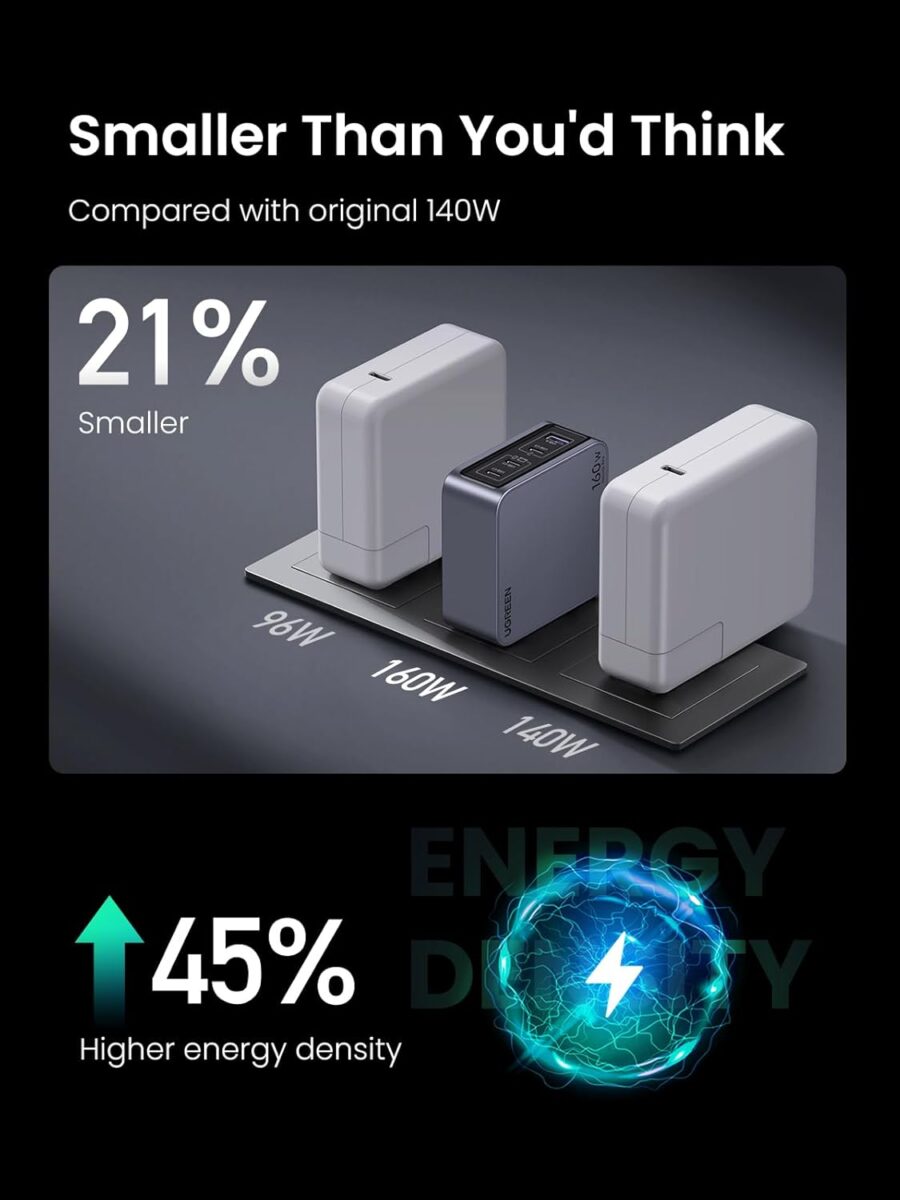
When Notebookcheck calls the X774 a “competitor of the Anker Prime 160W charger,” they’re not exaggerating. Gizmodo+3Notebookcheck+3anker.com+3 Both brands are chasing the same power-user audience: people who want a single compact brick that can fast-charge laptops and multiple devices at once.
Key Differences
1. Ports
- Ugreen 160W GaN charger (X774): 4x USB-C + 1x USB-A (5 ports total) Notebookcheck
- Anker Prime 160W: 3x USB-C (no USB-A)
If you still rely on USB-A accessories, Ugreen’s extra A-port is a big plus.
2. Display and Smart Features
Both chargers include a smart display showing per-port power. Anker pairs this with app-based controls and firmware updates for its wider Prime ecosystem. anker.com+2anker.com+2 Ugreen’s X774 focuses on the display itself rather than an app platform, keeping things simpler and likely cheaper.
3. Price
- Ugreen’s launch price in China: ~259 CNY (~36 USD) Notebookcheck
- Anker Prime 160W charger: often $120–150 USD at U.S. launch before discounts. TechRadar+2Gizmodo+2
Global pricing for the Ugreen 160W GaN charger hasn’t been announced yet, but based on Ugreen’s existing Nexode Pro 160W chargers (often around $80 or less in Western markets), it’s safe to expect a significant price advantage over Anker Prime.
4. Ecosystem & Brand Perception
Anker has a strong “premium accessory” reputation and deep integration with its Prime docks and power banks. Ugreen is known for aggressive pricing and solid reliability, especially in chargers and cables, and has been expanding fast with multiple GaN lines.
Which One Should You Pick?
- Choose Anker Prime 160W if you value
- Brand ecosystem, app features, and potentially better retailer support in your country
- 3x USB-C ports only (no need for USB-A)
- Choose the Ugreen 160W GaN charger if you want
- More ports (4C+1A) in a single brick
- A powerful charger with a smart display at a much lower expected price
- A simple plug-and-use device without app complexity
For many users, especially travellers and families, Ugreen’s design delivers more flexibility per dollar.
Pros and Cons of the Ugreen 160W GaN Charger
Pros ✅
- 160 W total output with up to 140 W on a single USB-C port, enough for large laptops MegaDron.
- 4 USB-C + 1 USB-A means you can charge up to five devices at once
- Smart display gives real-time feedback on power distribution and helps diagnose cables and ports The Verge+3Notebookcheck+3Notebookcheck+3
- Based on GaNInfinity tech, providing better efficiency and smaller size than comparable silicon chargers ركن الشريف+
- Wide expected protocol support (PD 3.1 / PPS / QC4+ / FCP / AFC etc.) makes it compatible with almost every modern USB-C device MegaDron.pl+1
- Aggressive launch price in China (~$36) hints at very competitive global pricing when it ships worldwide Notebookcheck
Cons ❌
- Currently China-only launch; global release timing and final pricing remain unknown Notebookcheck
- Total power is shared: you won’t get 140 W for two laptops at the same time (this is a limitation of all 160 W multi-port chargers, not just Ugreen) MegaDron.pl+3Notebookcheck+3UGREEN EU+3
- The smart display adds complexity and potential failure points compared to “dumb” bricks
- Heavier than a simple 65 W travel charger if you only need to power one laptop and a phone
Availability and Global Launch: When Can You Buy It?
As of early November 2025, Ugreen has announced the X774 Ugreen 160W GaN charger in China with a price tag of 259 CNY. Notebookcheck The company has not yet confirmed when this specific 5-port, smart-display model will reach international markets, but Ugreen historically globalizes most of its GaN chargers shortly after Chinese launch, often under the Nexode or Nexode Pro branding. Ugreen India+5Notebookcheck+5The Verge+5
Until that happens, many users outside China will continue to buy the existing Nexode Pro 160W (3C1A) models, which already deliver similar power and protocol support but lack the 5-port layout and front display.
Final Verdict: Should You Wait for the Ugreen 160W GaN Charger?
If you’re already hunting for a powerful multi-port charger in late 2025, the new Ugreen 160W GaN charger with smart display and 5 ports is absolutely one to watch.
- For heavy laptop + phone + tablet users, it offers desktop-hub levels of power in a compact wall brick.
- The smart display turns invisible wattage into visible information, which is surprisingly useful if you care about cables, speeds and device health.
- The 4C+1A layout and probable support for all major fast-charging protocols make it one of the most flexible 160 W chargers on the market today.
The only real downside is timing: unless you’re in China, you’ll need to wait for global availability. If you can’t wait and need something right now, Ugreen’s existing Nexode Pro 160W or the Anker Prime 160W are still excellent, proven options—though they’ll likely cost more and may offer fewer ports.
For everyone else, this Ugreen 160W GaN charger looks like one of the most interesting power bricks of 2025—a tiny, screen-equipped beast that wants to replace your laptop charger, phone charger, tablet charger and travel charger all in one go.
YOU MIGHT LIKE TO READ!
2025 Viral Amazon Gadgets Review: 5 Must-Have TikTok-Made-Me-Buy-It Finds
Black Friday 2025 + “MadeMeBuyItNow”: Why These Tech Deals Go Viral
🔥 Join 120,000+ Smart Shoppers!
Get exclusive gadget deals, viral Amazon finds and tech reviews before they trend. Only the best — straight to your inbox every week 🚀