A complete, real-world look at strong Samsung Galaxy XR vs Apple Vision Pro,strong in 2025/2026 — specs, comfort, displays, AI, apps, pricing, ratings and daily use so you can decide which mixed reality headset actually makes sense for you.
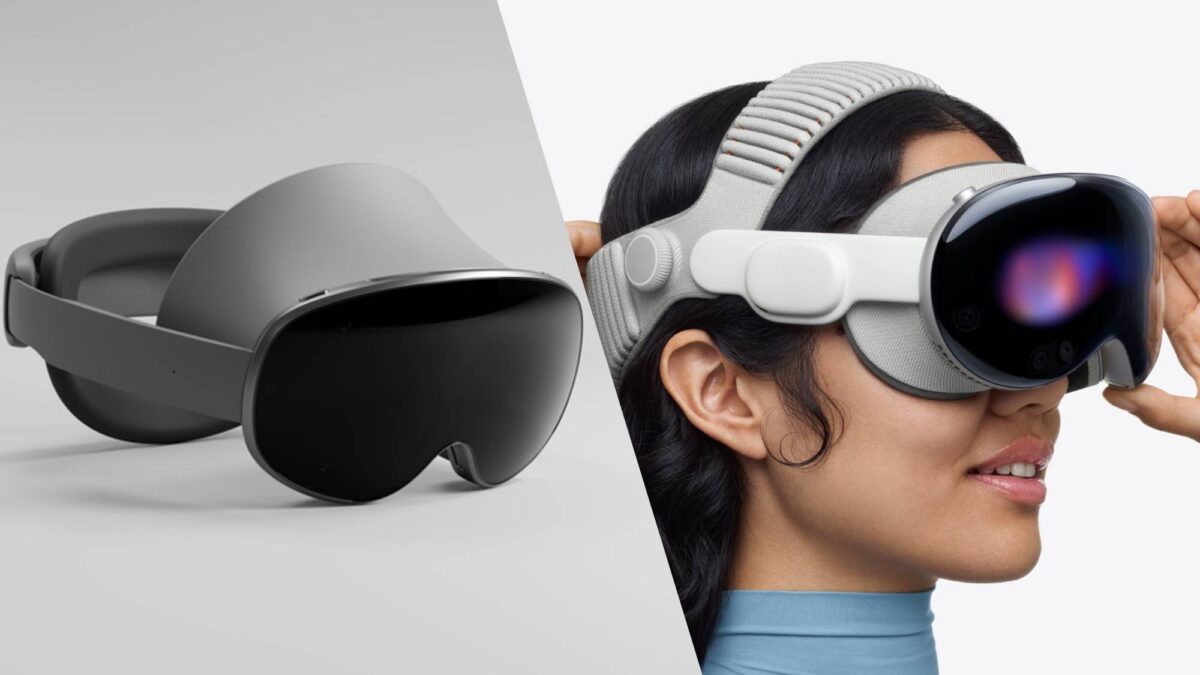
XR & Mixed Reality • Updated for 2025/2026Is Samsung XR Really Better Than Apple VR?
Mixed reality is no longer science fiction. In 2025/2026, we finally have consumer headsets that can replace a TV, a portable cinema, and even parts of a laptop or tablet workflow. At the center of this new XR war we find two giants: Samsung Galaxy XR vs Apple Vision Pro. One is built on Android XR with Google and Qualcomm, the other is Apple’s premium “spatial computer” tied tightly to the iPhone and Mac ecosystem.
The question everyone keeps asking is simple: is Samsung Galaxy XR actually better than Apple Vision Pro, or does Apple still justify its huge price with a better overall VR and mixed reality experience? In this ultra-detailed Samsung Galaxy XR vs Apple Vision Pro comparison, we go deep into specifications, display quality, comfort, AI features, use cases, price, and long-term value.
If you are ready to buy, you can already find both devices and related bundles on Amazon:
👉 Check Samsung Galaxy XR deals on Amazon
👉 Check Apple Vision Pro listings on Amazon
Quick Verdict: Samsung Galaxy XR vs Apple Vision Pro in One Look
Before we dive into the long-form breakdown, here is the short verdict on Samsung Galaxy XR vs Apple Vision Pro in 2025/2026:
- Best overall value for most people: Samsung Galaxy XR
- Best premium “no compromise” experience: Apple Vision Pro
- Best if you live in Android and Google services: Samsung Galaxy XR
- Best if your life is Apple (iPhone, Mac, iPad): Apple Vision Pro
The new Samsung Galaxy XR undercuts Apple on price, offers a lighter design, and taps into the open Android XR ecosystem with YouTube, Google services, and PC streaming. For many users, that combination makes Samsung Galaxy XR the more realistic choice.
The Apple Vision Pro, however, still wins on sheer display sharpness, ultra-polished eye and hand tracking, and deep integration with Macs, iPhones, iCloud, and Apple’s creative tools. For people who want a “spatial MacBook” and can afford it, Apple Vision Pro remains a unique high-end option.
Samsung Galaxy XR vs Apple Vision Pro: Specs and Core Differences
To understand the Samsung Galaxy XR vs Apple Vision Pro battle, it helps to start with a clean side-by-side comparison. The exact numbers can change with revisions and regional models, but the core picture stays the same.
| Feature | Samsung Galaxy XR | Apple Vision Pro |
|---|---|---|
| Typical price (2025/2026) | Around $1,800 (varies by bundle and region) | Starts around $3,499 in most regions |
| Platform / OS | Android XR with Samsung’s Galaxy XR interface and Google services | visionOS with deep Apple ecosystem support |
| Chipset | Qualcomm Snapdragon XR2+ Gen 2 (optimized for XR workloads) | Apple M-series chip with dedicated coprocessor for sensor processing |
| Display type | High-resolution 4K micro-OLED per eye | Ultra-dense dual micro-OLED panels per eye |
| Field of view | Wide, immersive FOV aimed at gaming and cinema use | Slightly narrower but extremely sharp, “window-like” image |
| Tracking and input | Inside-out tracking, eye + hand tracking, voice, optional controllers | Eye + hand tracking, voice (Siri), support for keyboard, trackpad and controllers |
| Main ecosystem | Android XR, Google Play, YouTube, PC streaming, Samsung Galaxy devices | Apple TV+, iCloud, Mac, iPad and iPhone apps in visionOS |
The numbers show why Samsung Galaxy XR vs Apple Vision Pro is a real fight: both push high-end micro-OLED visuals and advanced tracking, but Samsung leans into price and openness, while Apple leans into luxury and deep ecosystem integration.
What Is Samsung Galaxy XR and What Is Apple Vision Pro?
To judge Samsung Galaxy XR vs Apple Vision Pro fairly, we have to understand what each company is trying to build in the XR space.
Samsung Galaxy XR in 2025/2026
Samsung Galaxy XR is Samsung’s new generation mixed reality headset built on the Android XR platform in partnership with Google and Qualcomm. It is designed to blend VR, AR, and MR into a single “spatial” device that can play games, show multiple virtual screens, stream PC content and integrate with your Galaxy phone and Google account.
The focus of Galaxy XR is to deliver a modern mixed reality experience at a price far below Apple’s, while still feeling like a premium device. That is why the Samsung Galaxy XR vs Apple Vision Pro conversation is so interesting: Samsung is targeting more mainstream buyers who want a high-end XR headset that feels futuristic but doesn’t cost as much as a high-end laptop plus a TV.
Apple Vision Pro in 2025/2026
Apple Vision Pro, on the other hand, is positioned less as a “VR headset” and more as a “spatial computer.” It runs visionOS, a new operating system with floating windows, spatial environments, and tight links to your iPhone, Mac, Apple TV and iCloud content. Apple’s goal is to create a high-end computing platform that lives on your face instead of on a desk.
In the battle of Samsung Galaxy XR vs Apple Vision Pro, Apple’s headset is clearly the more premium, more expensive choice. It is aimed at early adopters, professionals, developers and enthusiasts who are deeply invested in the Apple ecosystem and want the most futuristic version of a Mac + iPad hybrid in 2025/2026.
Design and Comfort: Which Headset Feels Better on Your Head?
One of the most important things in any comparison of Samsung Galaxy XR vs Apple Vision Pro is comfort. Specs and features mean nothing if you cannot wear the headset for more than 20 minutes without neck strain.
Apple Vision Pro Design and Comfort
Apple Vision Pro uses a combination of aluminum, glass and fabric. The front is a sleek curved glass panel, and the headband is a knit strap that wraps around the back of your head. The materials feel extremely premium and look like something between a luxury headphone and an Apple Studio Display squeezed into a visor.
However, the Vision Pro is not light. The headset itself is chunky, and Apple uses an external battery pack connected by a cable. This design keeps some weight off your face, but many users still feel the headset pressing down on their cheeks and forehead during long sessions. If you are comparing Samsung Galaxy XR vs Apple Vision Pro for all-day meetings or long work sessions, weight distribution matters a lot.
Samsung Galaxy XR Design and Comfort
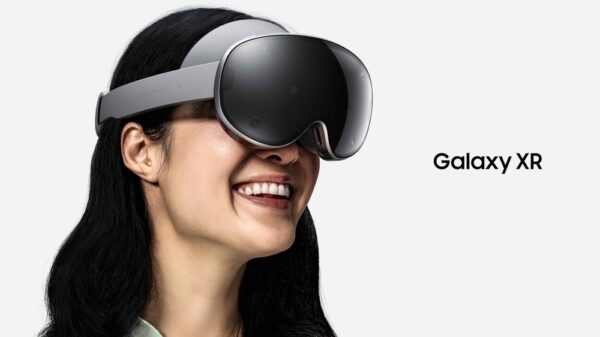
Samsung Galaxy XR takes a different approach. It still looks premium, but the design language is closer to high-end VR headsets than to a glass sculpture. The visor is more compact, and Samsung has focused strongly on reducing weight and improving long-term comfort.
In practice, early impressions describe Samsung Galaxy XR as noticeably lighter than Apple Vision Pro. Combined with a balanced strap system and smart padding, the headset sits more comfortably for gaming, VR workouts, or multi-hour entertainment sessions. In the comfort chapter of Samsung Galaxy XR vs Apple Vision Pro, Samsung gets a clear win for most people who care about longer sessions.
If you want short, focused bursts of “spatial laptop” work and media, Apple Vision Pro is fine. If you want a mixed reality device you can wear for longer periods, the lighter design of Samsung Galaxy XR will usually feel better, especially in 2025/2026 when more apps encourage longer XR use.
Display Quality and Field of View: Immersion vs Perfect Sharpness
Display quality is where the Samsung Galaxy XR vs Apple Vision Pro battle gets really interesting. Both use cutting-edge micro-OLED panels, but each company tunes them differently.
Apple Vision Pro Display
Apple Vision Pro is famous for its incredibly sharp display. The dual micro-OLED screens pack a huge number of pixels into a very small area, which makes text crisp and video extremely detailed. When you watch high-quality content, it genuinely feels like sitting in front of a premium TV or monitor in a dark theater.
The downside is that the field of view is not the widest on the market. It feels like looking through a very high-resolution window rather than having a completely “helmet-like” full vision of VR space. For productivity and movie watching this is fine, but in fast games or fully immersive experiences you may notice the edges of the frame.
Samsung Galaxy XR Display
Samsung Galaxy XR also uses high-resolution 4K micro-OLED panels per eye, with a strong focus on wide field of view. Colors are vibrant, blacks are deep, and the image is extremely sharp compared to older VR headsets. For most people, the image quality of Samsung Galaxy XR will feel stunning and more than enough for movies, text, and gaming.
Where Samsung often wins in the Samsung Galaxy XR vs Apple Vision Pro comparison is immersion. The wider field of view can make you feel more “inside” the virtual world, especially in games and 3D experiences. While Apple arguably still has the edge in absolute pixel density and color accuracy, the combination of wide FOV and high resolution on Galaxy XR delivers a very compelling, cinematic experience.
If your top priority is pixel-perfect Apple-style sharpness for productivity, Apple Vision Pro wins. If your top priority is a more immersive field of view at a better price, Samsung Galaxy XR is the better choice in this part of the Samsung Galaxy XR vs Apple Vision Pro battle.
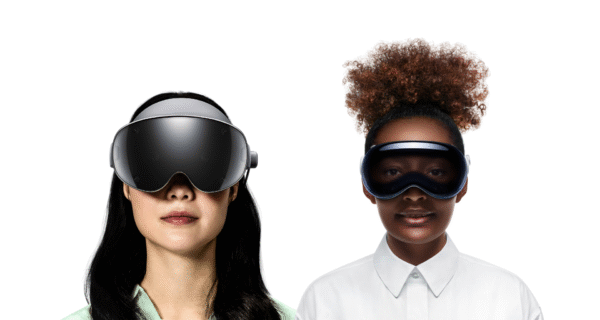
Performance, AI and Tracking: Snapdragon XR vs Apple Silicon
Another key chapter in the Samsung Galaxy XR vs Apple Vision Pro comparison is raw performance, tracking smoothness, and AI integration.
Apple Vision Pro: Apple Silicon Powerhouse
Apple Vision Pro runs on an Apple M-series chip similar to what you find in modern MacBooks and iPads, paired with a dedicated sensor coprocessor. The result is very smooth performance in visionOS, with low-latency eye and hand tracking, fluid window animations, and impressive rendering even when multiple apps are floating around you.
Apple has also started to layer in more “Apple Intelligence” features into the ecosystem, which enhances dictation, summarization, and future AI-assisted workflows. The combination of on-device processing and cloud-assisted AI makes Apple Vision Pro feel like a powerful, premium workstation rather than just a headset for games.
Samsung Galaxy XR: Snapdragon XR2+ Gen 2 with Gemini
Samsung Galaxy XR is powered by the Snapdragon XR2+ Gen 2 chip, a processor specifically built for XR workloads. It handles high-resolution rendering, inside-out tracking, and mixed reality passthrough with ease. Android XR is optimized to take advantage of this hardware, so UI navigation feels snappy, apps open quickly, and games can run smoothly when optimized.
A huge strength in the Samsung Galaxy XR vs Apple Vision Pro showdown is AI. Because Galaxy XR is tied into Google’s ecosystem, it can lean heavily on Gemini and other Google AI services for voice commands, real-time translation, spatial search, and AI-assisted tasks inside XR spaces. This can be incredibly powerful for work, travel, and everyday use when developers fully embrace it.
In pure performance, these headsets are closer than you might think. Apple Vision Pro still feels slightly more polished thanks to Apple’s total hardware-software control. Samsung Galaxy XR, however, offers excellent performance plus a more open, Google-powered AI layer. In the long run, the AI story may tilt the Samsung Galaxy XR vs Apple Vision Pro comparison in Samsung’s favor for many everyday users.
Ecosystem and Apps: Android XR World vs Apple visionOS World
The heart of Samsung Galaxy XR vs Apple Vision Pro isn’t just the hardware. It’s the ecosystem you are buying into for the next 3–5 years.
Samsung Galaxy XR Ecosystem (Android XR)
Samsung Galaxy XR runs on Android XR, with close collaboration between Samsung and Google. That means Galaxy XR can tap into a massive library of existing Android apps, plus new XR-native apps designed specifically for mixed reality.
Out of the box, you can expect core apps like YouTube, Chrome, Google Photos, Gmail, Google Drive, and other Android favorites to appear in XR windows around you. On top of that, Samsung can push Galaxy-exclusive experiences, and PC streaming gives access to Windows and PC-based workflows and games. For someone comparing Samsung Galaxy XR vs Apple Vision Pro who already lives inside Google’s world, Galaxy XR feels like a natural extension of your phone and laptop.
Apple Vision Pro Ecosystem (visionOS)
Apple Vision Pro uses visionOS, which merges ideas from iOS, iPadOS and macOS into a spatial interface. You can open Safari, Messages, Photos, Apple Music, and many iPad apps in floating windows. You can also mirror your MacBook screen as a giant virtual monitor and interact with it using a keyboard and trackpad.
For someone who is deeply embedded in Apple’s ecosystem, visionOS offers a dream scenario. Your iCloud photos, Apple TV+ shows, Apple Music playlists, and productivity apps travel with you into XR. When looking at Samsung Galaxy XR vs Apple Vision Pro through the lens of a heavy Apple user, Apple Vision Pro is extremely attractive and feels like the most natural step forward from a MacBook + iPad setup.
The difference is clear: Samsung Galaxy XR offers more openness and easy access to a wide range of Android apps and services. Apple Vision Pro offers a more curated, premium, Apple-only ecosystem with fewer apps but tighter integration. The right choice in this part of the Samsung Galaxy XR vs Apple Vision Pro debate depends entirely on whether you are more “Android/Google” or “Apple/iCloud” in your daily life.
How Samsung Galaxy XR vs Apple Vision Pro Fit into Real Life
Specs are one thing, but real life is another. To decide between Samsung Galaxy XR vs Apple Vision Pro, you need to imagine how you will actually use these headsets in daily routines.
Work and Productivity
If you are building a “spatial office” at home, both headsets offer multi-window environments. With Samsung Galaxy XR, you can open multiple browser windows, Google Docs, Sheets, Slides, Gmail, and communication tools in a 3D workspace. Add PC streaming, and you can access full desktop applications like Adobe Premiere Pro, DaVinci Resolve or Photoshop in a large virtual screen.
With Apple Vision Pro, the productivity story is more about Apple devices. You can mirror your Mac, open multiple visionOS app windows around you, and treat the headset like a multi-monitor Mac setup anywhere you sit. For an Apple-only workflow, this feels extremely premium, and is a strong point for Apple in the Samsung Galaxy XR vs Apple Vision Pro race.
Entertainment and Streaming
For entertainment, the Samsung Galaxy XR vs Apple Vision Pro comparison is almost a tie. Samsung Galaxy XR shines with YouTube, Android streaming apps, wide-FOV cinema modes, and potential deals for streaming sports and movies in XR. Apple Vision Pro shines with Apple TV+, immersive environments, and extremely high-quality movie playback.
In both cases, you can sit on a couch or lie in bed and feel like you are inside a giant private theater. For someone who watches a lot of movies and series alone, both Galaxy XR and Vision Pro are game-changing. The choice again comes down to whether you want Android apps and YouTube front and center, or Apple TV+ and Apple’s own media offerings as the main attraction.
Gaming and XR Experiences
Gaming is where the Samsung Galaxy XR vs Apple Vision Pro comparison leans more clearly toward Samsung. Apple Vision Pro has some cool experiences and Apple Arcade titles, but it is not positioned as a hardcore gaming headset. Samsung Galaxy XR, with optional controllers, Android XR games and possible PCVR streaming, is much more attractive for gamers who want to play immersive VR titles, rhythm games, and action experiences.
Pricing and Long-Term Value: Is Samsung Galaxy XR Better Value Than Apple Vision Pro?
Pricing is where the difference between Samsung Galaxy XR vs Apple Vision Pro becomes brutally obvious. Apple Vision Pro is extremely expensive, while Samsung Galaxy XR tries to deliver 80–90% of the premium mixed reality experience for almost half the price.
| Headset | Approx. starting price (2025/2026) | Who it is for | Value summary |
|---|---|---|---|
| Samsung Galaxy XR | Around $1,800 (often with deals and bundles) | Mainstream enthusiasts, gamers, Android users, early adopters who want power but also care about price. | Great balance of features, performance and cost. The stronger choice in Samsung Galaxy XR vs Apple Vision Pro for most people. |
| Apple Vision Pro | Typically around $3,499+ depending on storage and region | Apple power users, professionals, developers and early adopters who want the absolute top-tier experience and can pay for it. | Incredible experience but very expensive. Best when you see it as a “spatial Mac” instead of a normal headset. |
When you look at pure value, Samsung Galaxy XR vs Apple Vision Pro is not a fair fight. Samsung offers a mixed reality device that is more accessible, more gamer-friendly, and easier to buy without destroying your budget. Apple offers something more luxurious and tightly polished, but at a price that many people simply cannot justify.
If you already planned to spend laptop-level money on an XR headset and you love Apple, the Vision Pro can make sense. If you want high-end XR that still feels sane from a budget perspective, Samsung Galaxy XR is clearly the better value in 2025/2026.
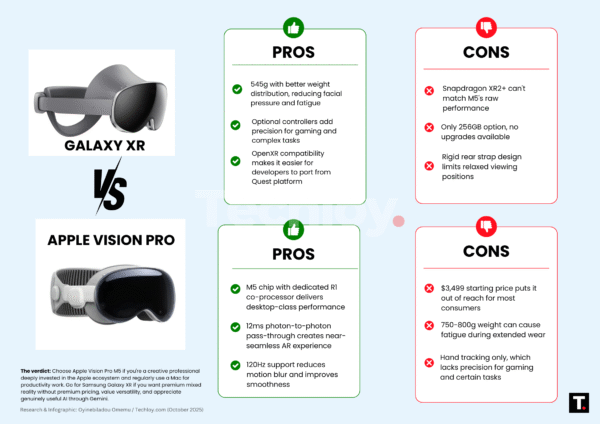
Samsung Galaxy XR vs Apple Vision Pro: Pros and Cons
To close the main comparison, here is a simple pros and cons breakdown for each device in the Samsung Galaxy XR vs Apple Vision Pro debate.
Samsung Galaxy XR – Pros
- Much more affordable price compared to Apple Vision Pro.
- Wide, immersive field of view with sharp micro-OLED displays.
- Comfortable, lighter design for longer VR and MR sessions.
- Open Android XR ecosystem with Google Play and Google services.
- Great potential for XR gaming thanks to controllers and PC streaming.
- Strong AI integration via Google Gemini and related tools.
Samsung Galaxy XR – Cons
- Not as polished as Apple in terms of OS animations and UX details.
- Ecosystem is more fragmented and depends on third-party app quality.
- Fewer “premium feeling” materials than Apple Vision Pro.
Apple Vision Pro – Pros
- Insanely sharp, high-density micro-OLED displays with beautiful color.
- Ultra-refined eye and hand tracking, extremely natural gestures.
- Deep integration with iPhone, Mac, iPad and iCloud.
- Perfect for Apple-centric productivity and content creation.
- Premium build quality and luxury design language.
Apple Vision Pro – Cons
- Very expensive, often more than many laptops plus a monitor.
- Heavier headset, can be tiring for long sessions.
- Ecosystem is closed and lives almost entirely inside Apple’s world.
- Gaming support is more limited than Samsung’s XR ambitions.
Samsung Galaxy XR vs Apple Vision Pro for Creators and Streamers
One of the most interesting ways to look at Samsung Galaxy XR vs Apple Vision Pro is from a creator perspective. If you shoot video, stream games, record tutorials or design content for social media and YouTube, the headset you choose will change how you plan your workflow in 2025/2026.
Content Creation with Apple Vision Pro
Apple Vision Pro fits naturally into an Apple creator setup. If you already use Final Cut Pro, Logic Pro, iMovie, GarageBand and other Apple creative tools, visionOS lets you place huge virtual windows around you with your timelines, preview monitors and reference material. For editing in a quiet room, Vision Pro really feels like a next-level studio space.
You can mirror your Mac into a big, sharp display, while floating notes, scripts or reference clips nearby. This makes Apple Vision Pro a powerful “visual editing room” for creators who want to maximize screen space without buying multiple monitors. When you think about Samsung Galaxy XR vs Apple Vision Pro specifically for creative editing, Apple’s headset still has a big advantage if you are already in the Mac ecosystem.
Content Creation with Samsung Galaxy XR
Samsung Galaxy XR, on the other hand, shines more for creators who live in web tools, Windows PCs and Android apps. You can open a big Chrome window, a YouTube Studio dashboard, analytics panels, and scripts in Google Docs all around your view. With PC streaming, you can bring full desktop tools like Adobe Premiere Pro, DaVinci Resolve or Photoshop into a virtual multi-monitor workspace as well.
For streamers, the gaming strength of Samsung Galaxy XR is a big win. You can play on your PC with a VR-style view, while monitoring chat or overlays in additional windows. When you compare Samsung Galaxy XR vs Apple Vision Pro from the angle of live streaming and gaming-based content creation, Galaxy XR has a strong lead due to its more open gaming and PC integration.
The bottom line for creators is simple: if your workflows are built around Mac and Apple’s pro apps, Apple Vision Pro feels like a natural “studio in a headset”. If your workflows are mixed, multi-platform or Windows-based, Samsung Galaxy XR gives you a more flexible creative space at a better price.
Samsung Galaxy XR vs Apple Vision Pro for Business, Training and Education
Mixed reality is not just for gamers and tech fanatics. More companies and schools are starting to ask if Samsung Galaxy XR vs Apple Vision Pro can help them train people, run meetings and teach in new ways.
Samsung Galaxy XR in Business and Education
Samsung Galaxy XR becomes very attractive for organizations because it runs on Android XR with strong Google integration. Many companies already use Google Workspace, Gmail, Chrome, and Android phones. With Galaxy XR, they can:
- Run virtual training sessions with 3D content, simulations and interactive environments.
- Display multiple productivity apps in a meeting, including slides, browser tabs and documents.
- Use PC streaming to connect XR training to existing Windows software and corporate systems.
- Benefit from lower hardware prices when buying multiple units for teams or classrooms.
Schools and universities can also use Samsung Galaxy XR to create immersive lessons in science, history, medicine and engineering, without locking themselves into a single closed ecosystem.
Apple Vision Pro in Business and Education
Apple Vision Pro is aimed at premium, high-budget use cases. For companies that already standardize on Mac, iPhone and iPad, Vision Pro can become a powerful spatial presentation and collaboration tool. Imagine joining a meeting where every attendee wears Apple Vision Pro and shares documents, prototypes and 3D models in a shared virtual space.
In training and education, Vision Pro is ideal for specialized labs, medical simulations or design studios where each user has a large Apple device budget. However, when you compare Samsung Galaxy XR vs Apple Vision Pro as a fleet purchase for dozens or hundreds of users, Samsung’s lower price and Android foundation usually make more sense for schools and companies that need scalability.
In summary, Apple Vision Pro is a beautiful, powerful choice for high-end, Apple-centric business and education projects. Samsung Galaxy XR is a more realistic solution for large deployments, public institutions, and organizations that use mixed devices and rely heavily on Google services.
How to Set Up Samsung Galaxy XR vs Apple Vision Pro for the Best Experience
No matter which side you choose in Samsung Galaxy XR vs Apple Vision Pro, your first days with the headset will define how much you actually use it. A few smart setup decisions can make the difference between a life-changing XR product and an expensive toy that sits in a drawer.
Best Practices for Samsung Galaxy XR
- Pair it with your main Android phone: Use your primary Google account so apps, photos, and emails sync instantly.
- Create a clean XR workspace: Choose a comfortable room, clear some physical space and set up guardian boundaries correctly.
- Start with simple apps: YouTube, Chrome, a couple of Android XR experiences and basic PC streaming to test your network.
- Try different strap adjustments: Spend time adjusting the straps and padding until the headset feels stable but not tight.
- Limit your first sessions: Start with 20–30 minutes to avoid eye strain while your brain adapts to XR.
Best Practices for Apple Vision Pro
- Use your main Apple ID: This brings in your iCloud, Photos, iMessage, Contacts, Apple TV+ and app purchases.
- Connect your Mac and iPhone: Enable screen mirroring and continuity so Vision Pro instantly becomes a spatial extension of your Apple world.
- Adjust the band and light seal: Take time to find the right band and size so pressure is balanced on your head.
- Experiment with environments: Try different immersive backgrounds and adjust immersion level for comfort.
- Set time limits: Use it for focused work sessions or movie nights to avoid fatigue from wearing a heavy headset too long.
If you treat both devices as tools and not just novelties, your long-term satisfaction with Samsung Galaxy XR vs Apple Vision Pro will be much higher. Smart setup, comfort tuning and realistic expectations are key.
Common Mistakes When Choosing Between Samsung Galaxy XR vs Apple Vision Pro
Because both headsets are expensive, it is easy to make emotional decisions. Here are common mistakes people make when they compare Samsung Galaxy XR vs Apple Vision Pro.
- Ignoring ecosystem: Buying Apple Vision Pro while using mostly Windows and Android will waste half its power. Buying Samsung Galaxy XR while owning only Macs and iPhones will also feel awkward.
- Overestimating daily use: Many users imagine using XR eight hours a day. In reality, you might only need it for 1–2 hours of focused work, games or movies.
- Underestimating comfort: Headset comfort is as important as display specs. A slightly less sharp device that is comfortable to wear is better than a super-sharp headset that hurts after 30 minutes.
- Buying only for hype: Both Samsung Galaxy XR and Apple Vision Pro get huge social media coverage. Make sure you actually have use cases for XR beyond “it looks cool”.
- Ignoring price tiers: If buying Apple Vision Pro means you cannot upgrade your Mac, or you must delay other important tech purchases, Samsung Galaxy XR may be the smarter move.
If you avoid these mistakes and focus on your real ecosystem, budget and use cases, you will be much happier with whichever side you choose in the Samsung Galaxy XR vs Apple Vision Pro decision.
Which Headset Should You Buy in 2025/2026?
After exploring all angles of Samsung Galaxy XR vs Apple Vision Pro, the final answer depends on who you are and what you do.
Choose Samsung Galaxy XR if:
- You want a powerful XR headset that doesn’t cost as much as a high-end Apple laptop.
- You mainly use Android phones, Google Chrome, Gmail, Google Docs, and YouTube.
- You care about gaming, PC streaming, and VR apps as much as productivity.
- You prefer a lighter headset for longer entertainment sessions.
- You like the idea of an open ecosystem where you can experiment with lots of apps.
Choose Apple Vision Pro if:
- You already own an iPhone, Mac and iPad and you are very comfortable in Apple’s ecosystem.
- You want the most polished mixed reality user experience available right now.
- You are willing to pay a premium price for cutting-edge Apple hardware.
- You see Vision Pro as a new kind of “spatial Mac” rather than just a VR toy.
- You care deeply about display quality, text clarity, and Apple-style design.
For most mainstream consumers, the winner in the Samsung Galaxy XR vs Apple Vision Pro comparison is Samsung Galaxy XR. It offers a more reasonable entry price, strong specs, a wide field of view, and an open ecosystem with great potential. For high-budget Apple enthusiasts, Apple Vision Pro remains the ultimate status device that turns your Apple world into an immersive spatial experience.
Ready to explore prices and bundles?
👉 Browse Samsung Galaxy XR listings on Amazon
👉 Browse Apple Vision Pro listings on Amazon
FAQ – Samsung Galaxy XR vs Apple Vision Pro
Is Samsung Galaxy XR better than Apple Vision Pro?
In pure price-to-performance and general accessibility, yes, Samsung Galaxy XR is better than Apple Vision Pro for many people. It is cheaper, lighter, and more gaming-friendly, and works beautifully with Android and Google services. If you are very deep into Apple and you want the best possible Apple-style spatial computer, Vision Pro still has the edge. The real winner in Samsung Galaxy XR vs Apple Vision Pro depends completely on which ecosystem you live in.
Which has better display quality: Samsung Galaxy XR or Apple Vision Pro?
Apple Vision Pro likely still holds the crown for pure pixel density and color accuracy, especially for productivity and movie watching. Samsung Galaxy XR is also extremely sharp, with the bonus of a wider field of view that can feel more immersive in games. Most users will find both to be dramatically better than older VR headsets.
Is Samsung Galaxy XR good for gaming?
Yes, Samsung Galaxy XR is designed to be strong for gaming. With optional controllers, Android XR titles, and the ability to stream PC VR games, it offers a solid platform for players. In the gaming segment of Samsung Galaxy XR vs Apple Vision Pro, Samsung is generally the better choice.
Can Apple Vision Pro replace a Mac or a PC?
For some people, Apple Vision Pro can act like a “floating Mac display” and replace an external monitor. However, it is not a full replacement for all workflows yet. It is better to think of Vision Pro as a powerful companion to a Mac rather than a total replacement, at least in 2025/2026.
Which headset is more future-proof?
Both headsets will evolve with software updates and new apps. Apple will keep improving visionOS and Apple Intelligence. Samsung and Google will keep expanding Android XR and Gemini. From a future-proof perspective, the best choice in Samsung Galaxy XR vs Apple Vision Pro is simply the ecosystem you trust to keep improving: Apple if you love iOS and macOS, Samsung + Google if you love Android and Google services.
You Might Also Like to Read
If you enjoyed this long comparison of Samsung Galaxy XR vs Apple Vision Pro, here is another premium device review that your readers may love:
Amazon Affiliate Disclosure
Some links in this Samsung Galaxy XR vs Apple Vision Pro article are Amazon affiliate links. This means that if you click through and make a purchase, we may earn a small commission at no extra cost to you. This helps support the time, testing and research that goes into creating long, detailed XR and tech reviews, so you can decide which products are actually worth your money.
🔥 Join 120,000+ Smart Shoppers!
Get exclusive gadget deals, viral Amazon finds and tech reviews before they trend. Only the best — straight to your inbox every week 🚀