Razer Kitsune Review Is This Stickless PS5 & PC Controller Really Worth It?

Gaming Gear Reviews • Updated
The ultimate Razer Kitsune review 2025 2026 for competitive fighting game players, casual fans and anyone curious about the leverless controller meta
Leverless controllers like the Razer Kitsune are not for everyone — and that’s exactly why this review matters. After researching competitive controllers and analyzing how different players use them in real-world setups, it’s clear that the Kitsune targets a very specific type of gamer in 2025 and beyond.
This review breaks down who the Razer Kitsune is truly for, where it shines, where it falls short, and whether its premium price actually makes sense depending on your playstyle.
If you follow high-level Street Fighter 6, Tekken 8 or Guilty Gear tournaments, you have probably seen a sleek, ultra-thin controller
on the players’ laps with no joystick at all. That is the Razer Kitsune, an all-button, leverless arcade controller
built for PlayStation 5 and PC. It is fast, controversial, and expensive – and it is one of the most talked-about products in the
fighting game community heading into 2025/2026.
In this long form Razer Kitsune review 2025 2026, we break down what makes this controller unique, who it is really
for, how it feels to play on, the pros and cons, and whether you should buy it over a traditional fight stick or a cheaper
Hitbox-style alternative. We will also link to the official Amazon listing so you can check the latest price, reviews and color
variants.
👉 Official Amazon listing:
Razer Kitsune All-Button Arcade Controller for PS5 & PC on Amazon
Quick Verdict – Who the Razer Kitsune Is For (and Not For)
Short on time? Here is the TL;DR of this Razer Kitsune review 2025 2026:
- If you play fighting games seriously on PS5 or PC and want tournament-ready hardware with ultra-fast inputs and a slim, portable form factor, the Kitsune is one of the best leverless controllers you can buy.
- If you are brand-new to fighting games or mostly play story modes casually, the learning curve and price may be overkill – a cheaper pad or entry-level stick might make more sense.
- If tournaments and rulesets matter to you, the Kitsune is designed with SOCD cleaning, cable locks and a lock switch to be legal and reliable at events.
- If you hate loud, clicky hardware, the low-profile optical switches on the Kitsune are smoother and quieter than many mechanical buttons and lever microswitches.
The rest of this Razer Kitsune review 2025 2026 dives deep into design, specs, gameplay feel, pros, cons and value.
Who Is the Razer Kitsune Really For?
The Razer Kitsune is best suited for:
Competitive fighting game players
Gamers already familiar with leverless or hitbox-style controllers
Players focused on precision inputs rather than casual play
Tournament-oriented users who value portability and build quality
If you mainly play casually or are new to fighting games, the Kitsune’s learning curve and price may not be justified.
What Is the Razer Kitsune, Exactly?
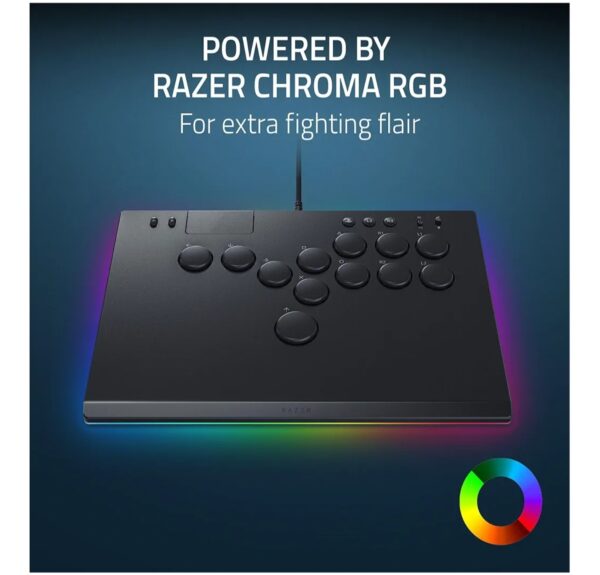
The Razer Kitsune is an all-button optical arcade controller for PS5 and PC. Instead of a traditional joystick, it
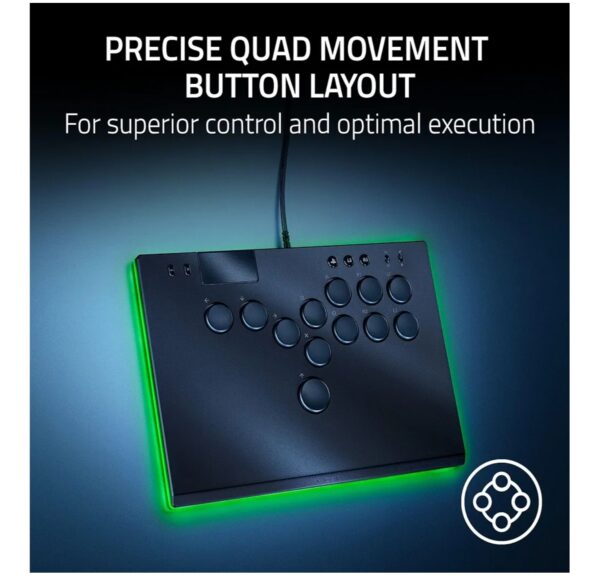
uses four directional buttons for movement (left, down, right, and a dedicated up button). Attacks, specials and other actions
are mapped to the rest of the face buttons, giving you a completely leverless layout.
Razer built the Kitsune as a tournament-grade controller: it uses low-profile linear optical switches for ultra-fast
actuation, has a precise quad movement button layout for clean inputs, features a
slim, portable form factor, includes a lockable USB-C cable and tournament lock switch to avoid
accidental pauses, and has a removable aluminum top plate you can customize with artwork. It is also powered by
Razer Chroma RGB lighting, so the controller glows with customizable colored effects while you play.
In other words, the Kitsune is not just a novelty. It is Razer’s high-end answer to the Hitbox and other leverless
controllers dominating the competitive scene.
Razer Kitsune Specs (2025/2026 Overview)
Here is a quick spec sheet for this Razer Kitsune review 2025 2026, based on the official product details:
Razer Kitsune – Key Specifications
- Type: All-button optical arcade controller (leverless)
- Platforms: PlayStation 5 and Windows PC (wired)
- Connection: USB-C to USB-A detachable cable (approx. 3.1 m / 10.1 ft)
- Switches: Razer low-profile linear optical switches on all buttons
- Movement Layout: Quad movement buttons instead of a joystick (left, down, right, up)
- SOCD Cleaning: Built-in, with multiple modes available via firmware
- Body: Slim form factor with removable aluminum top plate
- Lighting: Razer Chroma RGB per-device lighting
- Security: Cable lock plus tournament lock switch for menu buttons
- Dimensions (approx): 296 mm (L) x 210 mm (W) x 19 mm (H)
- Weight: ~800 g (around 2 lbs)
- Audio Jack: None (no built-in headset port)
- Wireless: No – this is a fully wired controller for lowest latency
The thin profile and light weight make the Kitsune far more portable than most traditional arcade sticks, which often weigh
several kilos and use bulky cases. This is a big deal if you travel to locals, majors or simply like moving between a desk
setup and a living room TV.
Design & Build Quality – Slim, Solid and Tournament-Ready
One of the first things you notice in any Razer Kitsune review 2025 2026 is just how thin the
controller is. Razer deliberately designed it to sit comfortably on your lap without forcing your wrists into an awkward angle.
The profile is closer to a laptop keyboard than a classic arcade panel.
The top plate is made of aluminum and is removable, which means you can swap skins or custom art
in the future. Underneath, the chassis feels stiff and sturdy with no creaks or flex when you press hard on the buttons.
Despite the slim design, the Kitsune does not feel cheap or hollow.
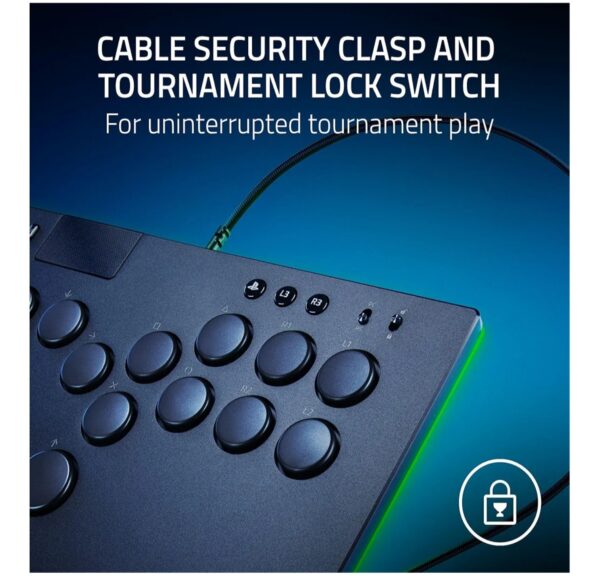
Around the edges, Razer includes a cable lock mechanism and a tournament lock switch. The cable
lock secures the USB-C cable so a stray foot or accidental tug will not unplug you mid-match. The tournament lock disables the
system and menu buttons along the top edge so you cannot pause the game by accident – something that can cost you a round or
even a match according to most tournament rules.
On the surface, the button layout is clean and minimal. Movement buttons are lined up along the left,
attack buttons on the right. The RGB under-glow is tasteful out of the box but can be customized with button combos to match
your setup color scheme, or turned off entirely if you want a stealthier look.
Overall, the build quality feels premium and appropriate for the price. It is clearly aimed at players who will carry this
controller to tournaments and expect it to survive heavy travel and play.
Who Should Avoid the Razer Kitsune
The Razer Kitsune may not be the right choice if you:
-
Are new to fighting games
-
Prefer traditional arcade sticks or gamepads
-
Want a budget-friendly controller
-
Expect instant performance improvements without practice
Leverless controllers require time and adaptation — they don’t magically improve skill overnight.
Leverless Layout & Learning Curve – From Stick to All Buttons
The biggest question in any Razer Kitsune review 2025 2026 is: how does it feel to play on a leverless layout?
If you have only ever used a standard fight stick or gamepad, it can look intimidating.
Instead of holding a joystick, your left hand controls movement with four directional buttons:
left, down, right, and a separate up button usually pressed with your thumb. Your right hand handles attack buttons similar to
a fight stick. The idea is to move from analog lever movements to precise digital taps.
Why Competitive Players Love Leverless Controllers
- Cleaner inputs: It is easier to input exact directions (down-forward, down-back, etc.) by pressing specific buttons, reducing accidental diagonals.
- Faster execution: You can move from left to right or down to up instantly with button presses instead of waiting for a joystick to travel physically.
- Easier charge moves: Holding back or down-back while tapping other inputs becomes simpler, helping characters who rely on charge specials.
- Ergonomics: Some players find button movement less stressful on the wrist over long sessions than yanking a lever.
Learning Curve – How Long Until It Feels Natural?
Most players coming from pad or stick report one to four weeks of adjustment, depending on how often they play. The first
few sessions can feel like learning to walk again: you will mis-input jumps, dashes and charge moves until your fingers
understand the new layout.
The best approach is to spend time in training mode and simple trials. Grind basic motions – fireballs, dragon punches, quarter circles, half circles, charge specials, instant air dashes – until you no longer have to think about which finger hits what.
When things “click”, the leverless layout starts to feel like a cheat code, in a good way.
In-Game Performance – Street Fighter 6, Tekken 8, Anime Fighters and More
A hardware review is nothing without game testing. For this Razer Kitsune review 2025 2026, we look at how the
controller performs in popular fighting games and why it is becoming a standard at tournaments.
Street Fighter 6
SF6 heavily rewards fast whiff punishes, clean anti-airs and precise charge timing – three things the Kitsune excels at. The
low-profile optical switches actuate with very little travel, so your crouching medium kicks and drive impacts come out the
moment you press the button. Charge characters like Guile and Dee Jay feel easier to control because you can comfortably hold
back/down-back while tapping other directions and buttons.
Tekken 8
Tekken’s complicated movement and execution (Korean backdash, wavedashing, instant while-running moves) benefit from leverless
precision. Dashing back and forth with clean input buffering feels more consistent, especially when practicing movement drills.
That said, Tekken players deeply used to stick may need extra time to adjust to doing EWGF or command throws with buttons.
Anime Fighters (Guilty Gear Strive, Granblue Fantasy Versus, etc.)
Fast air dashes, precise air specials and tight Roman Cancel sequences all benefit from the Kitsune’s rapid inputs. Having a
dedicated up button makes instant air dash motions more predictable, and you can quickly experiment with alternate directional
shortcuts that only really feel possible on leverless layouts.
Platform Fighters and Other Genres
While the Kitsune is primarily marketed as a fighting game controller, it technically works for other genres on PC. However,
the layout is very specialized; for platform fighters or non-fighter games, a traditional pad or keyboard/mouse usually
remains more comfortable. This is a specialised weapon, not a general purpose gamepad.
Razer Kitsune vs Traditional Arcade Sticks
Compared to traditional arcade sticks, the Razer Kitsune offers faster directional inputs and a much slimmer form factor. However, arcade sticks still feel more intuitive for many players and offer a smoother learning curve.
While the Kitsune excels in portability and precision, it sacrifices familiarity — something many casual players still prefer.
Optical Switches, SOCD Cleaning & Input Reliability
Razer markets the Kitsune heavily on its low-profile linear optical switches and SOCD cleaning features.
Both matter a lot for competitive players.
Low-Profile Optical Switches
Optical switches use light instead of metal contacts to detect button presses. That means no contact bounce, less physical
wear and extremely consistent actuation over time. On the Kitsune, the travel distance is short and the response is almost
instant, which is ideal for fast games. The switches are linear, so there is no tactile bump – you get a smooth press with a
subtle bottom-out feel.
Noise is moderate: quieter than clicky mechanical switches and joystick microswitches, but not completely silent. If you
play late at night near other people, the Kitsune is easier to live with than a typical arcade stick.
SOCD Cleaning (Simultaneous Opposite Cardinal Directions)
Leverless controllers can physically press left and right, or up and down, at the same time – something that is impossible on a
joystick. To keep things fair and consistent, the Kitsune uses SOCD cleaning built into its firmware. That means:
- Pressing left + right together resolves to a specific rule (for example, neutral).
- Pressing up + down together resolves to either up, down or neutral depending on the mode.
- These behaviors are tuned to match tournament standards so the controller stays legal.
Razer’s firmware updates allow multiple SOCD modes, so you can pick the one that best matches your game or event rules.
This is one of the reasons tournament organizers often feel more comfortable approving the Kitsune over lesser-known brands.
Comfort, Lap Feel & Portability
Because the Kitsune is so thin, it sits naturally on your lap like a slim laptop. For players used to tall, heavy sticks that
dig into their legs, this is a major comfort upgrade. Wrists rest at a fairly neutral angle, and arm strain is minimal even in
long sets.
The weight – around 800 g – is heavy enough to feel solid but light enough to carry in a backpack. Many competitive players
travel with multiple peripherals, clothes and sometimes even cameras; shaving kilos off your controller weight helps more than
you’d expect on multi-day trips.
The wired USB-C cable detaches, which makes packing easier and also reduces strain on the port. With the cable lock and
tournament lock switch, you can confidently set up on a stage or at a local without fear of random disconnects or pauses.
Customization & RGB – How Much Can You Personalize the Kitsune?
While this Razer Kitsune review 2025 2026 focuses mostly on performance, style matters too – especially when
your controller is visible on stream or on stage.
Removable Top Plate
The aluminum top plate can be removed, allowing for custom art, skins or replacement plates. Razer and third
parties offer designs (including character-themed versions for Cammy, Chun-Li and others in some regions), and you can even
commission custom prints. For players who love matching their controller to their main character or personal brand, this is a
major plus.
Razer Chroma RGB Lighting
Under the buttons and along the edges, the Kitsune includes Razer Chroma RGB. Through button combos, you can
switch between pre-set color modes, breathing effects, static colors and more. On PC, you can integrate it into wider Razer
Chroma setups if you use other Razer hardware.
RGB does not make you play better, but it absolutely makes your setup look more premium and helps the controller stand out
in a crowded venue or stream.
Who Should Buy the Razer Kitsune in 2025/2026?
Summarizing this Razer Kitsune review 2025 2026, here is a quick breakdown of who the controller is best suited for:
Ideal Buyers
- Competitive fighting game players on PS5/PC who travel to locals, online tournaments or majors and want a high-end, tournament-grade leverless controller.
- Gamepad or keyboard players who already prefer digital inputs and want to transition into a dedicated fight controller with similar directional logic.
- Content creators and streamers who want a visually striking controller that also offers top-tier performance.
- Players worried about long-term joystick wear who prefer optical switches with consistent actuation.
Who Should Probably Skip It
- Very casual players who stick to story modes or occasional matches – a standard pad or cheaper stick will be more than enough.
- People deeply attached to traditional joysticks who do not want to relearn motions or directional input styles.
- Gamers on platforms like Xbox or Switch – the Kitsune is officially supported for PS5 and PC only.
- Anyone on a strict budget – the controller is premium-priced; there are more affordable leverless options if you mainly want to try the layout.
Razer Kitsune vs Traditional Fight Sticks & Other Leverless Controllers
No honest Razer Kitsune review 2025 2026 is complete without some comparison. You have three main controller
categories to choose from: gamepads, classic fight sticks and leverless (all-button) controllers like the Kitsune.
Versus Traditional Fight Sticks
- Precision: Leverless inputs tend to produce cleaner quarter-circles and diagonals once you adapt, while sticks can introduce accidental directions if you ride the gate sloppily.
- Speed: Buttons have less travel than a joystick shaft, giving leverless layouts a slight edge in raw execution speed.
- Feel: Sticks offer a classic arcade feel, complete with satisfying lever clicks. The Kitsune feels more like a premium keyboard than a cabinet.
- Portability: The Kitsune wins – much slimmer and lighter than most full-size sticks.
Versus Other Leverless/Hitbox-Style Controllers
- Build quality: The Kitsune’s slim aluminum-topped chassis and optical switches feel very premium compared to many smaller brands.
- Features: Tournament lock, cable lock, SOCD modes and Chroma RGB give it an edge for events and style.
- Price: It is usually more expensive than many third-party leverless controllers. You pay for brand, build, features and support.
- Support & legality: Being from a major brand makes it easier for tournaments to approve and support firmware updates that align with rules.
Razer Kitsune Review 2025/2026 – Pros & Cons
Pros
- Ultra-fast low-profile optical switches with consistent actuation.
- Precise quad movement button layout for clean inputs and strong execution.
- Slim, lightweight body that is easy to carry to locals and majors.
- Removable aluminum top plate for skins and custom art.
- Razer Chroma RGB lighting for a premium, customizable look.
- Built-in SOCD cleaning and firmware modes tailored for tournament legality.
- Cable lock and tournament lock switch help prevent match-ending accidents.
- Excellent for charge characters and advanced movement techniques.
Cons
- High price compared to entry-level sticks or pads.
- Leverless layout has a real learning curve for stick players.
- Wired-only with no built-in headset jack.
- Specialized for fighting games; not ideal as a general-purpose controller.
- Availability of special editions and colors can vary by region.
-
High price compared to alternatives
-
Steep learning curve
-
Not ideal for casual players
-
Limited compatibility outside PS5 / PC
My Honest Take on the Razer Kitsune in 2025–2026
The Razer Kitsune is an impressive piece of hardware, but it’s not a universal upgrade. Its value depends entirely on how serious you are about fighting games and whether you’re willing to invest time adapting to a leverless layout.
For competitive players, the precision and portability make sense. For everyone else, there are more accessible and affordable options that deliver better overall value.
Is the Razer Kitsune Worth It in 2025/2026?
So, after a full Razer Kitsune review 2025 2026, is it worth your money? The answer depends on how seriously you take
fighting games and how willing you are to adapt to a new input style.
If you are grinding ranked, entering locals or aiming for major tournaments, the Kitsune gives you:
- Top-tier input speed and consistency.
- A layout that favors execution-heavy characters and techniques.
- Hardware built with the realities of offline events in mind.
- Premium construction that should last through years of practice and travel.
If you mostly play casually or are buying your very first fight controller, the Kitsune may be more controller than you need.
You might be better served by a cheaper pad, a budget stick or an entry-level leverless option while you discover whether
the genre and layout are right for you.
For the right player, though, the Razer Kitsune feels less like a gadget and more like a long-term investment in their fighting
game journey. It is not magic – you still have to practice – but it gives your hands every mechanical advantage the current
meta can offer.
👉 Check current pricing, reviews and color variants on Amazon:
Razer Kitsune All-Button Arcade Controller for PS5 & PC – Amazon Listing
FAQ – Razer Kitsune Review 2025/2026
Is the Razer Kitsune legal in tournaments?
Yes. The Kitsune is designed with tournament play in mind. It includes SOCD cleaning modes that comply with modern rules,
a tournament lock switch to disable system buttons, and a cable lock to minimize disconnects. Always check the rules of a
specific event, but in general it is treated similarly to other approved leverless controllers.
Is the Razer Kitsune good for beginners?
Technically yes – it is easy to press buttons – but its price and specialized nature make it a better pick for players who
are already committed to fighting games. Beginners may want to start with a more affordable pad or stick and upgrade later.
Can I use the Razer Kitsune on PS4, Xbox or Switch?
The Kitsune is officially designed for PS5 and PC. Some games or systems might recognize it in limited ways,
but it is not marketed or guaranteed for PS4, Xbox or Switch. If you mainly play on those systems, look for controllers
made for them specifically.
How long does it take to get used to leverless controls?
Most players report anywhere from a few days to a few weeks of adaptation. If you play regularly and commit to practicing
in training mode, the layout begins to feel natural faster. Once it clicks, going back to a stick can actually feel strange.
Will the Razer Kitsune make me a better player automatically?
No controller can replace practice, game knowledge and good decision-making. What the Kitsune can do is remove mechanical
barriers: it makes certain inputs easier and more consistent, so your execution can keep up with your mind. If you combine
that with serious practice, your performance ceiling goes up.
You Might Also Like to Read
Amazon Affiliate Disclosure
Some of the links in this Razer Kitsune review 2025 2026 are Amazon affiliate links. This means that if you click
through and make a purchase, we may earn a small commission at no extra cost to you. This helps support the site and allows
us to keep testing gaming gear and creating in-depth reviews for players who want to spend their money wisely.
How We Review Gaming Gear at MadeMeBuyItNow
At MadeMeBuyItNow, we focus on independent analysis and real-world usability. We don’t accept paid reviews, and our recommendations are based on research, user feedback, and long-term value — not hype.
Follow MadeMeBuyItNow for More Viral Amazon Finds 🚀
We test viral Amazon gadgets, smart home tech, and TikTok Made Me Buy It products so you don’t waste money.
Follow us for daily deals, honest reviews, and gadgets that actually work.
Save viral Amazon finds, gift ideas & smart home gadgets 📌
Trending gadgets, deals & viral reviews daily 💥
Smart home, Amazon finds & tech news 🧠
Reels, viral gadgets & daily Amazon deals 📱
TikTok Made Me Buy It gadgets you’ll love 🔥
Honest reviews, comparisons & long-form tests 🎥
👉 Follow us and never miss the next viral Amazon gadget.
🔥 Join 120,000+ Smart Shoppers!
Get exclusive gadget deals, viral Amazon finds and tech reviews before they trend. Only the best — straight to your inbox every week 🚀