A deep, real-world review of Google’s Pixel Buds 2a: design, sound quality, mic performance, AI features, battery life, pros & cons, and whether they’re worth it over Samsung, Sony and cheap TikTok buds.

Affiliate & Transparency Note
This article may contain affiliate links. That means if you click and buy, I may earn a small commission at no extra cost to you. It doesn’t change the score or verdict: the Google Pixel Buds 2a get the same analysis a friend would get in a long WhatsApp rant.
Google Pixel Buds 2a: Quick Take
The Google Pixel Buds 2a are Google’s latest “A-series” wireless earbuds – an affordable alternative to the more expensive Pixel Buds Pro. The idea is simple: keep the best Google tricks (instant Android pairing, Assistant on tap, real-time translation, Find My Device integration), cut some of the fancy hardware, and hit a price that feels impulse-buy during a sale.
If you’re in a hurry, here’s the gist of this Google Pixel Buds 2a review:
- They’re light, comfortable and very pocketable, with a low-profile design.
- The sound is balanced and surprisingly detailed for the price, tuned in that slightly warm, mainstream way that works for pop, podcasts and YouTube.
- Isolation is good enough for public transport, but they rely on passive seal rather than heavy-duty ANC.
- The Google experience is where they shine: Fast Pair, Audio Switch between Android devices, Assistant voice commands, live translation and tight integration with Pixel phones.
- Battery life is solid but not class-leading, and there’s still no wireless charging.
- At full MSRP they’re “fine”; on Black Friday or Prime-style discounts they’re genuinely easy to recommend if you’re on Android, especially with a Pixel phone.
If you’re expecting an AirPods Pro or high-end Sony rival for half the price, you’ll be disappointed. If what you want is reliable, smart, everyday earbuds that “just work” with your Android phone, the Pixel Buds 2a finally feel like the A-series hitting its stride.
The rest of this Google Pixel Buds 2a review goes deep: design, sound, features, battery, comparisons and a clear verdict on who should – and shouldn’t – buy them.
Google Pixel Buds 2a – Specifications Box
This specifications box gives you the core facts you need for any Google Pixel Buds 2a review or comparison.
- Model name: Google Pixel Buds 2a (A-series true wireless earbuds)
- Form factor: In-ear, fully wireless, stem-less design with silicone ear tips
- Drivers: Custom dynamic drivers, tuned for warm, balanced sound
- Connectivity: Bluetooth 5.x with Google Fast Pair and Audio Switch
- Supported platforms: Android (full feature set), ChromeOS (most features), iOS (basic Bluetooth only)
- Controls: Capacitive touch surfaces on both earbuds (play/pause, skip, volume, calls, Assistant)
- Smart features:
- “Hey Google” hands-free voice activation
- Google Assistant integration (notifications, replies, commands)
- Real-time translation via Google Translate
- Find My Device location and ring function
- Noise handling:
- In-ear passive noise isolation
- Beamforming mics and software noise reduction for calls
- Microphones: Dual beamforming microphones per bud (environmental noise filtering)
- Battery (earbuds): Approx. 5–7 hours playback per charge, depending on volume and features
- Battery (case + buds total): Up to ~24–30 hours combined use
- Charging: USB-C wired charging; fast top-up support; no wireless (Qi) charging
- Water resistance: IPX4 (earbuds) – resistant to sweat and light rain
- Case: Compact pebble-style case with magnetic lid and strong earbud magnets
- Sensors: Wear detection (auto pause/play), touch sensors, multipoint logic for Audio Switch
- Companion app / settings: Pixel Buds controls integrated in Pixel phones; Pixel Buds app for other Android devices (EQ presets, touch customization, fit test, firmware updates)
- Colors: Depending on region – usually at least one neutral color plus one or two playful tones
- Target user: Android / Pixel owners who want smart, comfortable everyday earbuds without Pro-level ANC pricing
Use this spec sheet as the quick reference section in your Google Pixel Buds 2a review, right under the intro or next to your main verdict.
Google Pixel Buds 2a – Ratings & Verdict Box
This ratings box summarizes the overall Google Pixel Buds 2a review in a way that’s easy for readers (and Google) to scan.
- Overall rating: ⭐⭐⭐⭐☆ (4.2 / 5)
- Sound quality: ⭐⭐⭐⭐☆ – Warm, clean tuning that suits pop, podcasts and everyday listening; not audiophile-grade, but better balanced than most budget earbuds.
- Comfort & fit: ⭐⭐⭐⭐⭐ – Very light, low-profile design; excellent all-day comfort and secure fit for commuting, office work and moderate workouts.
- Smart features & integration: ⭐⭐⭐⭐⭐ – This is where every serious Google Pixel Buds 2a review shines: Fast Pair, Audio Switch, Assistant, Find My Device and translation make them feel like a natural part of Android.
- Call quality: ⭐⭐⭐⭐☆ – Beamforming mics keep your voice clear indoors and handle street noise reasonably well; strong choice for calls and meetings.
- Noise isolation / cancelling: ⭐⭐⭐☆★ – Good passive isolation with a solid seal, but no full adaptive ANC; fine for daily use, not ideal for long-haul flights.
- Battery life: ⭐⭐⭐⭐☆ – Around 5–7 hours per charge and roughly a day’s use with the case; perfectly adequate, though not class-leading.
- Build quality: ⭐⭐⭐⭐☆ – Sturdy case, secure hinge, matte plastics that feel better than most budget competitors; IPX4 rating is enough for sweat and rain.
- Value for money: ⭐⭐⭐⭐☆ – At MSRP they’re good; on sale they become one of the most sensible choices for Android users in this price range.
Short verdict for your Google Pixel Buds 2a review
If you’re an Android or Pixel user who wants comfortable, reliable earbuds with real Google intelligence baked in, the Pixel Buds 2a are easy to recommend. They don’t win every spec battle, but they offer a smarter, more polished experience than most cheap earbuds – and that’s what makes the Google Pixel Buds 2a review end on a clear “yes, they’re worth it” for the right user.
Key Specs & Features at a Glance
Instead of a boring table, let’s walk through the headline specs in normal language – the things that actually matter in daily use.
- Form factor: True wireless earbuds with silicone tips and a low-profile stem-less design.
- Drivers: Custom dynamic drivers (similar philosophy to earlier Pixel Buds A-Series) tuned for a slightly warm, clean sound.
- Connectivity: Bluetooth 5.x with Google Fast Pair, Audio Switch between compatible Android/Chromebook devices, and support for Find My Device.
- Controls: Capacitive touch surfaces on each earbud for playback, volume, calls and Assistant.
- Noise handling: Focus on good passive isolation with an in-ear seal; no aggressive “Pro-level” adaptive ANC, but some smart background noise control for calls.
- Microphones: Beamforming mics with wind-reduction logic for clearer speech on calls and voice commands.
- Battery: Around 5–7 hours from the buds depending on volume and features, plus multiple recharges from the case for a total of roughly 24–30 hours.
- Charging: USB-C wired charging; no wireless charging at this price tier.
- Water/sweat resistance: IPX4 splash resistance on the earbuds (fine for rain and workouts, not for swimming).
- Software: Pixel Buds app / integrated settings on modern Android, with EQ presets, “bass boost”, fit detection and firmware updates.
- Extras: Hey Google / Assistant access, real-time translation, reading notifications, seamless pairing on Pixel phones and Android devices logged into your Google account.
The short version: hardware is fine, software is the selling point.
Design, Build & Comfort: A Discreet Everyday Fit
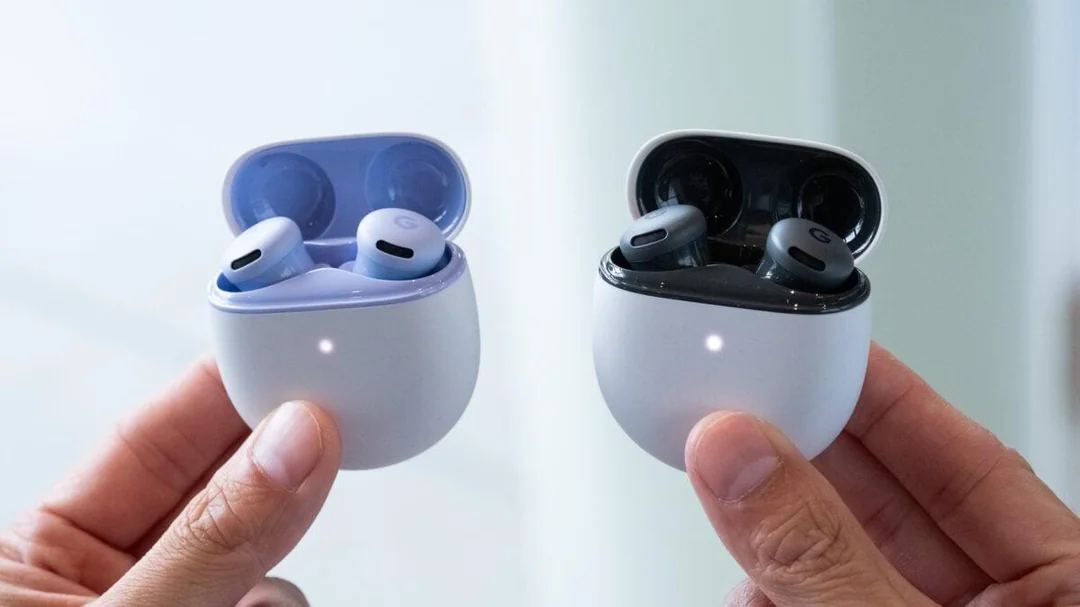
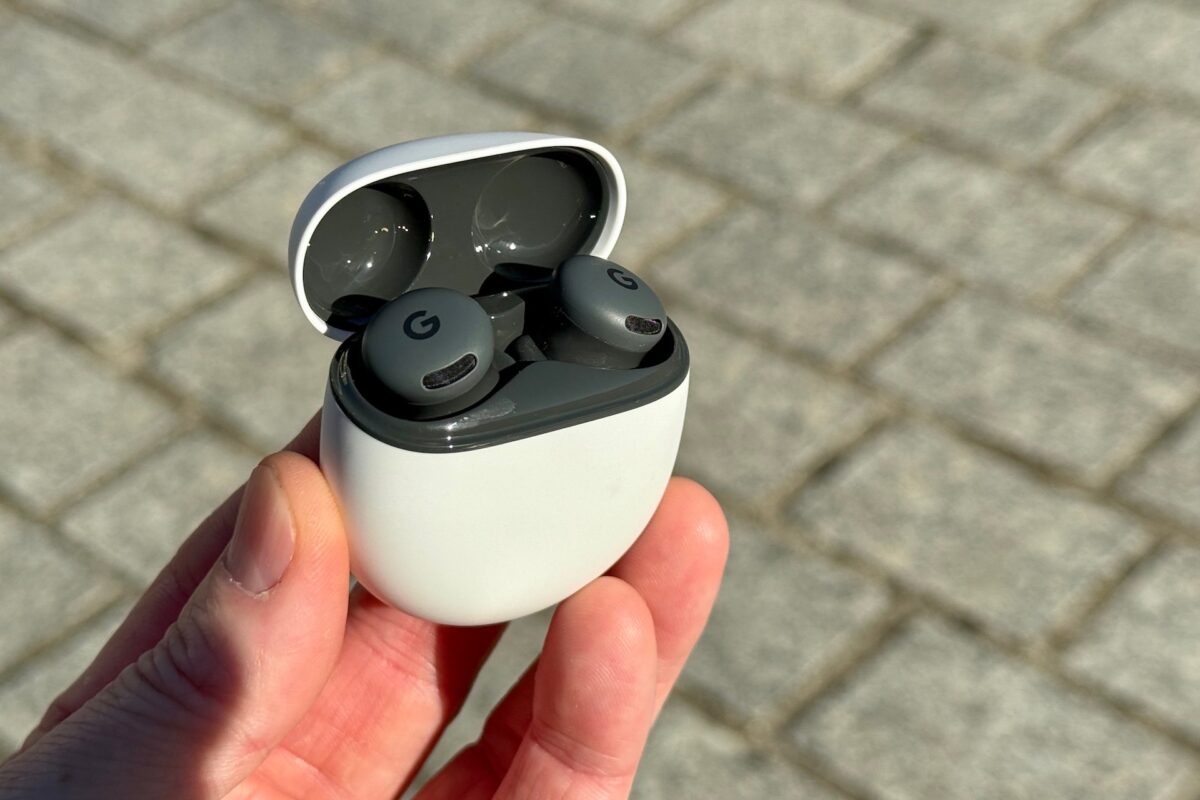
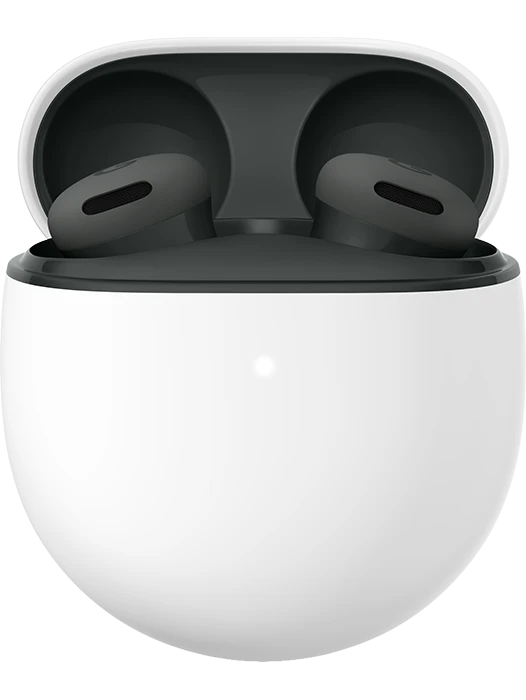
If the original Pixel Buds A-Series looked and felt like Google’s design experiment, the Pixel Buds 2a feel like the mature, refined version. The case is still that smooth pebble shape – easy to slip into jeans or a small handbag, with a confident magnetic snap when you close the lid. It’s the kind of design that doesn’t scream “gaming” or “sports”; it just quietly looks modern.
The buds themselves follow the same minimalist, no-stem philosophy:
- They sit flush inside the ear, so you don’t get the obvious AirPods “toothbrush head” look.
- The outer shell is rounded and soft; no sharp edges or weird pressure points.
- The subtle “G” logo is there, but it’s low contrast, so you don’t feel like a walking advertisement.
Google includes multiple silicone tip sizes in the box. As always, fit is crucial; if you rush this part, you’ll think the bass is weak and the isolation is bad. With the right tips, the Pixel Buds 2a slot in with a gentle twist and stay put through walking, commuting and moderate workouts.
Comfort is where they really impress:
- They’re light enough that you mostly forget they’re there after 10–15 minutes.
- The way they fill the concha of the ear without a stem means less leverage and less fatigue.
- The venting is tuned so you don’t get that intense “earplug suction” feeling that some deep-insert earbuds cause.
Even long podcasts and work calls are fine; you don’t get a burning or aching sensation the way you can with bulkier buds. For small ears, the low-profile shape is a big win – they’re less likely to press against the outer ear or fall out.
Build quality feels better than the price suggests. The hinge on the case doesn’t rattle, the magnets are strong, and the lid doesn’t feel like it’ll snap if you flick it open one-handed. The matte plastic hides fingerprints and micro-scratches well. IPX4 water resistance translates to: comfortable in the rain, safe for sweaty runs, not something you take into the shower or pool.
From a design and comfort standpoint, the Google Pixel Buds 2a nail the “daily wear” brief. They’re not flashy, they’re not fragile, and they don’t shout for attention – which is exactly what many buyers want.
Sound Quality: Warm, Clean and Non-Fatiguing
Sound is the part where budget earbuds usually fall apart: harsh treble, weird midrange, muddy bass. The Pixel Buds 2a avoid those traps pretty well. They’re clearly tuned for mainstream taste rather than studio neutrality, but the choices make sense.
Overall sound signature
Out of the box, the sound is:
- Slightly warm: bass has a gentle boost, giving body to pop, hip-hop and electronic music without turning everything into a subwoofer demo.
- Clean mids: vocals, podcasts and dialogue are easy to follow and sit forward enough in the mix.
- Polite treble: there’s enough sparkle to give cymbals and strings some life, but it rarely gets sharp or piercing.
For casual listening, that’s exactly the kind of profile most people enjoy. Watching YouTube or TikTok for hours doesn’t cause ear fatigue. Audiobooks and talk radio feel natural, not plasticky or thin. When you crank them up on your favorite playlist, the bass responds without completely drowning everything else.
Detail and stage
Do they resolve micro-detail like a pair of high-end IEMs? Of course not. But within their price bracket:
- There’s more clarity in vocals and acoustic instruments than you get from truly cheap “TikTok special” buds.
- Stereo image is decent; you can clearly hear left/right separation, and some songs with wide mixes feel engaging rather than collapsed.
- Separation between elements is good enough that busy pop and rock tracks don’t collapse into mush.
It’s a more mature tuning than many bass-monster budget earbuds. Google seems to know that these will be used for a lot of spoken word and casual listening, and they’ve balanced the sound accordingly.
EQ and tweaks
On modern Android phones (especially Pixel phones), you can:
- Pick EQ presets for more bass, more treble, or a more vocal-focused profile.
- Use simple sliders to tweak the balance if you find them too warm or too relaxed.
- Turn on features like “Volume EQ” that adjust the tuning slightly as you change volume.
The changes are subtle, but they help. If you’re used to very bright earphones, adding a little top-end helps cymbals breathe. If you’re a bass head, the “bass boost” preset gives more slam without completely muddying the mix.
Where they fall short
If you’re coming from Pixel Buds Pro, Sony WF-1000XM5 or high-end wired IEMs, you’ll notice:
- Sub-bass extension isn’t as deep or controlled.
- Complex tracks don’t have the same sense of layers and micro-detail.
- Dynamics feel more compressed at high volume – crescendos don’t explode out of the mix.
That’s normal for this price bracket. The Pixel Buds 2a aren’t for hardcore audio nerds; they’re for people who want good-enough sound plus Google smarts, and that’s exactly what they deliver.
Noise Isolation, Noise Cancelling and Call Performance
The Google Pixel Buds 2a approach noise in a two-part way: isolate the ear canal with a physical seal, and then use microphones and software to keep your voice clear during calls. They don’t chase the “kill every airplane engine” ANC race like their more expensive siblings.
Passive isolation
With the right tips:
- Low-frequency rumble (subway, bus engine) is reduced but not erased.
- Office chatter and cafe noise are softened enough that music or podcasts easily mask them.
- Keyboard clacks and high-pitched noises still sneak through, but at a much less annoying level.
This kind of isolation is perfectly adequate for commuting, working in a library, or walking in the city. You’ll still hear the world enough to stay aware, which some people prefer over full ANC.
No heavy adaptive ANC
Because the Pixel Buds 2a sit below the Pro tier, they skip the full adaptive ANC package. That’s one of the key differences from the Pixel Buds Pro and a major reason they’re cheaper.
Pros of this approach:
- No ANC-related pressure feeling or “ear suck” sensation.
- Fewer ANC artifacts: you don’t get the occasional whooshing or weird hiss some budget ANC buds produce.
- Battery life is simpler and more predictable.
Cons:
- Plane engines and very loud environments will still be audible; these are not “long-haul flight killers.”
- If you’re upgrading from serious ANC buds, you’ll notice the difference immediately.
Call quality and microphones
Where Google does lean on software is in call quality. The beamforming microphones, supported by voice-enhancement algorithms, do a solid job of:
- Locking onto your voice and keeping it intelligible in moderate background noise.
- Reducing wind noise when you’re walking outside.
- Keeping volume relatively stable even when you turn your head.
In quiet indoor settings, calls sound clean and clear to people on the other end. In noisy environments (busy streets, stations), your callers will hear some background noise, but your voice usually stays on top of it.
For video calls on laptops or tablets, they’re a huge upgrade over built-in microphones. Pair that with the comfortable fit, and they’re ideal for long meetings or remote classes.
Connectivity, Assistant & Smart Features: Where Google Shows Off
This is the part of the Google Pixel Buds 2a review where their Google DNA takes over. If you live in the Android world – especially with a Pixel phone – this experience is hard to beat at the price.
Fast Pair & automatic device recognition
Open the case near a compatible Android phone and:
- You get a pop-up animation with battery levels and a big Connect button.
- Once paired, the Buds 2a are associated with your Google account, so they appear on your other Android devices and Chromebooks automatically.
No digging through Bluetooth menus. No remembering if you paired left or right earbud first. For non-techy users, this frictionless pairing is a big deal.
Audio Switch between devices
If you’re using, say, a Pixel phone and a Chromebook:
- Watch a video on the Chromebook → Audio plays through the buds.
- A call comes in on your Pixel → The audio automatically switches to your phone so you can answer.
- You hang up → It slides back to the Chromebook.
It’s not infallible, but when it works (which is most of the time), it feels like magic and solves a real daily annoyance.
Google Assistant integration
Assistant is deeply woven into the Pixel Buds 2a:
- “Hey Google” hotword from the earbuds even if your phone is in a bag.
- Voice commands for music, volume, calls, navigation, reminders, etc.
- Read-out notifications in your ear when you’re walking or driving; you can control which apps are allowed.
- Quick replies: respond to messages with voice, including on WhatsApp and other apps that support Assistant replies.
If you’re already using Assistant around the house via Nest speakers, this continuity feels natural. It’s one of the big reasons to pick Pixel Buds over random generic earbuds.
Real-time translation and travel features
The Buds 2a work with Google Translate to give you:
- Conversation Mode: one person speaks into the phone, you hear the translation in your ear and respond in your language.
- On-the-fly translations of phrases and signs using your phone camera and spoken guidance.
- Handy travel helpers like “Translate this menu for me” without needing to stare at your screen constantly.
Are you going to negotiate a complex legal contract through them? No. But for vacation travel, restaurant interactions and basic street conversations, they’re a huge confidence boost.
Find My Device & security
Because they tie into your Google account, you can:
- See the last known location of your Pixel Buds 2a on the Find My Device map.
- Make them ring if they’re nearby but misplaced between couch cushions.
- See separate battery levels for each bud and the case in the companion app.
Lose a bud on the bus and you’re still sad, but at least you’ve got a chance of finding it.
Battery Life & Charging: Solid but Not Class-Leading
Battery life is one area where the Pixel Buds 2a are good enough but not record-breaking.
Real-world endurance
In typical mixed use:
- 5–6 hours of playback from the buds at moderate volume.
- Roughly 24–30 hours total including case recharges before you need a cable.
That covers:
- A full work day’s worth of listening (with breaks).
- A cross-country flight if you’re not blasting them at max volume.
- Several days of sporadic commuting and gym sessions.
Standby drain is modest; the case doesn’t hemorrhage battery while sitting in your bag overnight.
Charging speeds and convenience
Charging is over USB-C. From near-empty:
- Around 10 minutes in the case gives you enough juice for roughly an hour of music – good for “oh no I forgot to charge them” moments.
- A full case charge is around an hour or so via cable, depending on your charger.
The big missing feature is wireless charging. At this price tier it’s forgivable, but if you’re used to plopping your Pixel Buds Pro or AirPods on a Qi pad, going back to cables feels dated.
Still, in daily use, the Buds 2a rarely die on you mid-session. As long as you drop them in the case between meetings or on your commute, battery becomes an invisible part of the experience.
App Experience & Pixel Integration
On a Pixel phone, the Pixel Buds 2a feel like a natural extension of the system:
- Settings appear inline under the Bluetooth settings with Pixel branding.
- You can see battery, EQ, touch controls and Find My options in a clean, simple layout.
- Firmware updates happen in the background with clear progress indicators.
On other Android phones, you use the Pixel Buds app, which brings almost all the same controls:
- Customizable touch controls (play/pause, skip, call, Assistant, volume swipe).
- EQ presets and minor adjustments.
- In-ear detection toggles (auto-pause when you remove a bud).
- Fit check tools that play a test sound and measure leakage.
The app isn’t overloaded with gimmicks. There are no cheesy “3D stadium” modes or confusing ANC sliders; it focuses on the things that actually matter for this tier.
On iOS, you can use them as regular Bluetooth earbuds, but you lose most of the Google magic: no Fast Pair, no tight Assistant or Find My, no in-depth controls. That’s why, in this Google Pixel Buds 2a review, it’s important to be clear: these are Android-first earbuds. If you live in the Apple ecosystem, you’re better served by AirPods.
Comparison: Pixel Buds 2a vs Pixel Buds Pro vs Cheap TikTok Earbuds
To understand where the Pixel Buds 2a sit, it helps to compare them not just to one rival, but to two extremes: Google’s own Pro model and the flood of €30 buds on Amazon/TikTok.
Pixel Buds 2a vs Pixel Buds Pro
What you give up with 2a:
- Full adaptive ANC and more sophisticated background noise handling.
- Multipoint/Bluetooth LE Audio upgrades that may arrive on Pro first.
- Wireless charging and some higher-end materials.
- Slightly more refined sound and deeper bass.
What you keep (or almost keep):
- Fast Pair, Audio Switch, Find My Device.
- Assistant on tap with read-outs.
- Comfortable design and IPX4 rating.
- Solid, warm, non-fatiguing sound.
Pixel Buds Pro are for people who travel a lot, work in loud environments and want one pair to rule them all. Pixel Buds 2a are for people who want 80–85% of the experience for significantly less money.
Pixel Buds 2a vs random budget buds
Compared to most €30–€40 no-name earbuds:
- The Pixel Buds 2a win easily on build quality, microphone performance and connection stability.
- The companion app and Google integration make them feel like part of your phone rather than just “another Bluetooth thing.”
- Sound is more refined; fewer cheap plastic resonances, better tuning for long sessions.
Budget buds can still be great if all you care about is “music comes out when I hit play,” but for many Android users, the extra money on Pixel Buds 2a buys a lot of long-term comfort and convenience.
Pixel Buds 2a vs Samsung Galaxy Buds FE / midrange AirPods
Against Samsung Galaxy Buds FE or similar:
- Samsung’s buds often include basic ANC and tight Galaxy phone integration, but feel slightly bulkier for some ears.
- Pixel Buds 2a lean more into Assistant, Android-wide integration and Google’s translation features.
- Sound signatures are different; Samsung tends to go more V-shaped with bigger bass and brighter treble, which some love and others find tiring.
Against AirPods (3rd gen) if you pair them to an iPhone:
- AirPods will still win on seamless Apple ecosystem integration.
- Pixel Buds 2a are better value and more comfortable for people who prefer a sealed in-ear fit vs open-fit buds.
Who the Google Pixel Buds 2a Are For (and Not For)
After spending time with them, the Google Pixel Buds 2a clearly target a specific type of buyer.
Perfect for you if…
- You have a Pixel phone or modern Android phone and want earbuds that feel like a native accessory.
- You prioritize comfort, reliable connection and Google smarts over hardcore ANC and “audiophile” sound.
- You’re often on the go and appreciate Fast Pair, Audio Switch, Assistant and Find My more than niche features.
- You want something you can wear for hours for podcasts, YouTube and calls without ear fatigue.
- You plan to grab them during a sale, not necessarily at full launch price.
Probably not for you if…
- You fly long-haul frequently and need the strongest ANC possible – look at Pixel Buds Pro, Sony WF-1000XM5 or Bose QuietComfort.
- You’re heavily invested in the Apple ecosystem – AirPods Pro or AirPods 3 still make more sense there.
- You’re a serious audio hobbyist with a library of hi-res files and a taste for very neutral or analytical sound.
- You absolutely need wireless charging, high-res codecs or full waterproofing for swimming.
Pros & Cons Summary
Pros
- Lightweight, discreet design with excellent all-day comfort
- Warm, balanced sound that works well for music, podcasts and video
- Deep Google integration: Fast Pair, Audio Switch, Assistant, Find My Device
- Good call quality with effective noise reduction for your voice
- Reliable connection and smooth switching across Android devices
- Solid battery life for everyday use
- IPX4 resistance suitable for workouts and rain
- Fair price, especially when discounted during sales
Cons
- No full adaptive ANC – only passive isolation
- No wireless charging for the case
- Feature set is heavily Android/Pixel-centric; iOS users miss most of the magic
- Sound, while pleasant, doesn’t match the resolution and staging of higher-end buds
- Battery life, while decent, isn’t a standout vs some competitors
Verdict: Are the Google Pixel Buds 2a Worth It in 2025?
If you read this far, you care about more than just “are they good y/n?” – you care about value, integration and long-term experience. That’s exactly where the Google Pixel Buds 2a make the most sense.
They’re not the most feature-packed earbuds on the market, and they’re not trying to be. Instead, they focus on being:
- Comfortable enough to wear for most of your day.
- Smart enough to feel like part of your Android life, not an afterthought.
- Good-sounding enough that you don’t think about audio quality – you just enjoy your content.
- Affordable enough that you don’t panic every time you toss the case into a bag.
In a world full of loud, over-promised, under-delivering cheap earbuds, the Pixel Buds 2a come across as mature and well-considered. They’re the earbuds you recommend to your Android-using friend who keeps asking “which ones should I buy?” and then never wants to touch an EQ again.
If you’re all-in on Android or especially on Pixel, they should be near the top of your shortlist – particularly when Black Friday, Cyber Monday or Google Store promos bring them down to their inevitable “why not?” price.
YOU MIGHT LIKE TO READ!
🔥 Join 120,000+ Smart Shoppers!
Get exclusive gadget deals, viral Amazon finds and tech reviews before they trend. Only the best — straight to your inbox every week 🚀