Health & Wearables • Updated
The Complete 2025–2026 Guide
Everything you need to know to join the tests, understand the science, protect your privacy, and get real value from these experimental health features.
Google’s Fitbit team has opened two experimental initiatives for Pixel Watch owners: a Hypertension Study Lab and a new Unusual Trend Detection feature that flags unexpected changes in your health metrics. Below we explain who can join, how the enrollment works inside the Fitbit app, what data is collected, how the alerts may help in daily life, how this compares to Apple’s hypertension notifications, and what limitations to expect while the features are in research mode.
Key takeaway: The programs run through Fitbit Labs—an opt-in testing space inside the Fitbit app—where eligible Pixel Watch users can enroll or join a waitlist. At the time of writing, the hypertension study is U.S.-only and is recruiting up to 10,000 Pixel Watch 3 users for a 180-day study; some participants will be asked to wear an ABPM (ambulatory blood pressure) cuff for 24 hours and may receive a small incentive.
What are “Hypertension” and “Unusual Trend Detection” in Fitbit Labs?
Fitbit Labs is Google’s experimental program for testing pre-release health and fitness capabilities with volunteer participants. Eligible users see Labs offers inside the Android Fitbit app and can opt into studies or join a waitlist. That’s where two new items appear:
- Hypertension Study Lab: A research study that aims to analyze Pixel Watch data to see if early signals related to high blood pressure (“hypertension”) can be identified during everyday wear—potentially enabling future proactive alerts on Pixel Watch. Current recruitment is focused on U.S.-based Pixel Watch 3 owners for ~180 days.
- Unusual Trend Detection: An opt-in feature under Labs that looks for atypical changes in your health metrics (for example, vitals deviating from your baseline) and can prompt you to log context, surface recovery tips, and let you know when patterns normalize again.
Fitbit explains how to find Labs items in its support materials: open the Fitbit app, go to the You tab, scroll to the Fitbit Labs card, and tap See all to view eligibility. If you see “Unusual trends,” you can follow on-screen enrollment and consent steps there.
Specifications & Amazon Review Snapshot
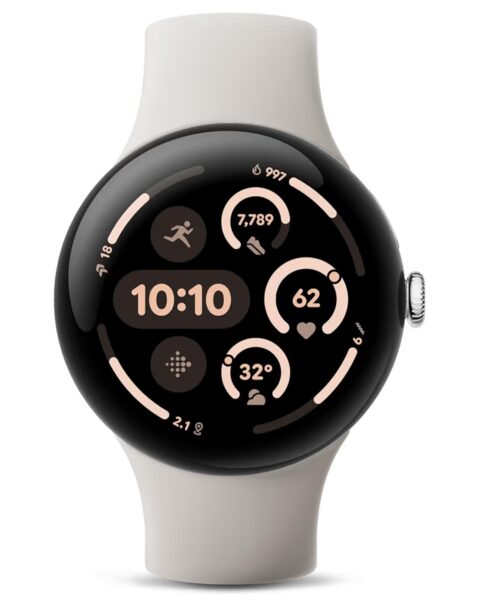
Key Specifications (Pixel Watch 3 – 41 mm / 45 mm)
- Case Sizes: 41 mm & 45 mm, height: ~12.3 mm.
- Weights (without band): ~31 g (41 mm) / ~37 g (45 mm).
- Display: AMOLED LTPO, ~320 ppi, brightness up to 2000 nits (45 mm model).
- Materials: 100% recycled aluminum chassis; fluoroelastomer sport band. 4
- Connectivity: 4G LTE/UMTS, Bluetooth 5.3, Wi-Fi 2.4/5GHz, NFC, Ultra-Wideband.
- GPS: GPS, Galileo, GLONASS, BeiDou, QZSS (depending on region).
- Battery: Up to ~24 hours typical use with always-on display; up to ~36 hours in Battery Saver mode (45 mm).
- Water & dust resistance: 5 ATM + IP68.
- Sensors: Optical heart rate, ECG-capable electrical sensors, SpO₂, altimeter, barometer, ambient light, skin temperature, conductance (cEDA) etc.
Amazon Average Rating Estimate
Based on early user reviews and aggregated feedback for the Pixel Watch 3 series, a reasonable estimate is an average rating of around 4.4 out of 5 stars.
Some users praise the health and safety features (including new detection functions), improved display brightness, and integration with Fitbit, while others mention battery life under heavy use and premium pricing as minor drawbacks.
Eligibility & Enrollment: Who Can Join—and How
Where to enroll
Enrollment happens inside the Fitbit app on Android. Head to You → Fitbit Labs, check your Eligible Labs, and tap Get notified (waitlist) or Join if you’re invited. Fitbit groups Labs into “eligible” vs “interested,” so you may see both a current offer and others you can bookmark for later. 4
Hypertension Study Lab (research cohort)
- Region & device: U.S. participants; currently focused on Pixel Watch 3 for this research phase (notably, the newer Pixel Watch 4 is excluded at this time).
- Duration: ~180 days of normal everyday wear while sharing de-identified watch data with the study.
- Sample size: Up to ~10,000 eligible participants sought.
- Extra equipment: A subset of participants will be shipped an ABPM cuff to wear for 24 hours to provide ground-truth blood pressure comparisons.
- Incentive: Some participants may receive a small gift card (reported at ~$25) upon completion; details vary.
- Language & age: At least 22 years old and able to complete an English questionnaire, per recruitment notes.
Unusual Trend Detection (feature pilot)
- Access: Appears as a Labs card when offered; not everyone will see it day one.
- What it does: Monitors your baseline metrics and sends a heads-up when something looks off; offers symptom logging and recovery suggestions, then updates you when baselines normalize.
- Battery note: Some outlets note a minor, temporary battery-life impact during testing, though day-long wear is still expected.
What to Expect After You Join: Setup, Daily Use, and Notifications
Once you’ve opted into a Lab, you’ll review a study-specific consent form, confirm eligibility, and enable data sharing for research purposes. You’ll then wear your Pixel Watch as normal; if you’re in the hypertension cohort selected for ABPM validation, you’ll receive instructions and a cuff to wear for a 24-hour period. Expect watch and app updates to arrive in the background as Google refines algorithms.
For Unusual Trend Detection, the watch/app quietly track your baseline. If an anomaly pops up (for instance, an unusual trend in heart-rate patterns, sleep, or activity), you may see a notification that explains what changed, invites you to add context (symptoms like stress, travel, illness), and suggests recovery actions—then follow-ups when your baseline returns toward normal.
The Science (and Limits) of Cuffless Hypertension Detection
It’s important to understand that the Hypertension Study Lab is a research project, not a medical-grade blood pressure (BP) monitor. Today’s wearables estimate risk signals—often derived from optical sensors (PPG), movement, temperature, or derived metrics—rather than performing a direct BP measurement the way a cuff does. The point of Fitbit’s study is to see how well signals from everyday Pixel Watch wear correlate with traditional BP readings in the real world.
That’s precisely why a subset of participants are asked to wear an ambulatory BP cuff for 24 hours: it produces a “ground truth” record against which smartwatch-generated features can be compared during algorithm training and validation. If the correlation is strong enough, Fitbit can later consider on-device alerts that suggest hypertension risk and nudge users to talk to their doctor—similar to how irregular rhythm notifications suggest potential AFib risk on many watches.
Apple took a similar, staged approach: in 2024–2025 it introduced hypertension notifications to newer Apple Watches using custom algorithms rather than cuff-based measurements (and without replacing medical devices). Google’s current work appears aimed at reaching comparable capabilities in the Pixel Watch line.
Why This Matters: Early Awareness, Personal Baselines, and Behavior Change
Hypertension is called the “silent killer” for a reason—many people don’t feel symptoms until complications occur. Even if a watch can’t diagnose or treat high blood pressure, a well-timed risk alert that’s grounded in your own baseline could prompt earlier conversations with a clinician. That can lead to validated testing (with proper cuffs), evaluation of contributing factors (sleep, stress, diet, medication), and potentially earlier interventions. Proactive nudges save lives when they encourage timely medical follow-up.
Similarly, Unusual Trend Detection can help you spot patterns that creep up slowly—like a string of poor nights of sleep, elevated resting heart rate during a cold, lowered HRV under stress, or diminished activity levels while traveling. The feature’s promise is not just a push notification; it’s giving you context and recovery guidance while closing the loop when your body returns to baseline. That can reinforce better habits—rest days, hydration, earlier bedtimes—over time.
How to Use the Alerts in Real Life (Without Overreacting)
Smartwatch alerts are clues, not conclusions. Here’s how to treat them:
- Log what changed: When Unusual Trend Detection pings you, record relevant context (travel, illness, alcohol, deadlines). Over months, this builds a personal playbook of cause-and-effect.
- Triangulate with routine measures: If you have access to a validated BP monitor at home or pharmacy, compare against the watch’s “risk” moments—especially if you’re in the hypertension study and receive ABPM.
- Look for patterns, not single blips: One odd night doesn’t equal a trend. The value in Labs is spotting persistent deviations from your baseline.
- Involve a clinician when warranted: If alerts coincide with symptoms (chest pain, severe headache, shortness of breath) or repeated high BP cuff readings, escalate to medical care. Smartwatches don’t substitute for diagnosis or treatment.
Pros & Cons: Fitbit Labs Hypertension / Unusual Trend Detection on Pixel Watch
✅ Pros
- Early-warning potential: The research into detecting hypertension and unusual health trends could give users valuable insights before symptoms become obvious.
- Leverages wearable data you already collect: Because you’re already wearing your Pixel Watch, no extra device is needed for early participation.
- Baseline-centric approach: Instead of one-size-fits-all alerts, the Unusual Trend Detection feature targets deviations from your own normal patterns — reducing random false positives.
- Validation under way: The hypertension study uses ABPM cuffs in a subset of participants—giving the feature scientific support rather than purely marketing hype.
- Education & empowerment: Adds context when alerts happen (log travel, illness, stress) which can help you build better self-tracking habits over time.
❌ Cons
- Not a diagnostic tool: These features are experimental. They cannot measure true blood-pressure values or replace clinical devices.
- Limited availability: The hypertension study currently covers only U.S. Pixel Watch 3 owners in this phase; global and Watch 4 rollout isn’t yet confirmed.
- Potential for false alarms: While trend-based models reduce noise, any algorithm may still notify when the cause is benign (travel, caffeine, illness) and cause unnecessary worry.
- Battery & sensor load: Running continuous health surveillance, logging, and cuff comparisons in studies may slightly reduce battery life and overall wear comfort.
- Model and fairness bias risk: Any feature trained in a limited cohort may perform less accurately for users with uncommon heart rhythms, skin tones, or health conditions not covered in the training set.
How Fitbit’s Approach Compares to Apple’s Hypertension Alerts
Apple rolled out hypertension notifications on recent Apple Watch models, positioned as algorithmic risk alerts—not replacements for cuff measurements. Fitbit’s Hypertension Study Lab indicates Google is working toward a parallel capability: first gather data in a big cohort (with ABPM validation), refine models, then ship risk alerts if/when accuracy is acceptable. The TechRadar report explicitly noted Apple’s head start and positioned Google’s effort as the catch-up phase.
Practically, users should expect a similar user experience if/when Fitbit’s feature launches broadly: occasional risk notifications tied to personal baselines, plus education that any concerning readings should be confirmed with clinical-grade tools. The immediate difference today is that Fitbit’s option is still in research via Labs, whereas Apple’s alerts are present on specified watch/iPhone combinations.
Privacy, Data Sharing, and Battery Life: What Changes When You Opt In
Joining a Lab means consenting to share specific, de-identified data for research under the terms outlined in the study. You’ll see those details during enrollment in the app. Most reports suggest a slight and temporary effect on battery life during testing, with the watch still lasting a full day. If you’re sensitive to endurance, monitor your drain in the first week and adjust settings (AOD, GPS, notifications) as needed.
As always, you can leave a Lab in the app if you no longer want to participate. Fitbit’s support pages for Labs and Pixel Watch detail where to find the Labs card and how to manage enrollment status.
Step-by-Step: How to Join a Fitbit Lab on Your Pixel Watch
- Update to the latest Fitbit app on your Android phone.
- Open the app ➜ tap You ➜ scroll to Fitbit Labs and tap See all.
- If you see Unusual trends or Hypertension Study Lab, tap the card and review the details.
- Read and accept the research consent (each Lab has its own terms). 26
- Tap Join (if invited) or Get notified to join the waitlist. Eligibility varies by device, region, and study capacity.
- Wear your Pixel Watch normally. If selected for ABPM, follow the instructions when the cuff arrives; you’ll wear it for 24 hours to provide ground truth.
Who Benefits Most from Joining Now
- Pixel Watch 3 owners in the U.S.: You’re the main target for the current hypertension cohort and most likely to receive an invite.
- Users curious about proactive health: If you value early warning signs and already act on your metrics, Unusual Trend Detection can be immediately useful.
- People comfortable with beta testing: Labs features can change. If you’re okay with experimentation (and a small chance of extra battery drain), you’ll enjoy contributing to the roadmap.
Limitations to Keep in Mind (So You Don’t Expect Medical Magic)
- Not a medical device: Neither Unusual Trend Detection nor the current hypertension research replaces diagnosis or treatment. Alerts are informational and should be validated clinically where relevant.
- Model restrictions: The hypertension study excludes Pixel Watch 4 in this phase; focus is on Watch 3. Enrollment is U.S.-only for now.
- Capacity limits: Labs cohorts are capped. You might only see a waitlist button until more slots open.
- Algorithm evolution: Because these are experiments, thresholds and alert behavior may shift during the study as Google tunes models based on collected data.
What This Signals for Google’s Health Roadmap on Pixel Watch
Recent reports and support pages collectively point to a clear trajectory: Fitbit Labs is becoming the proving ground for proactive health features that may roll out broadly once validated—exactly what we’ve seen with AFib risk notifications and sleep insights in recent years. Publications covering the labs note that Google is explicitly correlating smartwatch signals with medical-grade readings to strengthen future on-device risk warnings (for hypertension now, and possibly other conditions later). 36
If results look strong, expect a general availability feature that, like Apple’s, provides risk alerts (not cuff readings) and directs you to follow up with a clinician or home BP monitor. Fitbit’s unusual-trend approach also suggests a more holistic alerting system—less “single metric spike” and more “pattern change across your baselines,” which could be valuable for recovery and readiness decisions day to day.
FAQ: Fitbit Labs Hypertension & Unusual Trend Detection
Does the Pixel Watch measure blood pressure now?
No. The study is researching whether watch data can indicate risk of hypertension. Some participants will wear an ABPM cuff to provide validation data.
Why only Pixel Watch 3—what about Watch 4?
The current research cohort specifies Watch 3, with Watch 4 excluded for now. Google hasn’t provided a public reason; labs often start with a single hardware target to control variables. 39
How do I join Unusual Trend Detection?
Open Fitbit app ➜ You ➜ Fitbit Labs ➜ look for Unusual trends ➜ follow consent/enrollment steps or tap Get notified to join the waitlist.
Will this drain my battery?
Some outlets note a small, temporary impact during testing, but Google says you should still get a full day of use. Monitor your own endurance and tweak display/GPS/notifications as desired. 41
Is there compensation?
Reports mention modest incentives (e.g., ~$25) for specific cohorts that complete requirements; terms vary.
How is this different from Apple’s hypertension notifications?
Apple’s alerts are already live on certain models and are algorithmic—not cuff readings. Fitbit is currently running a research phase to validate similar capabilities on Pixel Watch, using Labs to gather data before any broad launch.
How to Get the Most Value from Fitbit’s Experimental Health Alerts
- Wear it consistently: Baselines improve with regular wear. Sporadic use equals noisy data and fewer useful insights.
- Be honest in logs: When Unusual Trend Detection asks for context, record it. Your future recommendations get better because of those notes.
- Pair with a home BP monitor: Especially if you have risk factors or family history. Use proper cuff technique and keep a log you can share with your clinician.
- Don’t catastrophize: Trends are leads, not diagnoses. Use them to inform smart next steps, like rest, hydration, or medical follow-up when appropriate.
- Review quarterly: Every few months, scan your trends—what throws you off? Travel? Stress sprints? Use that insight to pre-plan recovery behaviors.
Editorial Stance: Why We’re Optimistic (and Cautious)
We’ve seen this movie before with AFib risk notifications: years of algorithm and validation work, then a careful rollout that helps millions ask smarter questions at the doctor’s office. The fitbit labs hypertension initiative feels like the next chapter. If Google executes well—robust validation, clear UX, sensible thresholds—Pixel Watch owners get a helpful nudge system grounded in their own baselines.
But caution is warranted. Users can over-react to a single alert or under-react to persistent trends. Clear education during enrollment, reminders that cuff verification matters, and easy clinician-facing exports will determine whether these features become life-improving tools or just more notification noise. For now, Labs is the right venue to prove the benefit before mainstream shipping.
Sources & Further Reading
- TechRadar coverage outlining the Labs launch, enrollment pathway, and U.S. recruitment for Pixel Watch 3, plus mention of Apple’s hypertension alerts.
- Android Central report on the 180-day study, ABPM use, eligibility requirements, and $25 incentive note.
- Fitbit support pages explaining where to find Labs and how to enroll in Unusual trends within the Fitbit app.
- Android Authority/Wareable/9to5Google coverage confirming the scope of the Labs experiments and Pixel Watch 3 focus.
- Gadgets & Wearables notes on availability and how offers appear in the app.
- Notebookcheck summary of Google’s hypertension research recruitment and goals.
Important Disclaimer
This article is informational and not medical advice. Fitbit Labs features are experimental; they are not intended to diagnose, treat, cure, or prevent any disease. If you receive a concerning alert or have symptoms, consult a qualified healthcare professional and confirm measurements with validated medical devices.
YOU MIGHT LIKE TO READ!
Apple Watch vs Fitbit: Which Is Better for Sleep, Fitness, and Everyday Use?
🔥 Join 120,000+ Smart Shoppers!
Get exclusive gadget deals, viral Amazon finds and tech reviews before they trend. Only the best — straight to your inbox every week 🚀