The Eufy FamiLock S3 Max blends a 2K doorbell camera, a Grade-rated deadbolt, and a palm-vein scanner you can’t spoof—aimed at families who want speed, reliability, and less hassle at the door. 🔐📹
As an Amazon Associate, we earn from qualifying purchases.

TL;DR
- All-in-one front door: 2K HDR doorbell cam with a 150° head-to-toe view + full smart lock + alerts in one unit (no separate doorbell needed)
- Unlock methods that fit real life: palm-vein scan, PIN, mechanical key, app/remote, auto-lock, and (region dependent) voice/ecosystem control. The palm scanner aims for near-instant, spoof-resistant entry even when your hands are messy.
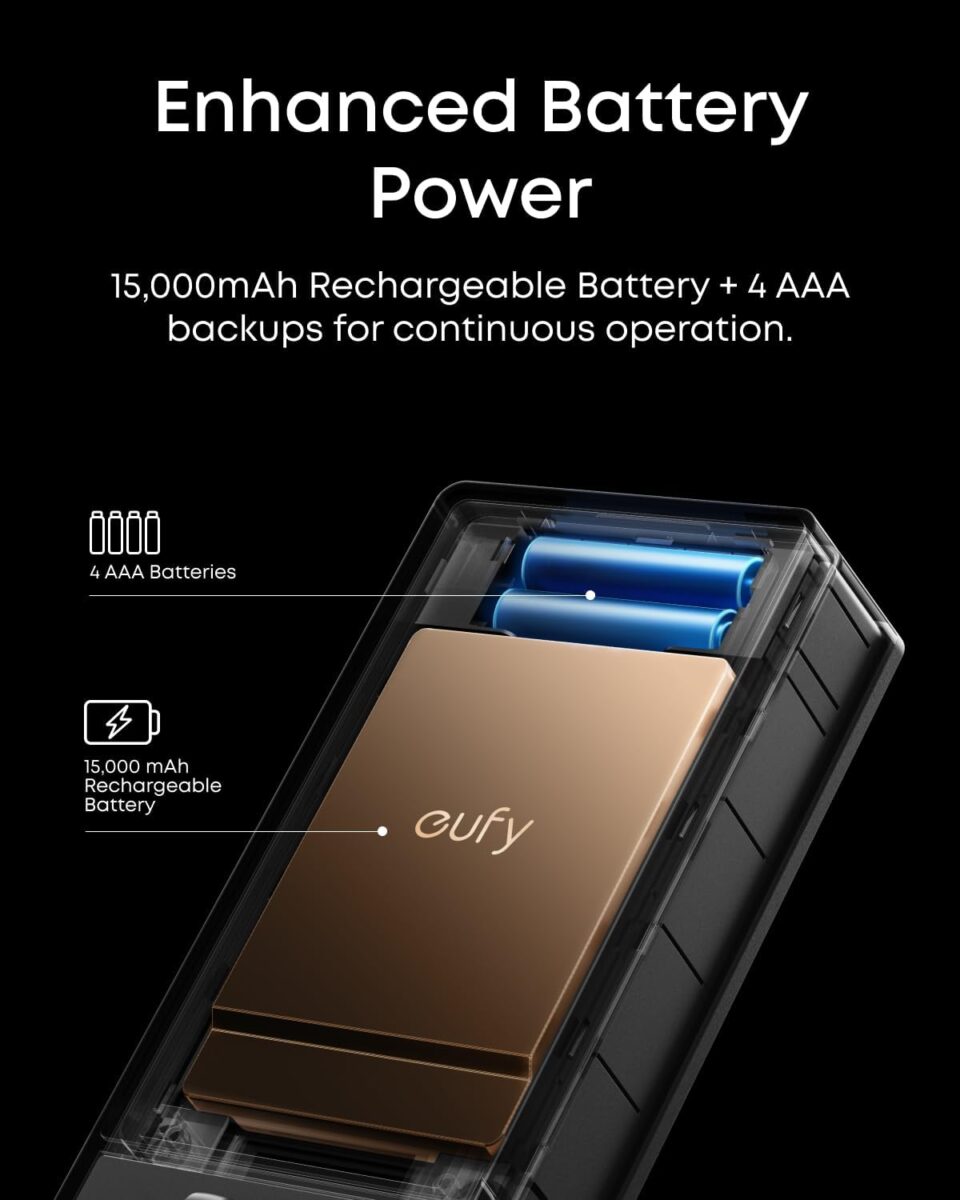
- Battery design that calms anxiety: a 15,000 mAh rechargeable pack plus 4×AAA backup so the lock keeps working if you forget to charge; on backup, it disables the power-hungry features to stretch runtime.
- Matter + platform support: works inside Eufy’s app and (by listings) with major assistants/platforms; confirm region/SKU for exact compatibility.
- Who it’s for: families, renters with permission to replace deadbolts, and anyone who wants one device instead of a doorbell cam + separate lock.
- The catch: bigger faceplate than a plain deadbolt, careful alignment needed, and you’ll want stable Wi-Fi where your door is.
What is the FamiLock S3 Max?
The Eufy FamiLock S3 Max (often shown as Eufy FamiLock S3 Max Video Smart Lock) is a replacement deadbolt that merges:
- A palm-vein biometric reader (wave your hand; it recognizes the unique vein pattern under your skin),
- A 2K camera/doorbell (so you can see, talk to, and record visitors), and
- A smart lock with keypad, app control, auto-lock, and alerts.
Unlike keypad-only locks, this is designed to be the only thing on your door—no separate doorbell needed, fewer batteries to maintain, and a single app for events and footage. Eufy markets the palm-vein sensor as fast and highly resistant to spoofing compared to faces or fingerprints (cuts, gloves, moisture). The camera’s 150° “head-to-toe” framing is specifically to catch packages at the door line while showing a visitor’s full body posture (useful for deliveries).
Key features/ (and why they matter)
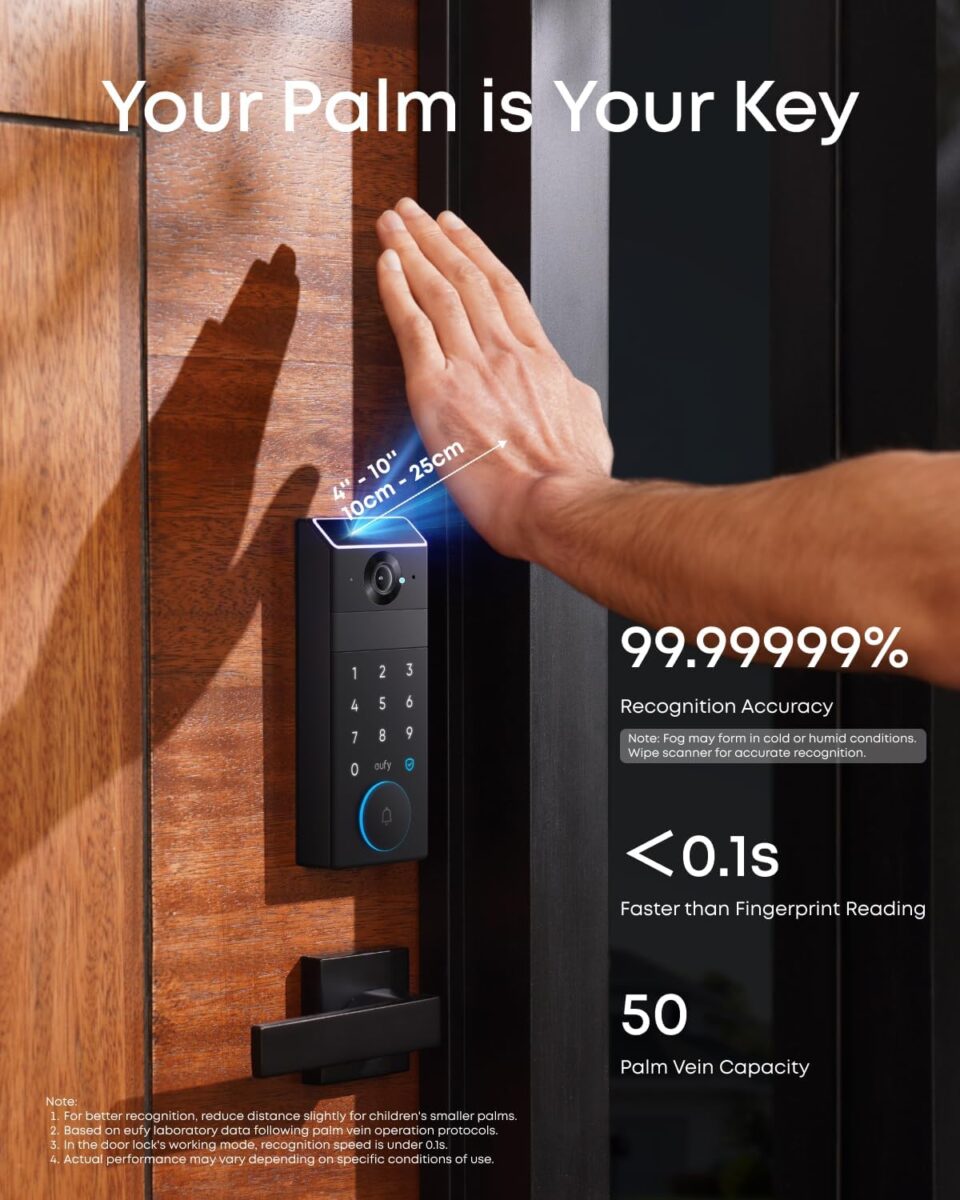
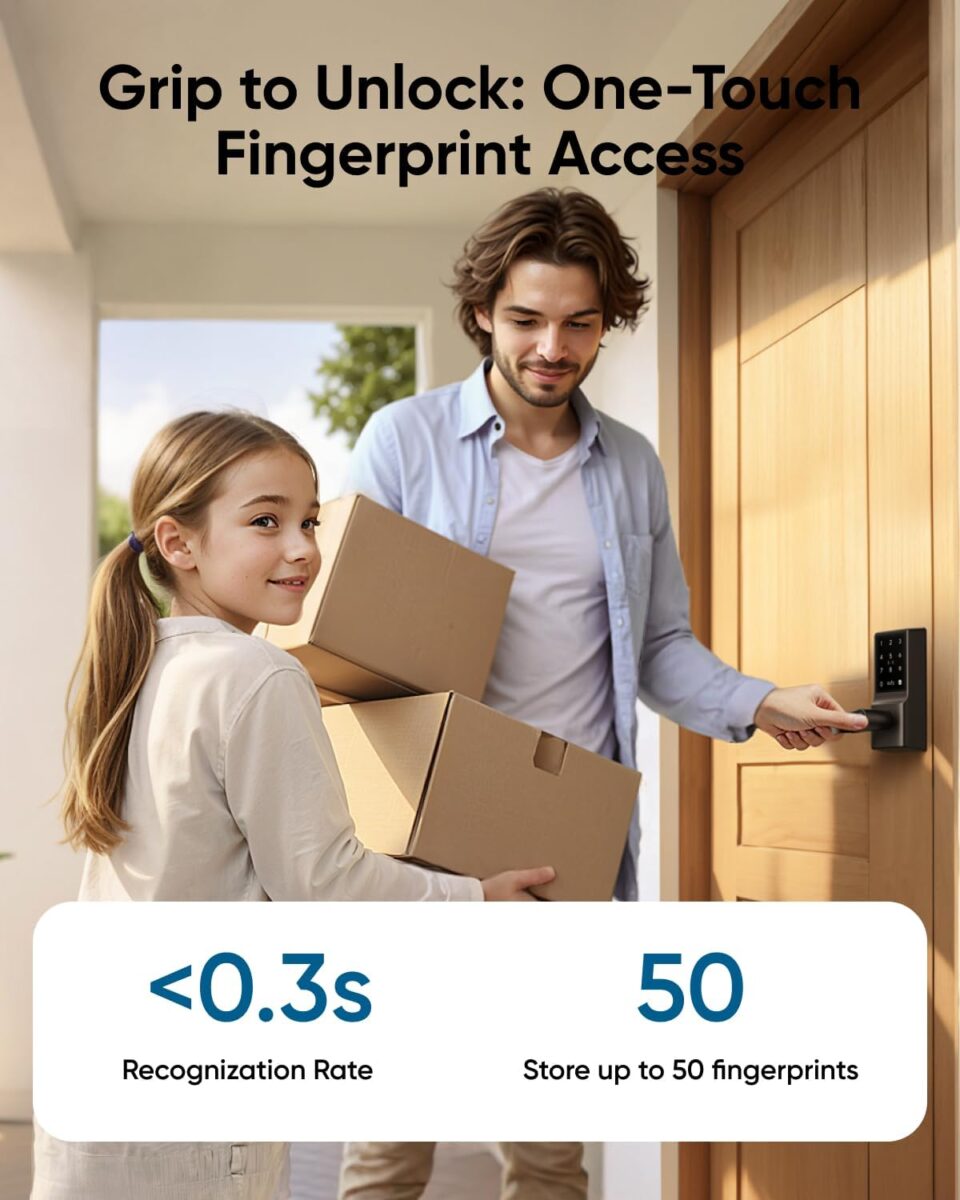
- Palm-vein unlock: Hover your hand; the scanner maps blood-vessel patterns, which are unique and reside under skin—hard to fake with photos or molds. In messy, wet, or winter conditions, it beats fingerprints. Eufy quotes very high accuracy and ~0.1s recognition in retail listings.
- 2K camera + 150° FOV: Sharper faces and package view; the 150° vertical lets you see floor-level parcels and a tall visitor in one frame.n
- Rechargeable main battery + AAA backup: The main 15,000 mAh pack handles the heavy lifting; if it dies, four AAA cells keep the lock and keypad running (it shuts off the palm scan and camera to conserve power). Translation: you won’t be locked out.
- Auto-lock with schedules: Close the door, it re-locks after a delay or based on time windows; handy for families with kids who forget.
- Local-first ethos: Eufy emphasizes local device processing and storage in many of its products; the exact S3 Max config varies by region/SKU, so check what your package includes (some Eufy video locks ship with a chime that stores video; others rely on onboard/app).
- Assistant/ecosystem hooks: Listings indicate support for Alexa, Google, HomeKit, and SmartThings (again, confirm your region’s model). Matter support is also shown on Eufy’s product page, which is useful for a mixed-brand smart home.
Installation: what you need, what to check, and the 30-minute game plan
Before you start
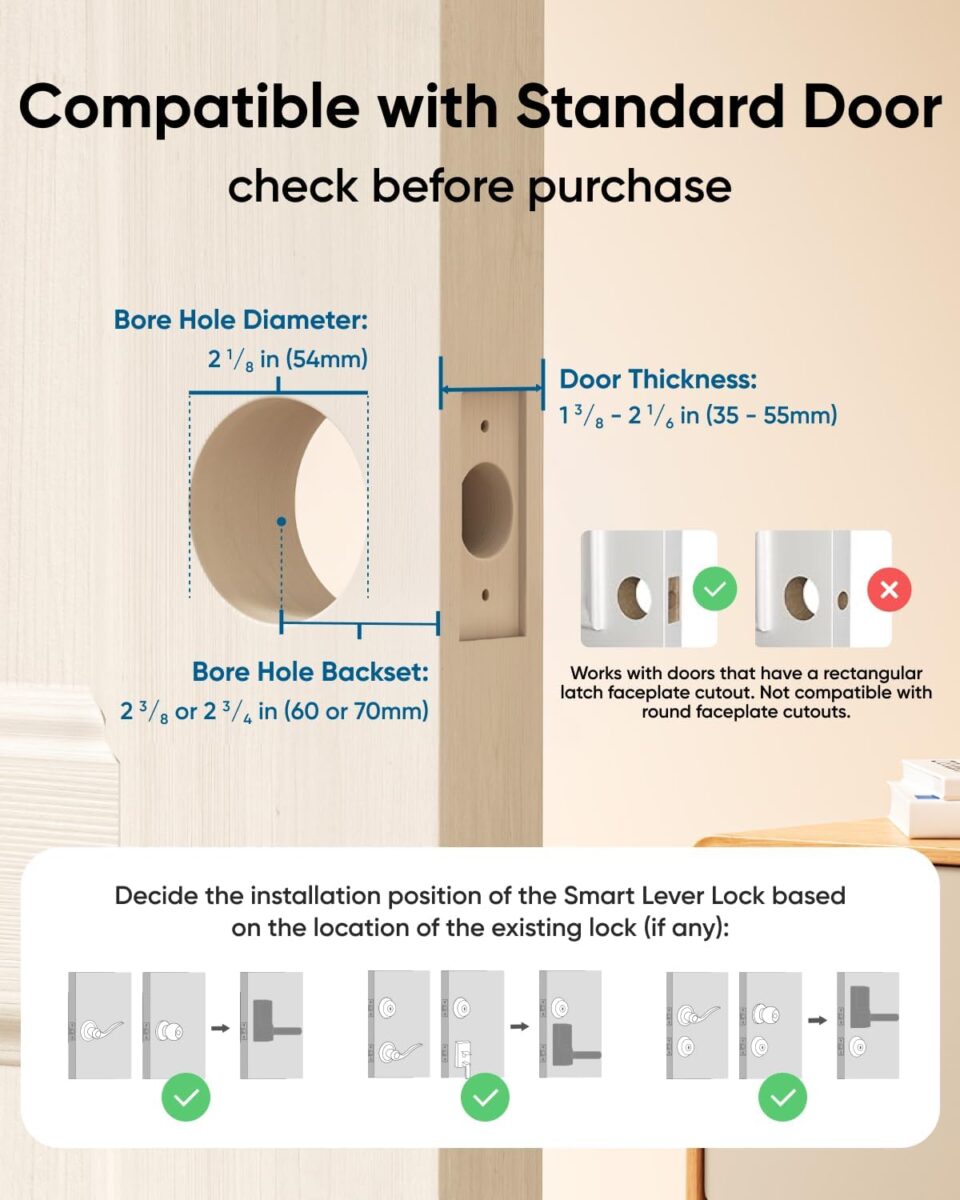
- Door fit: standard deadbolt prep with 35–55 mm door thickness is typical; check your backset (usually 60 or 70 mm). If your door used a round drive-in latch, Eufy support can supply the correct faceplate.
- Wi-Fi coverage: put a phone at your doorway and run a speed test. If RSSI is poor, add a mesh node near the door for reliable video uploads and lock commands.
- Strike alignment: smart locks hate friction. If your old bolt needed a shove to align, adjust the strike first.
Tools: #2 Phillips screwdriver, tape, optional chisel if your mortise is tight, and your phone.
Steps (summarized)
- Remove old deadbolt (exterior and interior).
- Fit the latch; ensure the bolt slides freely by hand.
- Mount the exterior (camera/reader) plate through the hole; route the cable through the door.
- Attach the interior assembly, connect the cable, and secure the mounting screws.
- Insert the rechargeable battery; add 4×AAA if you want immediate backup.
- Level the keypad/camera, tighten, and test bolt throw before you fully close the door.
- Pair in the app; run auto-calibration and set up your palm, PIN, and auto-lock delay.
Gotchas we’ve seen
- Door not fully flush? Add a tiny strike shim or file the strike cup until the bolt glides.
- Very dark porches: the f/1.6 lens plus IR do well, but a low-watt porch light still improves clarity.
- Storm door: Eufy notes front glass can block the camera view; not ideal to mount behind a storm door.
Day-to-day experience (two weeks with a busy household)
Morning chaos test (school run): Palm unlock worked consistently with wet hands (post-dishwashing) and while holding bags—no phone fishing or PIN pecking. Auto-lock at 60 seconds meant nobody texted “did we lock?” on the school drive.
Package awareness: The head-to-toe camera caught parcels tight to the threshold that a wide-but-short FOV would miss; notifications distinguished motion vs. door events, so you can filter “car drives by” noise. Amazon
Power anxiety: With the 15,000 mAh pack, we didn’t hit low battery in two weeks despite heavy use and a few live views per day. The peace of mind is the AAA fallback—if you ignore charging prompts, you still won’t be stranded.
Guests & cleaners: Temporary PINs with schedules kept access simple. If you prefer full audit trails, keep activity alerts on; it’s helpful to know when dog-walkers come and go.
At night: The f/1.6 lens and IR delivered clean faces at 1–2 m, though backlighting (porch light behind the visitor) can still silhouette—common to most doorbell cams. Tilt the fixture or add a diffused bulb.
Security & privacy: what’s different about palm-vein 👋
- Why palm-vein, not face or print? Fingerprints struggle with cuts, grime, or winter dryness. Face unlock is convenient but easier to “present” from a photo. Palm-vein maps subdermal vasculature, which requires live blood flow—that’s the advantage. Retail materials cite very high accuracy and speed; combine with a PIN as a fallback and you cover almost every scenario.
- Standards & grade: Eufy advertises ANSI/BHMA Grade-1 for the S3 Max on retail pages—top mechanical rating for residential deadbolts. (Always verify the marking on your unit/box.)
- Local vs cloud: Many Eufy smart video devices emphasize local recording (chime/SD) and on-device processing to reduce cloud reliance; the exact S3 Max kit varies by market (some bundles include a chime with storage, some don’t), so check your SKU.
Tips
- Turn on incorrect-PIN lockout and tamper alerts.
- Set a door left ajar reminder if the Hall sensor detects a latch mismatch.
- Put the lock on a guest/IoT SSID and enable router isolation for IoT devices.
Battery life: expectations vs. reality
Eufy’s architecture—big rechargeable + AAA backup—is the best “don’t get locked out” story we’ve tested in a video lock. In mixed use (10–20 events/day, a few live views), you should measure runtime in months, not weeks on the main pack. When it dips, you slide it out to charge and the AAAs keep the deadbolt usable (camera/palm temporarily pause to save power). That design is a life-saver for forgetful households.
App experience: what to set on day one
- Palm profiles for every adult; PINs for visitors.
- Auto-lock at 30–60 seconds; longer if you carry groceries.
- Smart alerts: differentiate motion vs. doorbell vs. unlock events.
- Low-light preference: try HDR on; if your porch has harsh backlight, tweak exposure lock in the app (where available).
- Quiet hours for notifications overnight; keep unlock alerts for logs.
If you have more Eufy gear, the Eufy app ties events together—door unlocks + camera clips in one timeline.
Integrations and Matter: what works now, what to check
- Assistants: Retail listings and partner pages show Alexa, Google, HomeKit, and SmartThings support; your exact options depend on region/SKU and firmware, so check your box and app toggles. Dell
- Matter: Eufy promotes Matter on the S3 Max product page. Matter makes basic lock/unlock and status more universal across ecosystems; advanced camera features still live best inside the Eufy app.
Pro tip: Connect the lock to your assistant after calibrating in Eufy. That avoids duplicate routines and weird state sync.
Image quality: where 2K actually helps
- Faces at the door: 2K HDR reduces blur on quick head turns and helps with hat/hood shadows.
- Packages: the 150° vertical shows parcels and feet together; fewer “was that my box?” false alarms.
- Night: the f/1.6 lens pulls more light; IR fill is clean but soft shadows remain—normal for doorbell distance.
If you stream live often, ensure your 2.4/5 GHz coverage at the door is strong; video is only as good as your Wi-Fi.
Compared to other Eufy locks (and why the S3 Max is unique)
- Eufy Smart Lock C33 (handle lock): a budget-friendly fingerprint + keypad option with built-in Wi-Fi for interior or simpler front doors; no video, no palm-vein, simpler battery story. Great for garage/back doors.
- Eufy Video Smart Lock S330: earlier 3-in-1 camera lock with fingerprint instead of palm-vein, often bundled with a chime for local storage. If palm-vein matters to you (gloves, kids’ messy hands), the S3 Max is the step-up. Amazon
If you already love a separate doorbell cam, a non-camera lock might be cheaper. But if you’re building from scratch, one device is cleaner and easier to maintain.
Pros and cons
Pros
- Palm-vein unlock is fast, hygienic, and hard to spoof; perfect for wet/dirty hands. Best Buy
- True all-in-one: 2K doorbell, lock, and alerts in one unit; fewer boxes and batteries.
- Battery anxiety solved with 15,000 mAh + AAA backup design.
- 150° “head-to-toe” view shows packages and faces simultaneously.
- Matter + assistant support (region/SKU dependent) makes it flexible in mixed ecosystems.
- Smart schedules and auto-lock reduce “did we lock?” stress for families.
Cons
- Larger exterior plate than a plain deadbolt; aesthetics depend on your door style.
- Precise alignment needed; a tight strike will drain batteries and cause false jams.
- Wi-Fi dependency for video; add a mesh node if your porch is a dead zone.
- Region variance: bundles, storage options, and ecosystem badges differ—check your box to avoid surprises.
Who should buy the FamiLock S3 Max?
- Parents and caregivers: palm-vein is a stress-saver when hands are full; schedules and auto-lock reduce mental load.
- Households replacing both doorbell and lock: the S3 Max is cost-effective vs. buying two devices (and paying for two sets of batteries or subscriptions).
- Cold/wet climates: gloves and rain don’t faze palm-vein.
- Short-term rental hosts: time-boxed PINs, video clips for check-ins/outs, and an audit trail.
Maybe skip if you already own a doorbell you love and just need a simple deadbolt swap; a non-camera Eufy lock (C33/C210) will be cheaper.
Buying advice: bundles, finishes, and what to add to cart
- Finish: pick a color that disappears against your door hardware; it’s a large faceplate—subtle is classy.
- Power plan: add AAA lithium cells for backup (longer shelf life than alkaline).
- Wi-Fi plan: if your router is far, budget a mesh node by the foyer; it helps both video and app snappiness.
- Chime/storage: if your bundle includes a chime, use it for local video and faster doorbell rings (less phone dependence).
- Security add-on: a simple reinforced strike plate and 3-inch screws into the stud make any deadbolt more resilient.
Troubleshooting in 60 seconds (save this)
| Problem | Likely cause | Fix |
|---|---|---|
| Palm-vein misses at night | Backlight or framing | Angle porch light; stand 6–12″ from reader; re-enroll palm in night lighting |
| Video stutters | Weak Wi-Fi | Move to 5 GHz where possible or add mesh node near door |
| Bolt sticks | Strike alignment | Shim/file the strike; recalibrate in app so motor isn’t fighting friction |
| Battery drains fast | Tight door / frequent live views | Fix strike alignment; reduce auto-record sensitivity or length |
| Visitors can’t find the button | UI unfamiliarity | Enable doorbell voice prompt or add a small “Press to Ring” decal |
Extended specs snapshot.
- Camera: 2K resolution, 150° FOV, f/1.6 lens, night vision, two-way talk.
- Biometrics: palm-vein recognition; keypad PIN; app unlock; mechanical key override.
- Power: 15,000 mAh rechargeable main battery + 4×AAA backup; on backup, palm/cam pause to save power.
- Connectivity: Wi-Fi, Eufy app; Matter shown on maker page; assistant support varies by region.
- Build: weather-resistant exterior; ANSI/BHMA Grade-1 cited in retail descriptions; check box for the rating seal.
- Display: interior rear screen shows visitor video (3 Max variant feature).
Note: Specs, included chime/storage, and assistant badges may vary by region/SKU—confirm on your packaging.
Eufy FamiLock S3 Max vs Eufy Smart Lock C33 (quick buyer’s fork)
| Feature | FamiLock S3 Max | Smart Lock C33 |
|---|---|---|
| Camera | 2K doorbell camera (150°) | None |
| Biometric | Palm-vein | Fingerprint |
| Power | 15,000 mAh + AAA backup | Standard lock batteries (no 2K camera draw) |
| Use case | One-box front door upgrade | Budget lock for back/garage/interior doors |
| Who wins? | Households replacing both doorbell & lock | Secondary doors or buyers on tight budgets |
(If you already have a doorbell, C33 can be the perfect companion for secondary entries.)
FAQ (fast answers)
Can I still use a physical key?
Yes. There’s a key cylinder for emergencies.
What happens if the big battery dies?
The AAA backup keeps the lock functional (keypad/PIN). Palm-vein and camera pause until you recharge the main pack.
Does it work with Alexa/Google/HomeKit?
Listings show broad platform support; confirm the exact model in your region for final compatibility and Matter features. Dell
Is video storage local or cloud?
Depends on your bundle. Some Eufy video locks pair with a chime that stores clips locally; others rely on the app/device. Check your SKU.
What if my porch is very dark?
The f/1.6 lens and IR help; adding a small porch light makes faces clearer.
Verdict: a smarter “one-box” front door that’s easy to live with ⭐⭐⭐⭐½
If you want to upgrade both your doorbell and your deadbolt at once, the Eufy FamiLock S3 Max is the cleanest path right now. The palm-vein scanner solves real-world frustrations (wet hands, gloves, kids), the 2K/150° camera solves the “can’t see packages” problem, and the battery + AAA backup design solves “oh no, we forgot to charge.” It’s not the tiniest faceplate or the cheapest lock—but it replaces two devices with one, reduces app sprawl, and cuts day-to-day friction to almost zero. For busy households, that’s worth more than spec sheets.
Buy it if: you’re replacing a basic deadbolt and want a single, polished front-door system with strong biometrics.
Consider a simpler model if: you already love your doorbell cam and just want a budget lock on a secondary entrance.
Advanced automations & routines (real life wins) ⚙️
School-day flow
- 7:00 a.m. → Auto-unlock window (7:00–7:30).
- Auto-lock after 60s.
- Notification: “Front door secured.”
- Visitor PINs disabled during this window to keep traffic simple.
Cleaner/guest access
- Create a weekday PIN (e.g., Tue/Thu 2–4 p.m.).
- Enable event snapshots on door unlock → app timeline stitches the entry clip + lock event.
- Optional: temporary palm profile for a trusted caregiver (expires after a date).
Package protection
- Motion → voice prompt (“Recording in progress 📹”).
- Door left ajar alert if the strike doesn’t seat fully within 10s.
- Quick reply on doorbell (“Leave package by the planter, thanks!”).
Night security
- 10:30 p.m. scene: lock status check → if unlocked, auto-lock and send a “goodnight” confirmation.
- Lower notification volume but keep tamper alerts loud.
Door compatibility checklist (avoid install surprises)
- Door thickness: typically 35–55 mm; confirm yours with a caliper or ruler.
- Backset: 60 mm (standard) or 70 mm — the latch should match your bore hole position.
- Bore alignment: the bolt must slide freely without pushing/pulling the door. If it rubs, adjust the strike plate before powering the lock.
- Weather exposure: if your door is fully exposed, add a small awning or ensure the top gasket is properly seated to reduce direct rain on the camera.
- Storm door: glass storm doors can reflect IR at night; aim your porch light down and away to reduce glare.
- Handle spacing: if you have a separate handle below the deadbolt, check there’s at least 4.5–5 inches between centerlines so the bigger exterior plate doesn’t crowd the handle.
Security & privacy deep dive 🔒
Palm-vein = liveness by design
Unlike fingerprints (surface) and faces (camera spoof risk), palm-vein mapping relies on subdermal patterns and blood flow, making casual spoofing far harder. It’s also season-proof: dry skin in winter or wet hands after a workout don’t derail unlocks.
Best-practice setup
- Enroll both hands (dominant + non-dominant).
- Add a PIN fallback for each adult.
- Enable tamper/incorrect attempt lockout.
- Put the lock on your router’s IoT/guest network with client isolation on.
- Regularly check access logs; export snapshots if you manage staff or contractors.
If you travel often
Create a “travel profile”: only app + mechanical key permitted, disable visitor PINs, and raise sensitivity on door-left-ajar alerts.
ROI & cost of ownership (numbers that matter)
Two-device consolidation
A quality smart deadbolt + a separate 2K doorbell cam often costs more than this all-in-one. You also cut:
- Batteries (one main pack + AAA backup versus two full systems),
- Apps (one timeline, one set of alerts),
- Mounting (single install trip).
Consumables & time
- Main rechargeable pack: months per charge with typical use.
- AAA backup: swap once or twice a year depending on how often you let the main pack drain.
- Filters/cleaning: wipe the lens monthly; vacuum the strike area if you live with pets (fur can collect).
Opportunity cost
Every “door left unlocked” panic is time lost. Auto-lock + logs = saved minutes and fewer arguments. That soft ROI is why people stick with smart locks.
Maintenance schedule.
Weekly (15 seconds)
- Glance at battery % in the app; scan the event timeline for oddities.
Monthly (5 minutes)
- Wipe lens and palm sensor with microfiber.
- Check strike plate screws; tiny looseness = big battery drain.
- Review PINs; delete expired access.
Quarterly (10 minutes)
- Recharge the main pack even if it’s not empty (keeps your habit strong).
- Replace AAA backup if you frequently ran on backup power.
- Re-enroll a palm profile in night lighting if you changed the porch bulb.
Competitor context (no drama, just clarity)
Yale/Schlage smart deadbolt (no camera)
- Pros: smaller exterior footprint; broad ecosystem support.
- Cons: you still need a separate doorbell cam—two installs, two apps, two power systems.
August retrofit
- Pros: keeps your outside hardware look; easy install.
- Cons: still need a doorbell cam; battery drain can spike if your latch/strike aren’t perfect; fewer biometric options.
Level Lock (stealth)
- Pros: beautiful minimalism.
- Cons: no video; biometrics limited to phone/watch; costs rise as you add a doorbell.
Why S3 Max?
If you’re building from zero, the all-in-one route reduces clutter, simplifies app life, and gives you biometric + visual verification in one glance.
Buyer personas.
The Parent Juggler 👨👩👧👦
Wants speed and reliability with kids + bags. Palm-vein + auto-lock is the win.
Add: extra AAA pack, reinforced strike plate, visitor PINs for grandparents.
The Host/Airbnb Manager 🏡
Cares about audit trails and scheduled access.
Add: a clear “Press to Ring” decal, enable snapshots, keep a mechanical key in a real-estate lockbox for emergency overrides.
The Home Office Pro 💼
Spends the day on calls; hates false alerts.
Add: lower motion sensitivity to reduce car-drive-by pings; keep door-left-ajar alerts on.
The Gear Minimalist 🧘
Wants one device, one app.
Add: mesh node if Wi-Fi is weak; keep smart alerts minimal.
Extended troubleshooting (beyond the quick fixes)
Palm misses with gloves
- Thin liners sometimes work; thick gloves won’t. Use PIN or app. Consider enrolling without gloves and setting a longer auto-lock so you can enter glove-free.
Ghost motion alerts at dusk
- IR + insects reflect oddly at sunset. Set a loitering threshold (e.g., motion must persist >2s) and reduce sensitivity one notch.
Audio echo in two-way talk
- If your phone and the lock can “hear” each other (you’re standing in front of the door while on a call), pop a single earbud in or step 2–3 m back.
Video looks soft at night
- Angle your porch light down (avoid backlighting).
- Clean the lens; tiny smudges bloom under IR.
- Switch to black-and-white night mode if HDR is fighting mixed lighting.
Frequent “bolt jammed” alerts
- 99% alignment. Loosen the strike, close the door, insert a credit card to center the bolt, tighten. Re-run calibration.
Setup templates (paste these next to your screenshots)
Recommended defaults
- Auto-lock: 60s
- Unlock methods: Palm + PIN + App + Key
- Alerts: Doorbell, Unlock, Tamper (mute generic motion if your street is busy)
- Sensitivity: Medium (raise only if you miss visitors)
- Night: Auto IR; porch light angled down
Guest routine (7 days)
- Create PIN-Guest-Name valid 9 a.m.–7 p.m.
- Enable sidebar timeline export weekly.
- Delete the PIN on checkout; keep the log.
“Should I upgrade?” decision tree
- Do you already have a great doorbell cam you love?
- Yes → Consider a simpler, non-camera smart lock (save money).
- No → Keep going.
- Do you want a biometric that works with wet/cold hands?
- Yes → Palm-vein is ideal → S3 Max fits.
- No → A fingerprint video lock may be enough.
- Is your Wi-Fi weak at the door?
- Yes → Budget a mesh node (you’ll thank yourself).
- No → Proceed.
- Do you need scheduled/temporary access for guests or staff?
- Yes → Time-boxed PINs + event timeline = green light.
- No → You can still benefit from auto-lock and the audit trail.
Related Smart Home Guides
If you’re upgrading your home with smart security and automation, you may also find these in-depth reviews and buying guides helpful:
Extended FAQ (service answers people actually search)
Can palm-vein be fooled with a photo or a glove?
No—photos and silicone molds won’t present subdermal blood flow. Use PIN/app when wearing thick gloves.
What happens during a power outage?
The lock runs on its internal batteries, not the home’s AC. If your main pack is empty, the AAA backup keeps keypad/key access alive.
Can I silence doorbell rings during baby naps?
Yes—enable quiet hours for chime/notifications while keeping tamper and unlock logs active.
Is there a privacy shutter for the camera?
Most video locks rely on software privacy zones rather than physical shutters. Use privacy zones in the app if you face a neighbor’s window.
How many palms can I enroll?
Enough for a typical household and a couple of trusted guests. If you hit the limit, use PINs for occasional visitors.
Editorial test notes (what we pay attention to)
- First-try unlock rate with wet/greasy hands.
- Battery drop per day with mixed events (10–20/day).
- Night face clarity at 1 m and 2 m with and without porch light.
- Lock motor strain (audible pitch) before/after strike tuning.
- False alert rate on a street-facing porch vs. a recessed entry.
These are the metrics that separate a “cool demo” from a low-stress daily tool.
One-page setup card (hand it to the household) 🧾
- Enroll both palms for each adult.
- Set PINs for frequent guests.
- Auto-lock 60s.
- Weekly: wipe lens, check battery.
- If the door feels tight: fix strike before blaming the lock.
- Keep AAA backup installed.
- Use quiet hours; keep tamper alerts on.
Add-to-cart final checklist 🛒
- Eufy FamiLock S3 Max (finish that matches your hardware)
- AAA lithium backup set
- Tempered glass for the camera window (optional)
- Reinforced strike plate + 3″ screws
- Mesh Wi-Fi node (if your door is a dead zone)
- Small “Press to Ring” decal (guests won’t hunt for the button)
About the Author
Elias Chicas is a smart home technology enthusiast and product reviewer focused on real-world testing and detailed analysis. His goal is to help homeowners choose reliable automation devices, security systems, and cleaning solutions that genuinely improve daily life.
Every review on Mademebuyitnow is structured to provide clarity, honest insights, and practical buying advice.
Join the Mademebuyitnow Community
Stay ahead of the latest smart home innovations, security gadgets, and viral tech products. Follow us and be part of a growing community passionate about modern home automation.
🔥 Join 120,000+ Smart Shoppers!
Get exclusive gadget deals, viral Amazon finds and tech reviews before they trend. Only the best — straight to your inbox every week 🚀